

-
Popular Now
-
 29
29By hellowalkman
Started
-
-
Posts
-

By NextGen_Gamer · Posted
Does anyone know how the Ghostery extension works in Google Chrome? I switched to that quite a while ago, from uBlock Origin after uBlock started having issues just working. Personally I love Ghostery and I think it does a fantastic job, and I really enjoy the whitelist I have built up as well for tons of websites that don't serve ads so that it isn't blocking good elements of them by accident. -

-

By CHUNWEI · Posted
Agreed with the statement. -

By excalpius · Posted
>pointed to a British firm called SafeToNet There it is. Some UK MP's brother/friend/spouse owns this shitware company and wants those kickbacks right into their own pocket. -

By sphbecker · Posted
DNS based blocking only works as long as the ads are served from hosts than the content. Closing that loophole would be pretty easy. I'd say it sits in a sweet spot of being just nerdy enough that the average person doesn't set it up, meaning it isn't really on the big companies' radars.
-
-
Recent Achievements
-

 D0nn13 earned a badge
Week One Done
-

 lamborghiniv10 earned a badge
Reacting Well
-
 lamborghiniv10 earned a badge
First Post
-
 skylerssviv earned a badge
Week One Done
-

 mobmobiles earned a badge
One Month Later
-
-
Popular Contributors
-
Tell a friend



.thumb.png.b7089ebbdf00d96b3b92dddbd04bac02.png)


Question
ryan.sun
Vspire psGmail 1.2.3 ( 8/18/2004 updated ) released now! many bugs fixed.
Vspire psGmail works fine with new Login procedure of Gmail service now!
News:
Since psGmail released in noewin.net bbs. i have got more and more help from here! such as some good ideas, some useful suggestions and bug report realtime.
So i decided, for your warmly help:
Everyone of neowin.net bbs(registered user) can get Vspire psGmail with the price that you think it is worth!
For example: if you think you want to cost $5.00( or $3.00/$9.00, etc) to buy it support me, ok! it's your price of psGmail!
All donate please to my paypal: [email protected] (paypal account), and don't forget to send a mail to me with your regname, hardware fingerprint and your neowin bbs name.
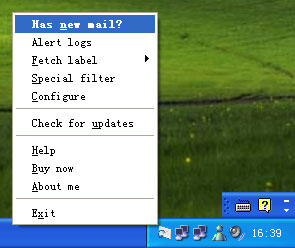
psGmail is a small trayicon application that allows you to check your Gmail account e-mail from a normal POP mail client (such as Outlook2000/2003, Mozilla Thunderbird, etc). Unlike standard email accounts which allow users to retrieve their e-mail through a POP mail client, Google's Gmail can normally only be checked on the web now. With psGmail, you can use your favorite POP mail client to retrieve your e-mail from your Gmail account. In addition, psGmail allows you to send e-mails through Gmail's service, as if it was a normal SMTP (outgoing mail) server.and it also can send you a msn-style alerts Instantly when you have a new email on Gmail.
Features of psGmail :
1. POP3/SMTP service base on Gmail of Google
2. Instant Email Alerts with msn-style(support multiple Gmail accounts)
3. fetch special email with filter function
4. fetch the emails in special label(eg: all mail)
5. http(s) proxy support, you can use it behind of firewall
and more...
for more details:
http://www.vspire.com
or
http://psgmail.windohs.net
Edited by ryan.sunLink to comment
https://www.neowin.net/forum/topic/191104-psgmail-release-now/Share on other sites
237 answers to this question
Recommended Posts