
Microsoft Teams is a pretty useful tool that is utilized for online communication and collaboration, primarily in enterprise environments. Microsoft regularly adds features to the software in order to retain its existing customers while attracting new ones. However, one area that has been mostly ignored is the support for Teams in virtual desktop infrastructure (VDI), up until now.
Microsoft has announced the public preview of its first VDI optimization for Teams running in Amazon Workspaces on Windows machines. This should greatly benefit organizations which assign cloud PCs to remote workers across the same or different continents and expect them to actively use Teams inside the allotted Workspaces machine.
The Redmond tech firm has touted this as the introduction of VDI support for Teams in AWS environments, both for Personal and Pools configurations. Microsoft's updated solution leverages multimedia offloading and optimization powered by the SlimCore Media engine, which subsequently offers HD audio and video, better screensharing experiences, reduced latency, and enhanced reliability for customers using Teams inside VDI. The technical details may not interest many, but you can check out details in the high-level architecture diagram below:
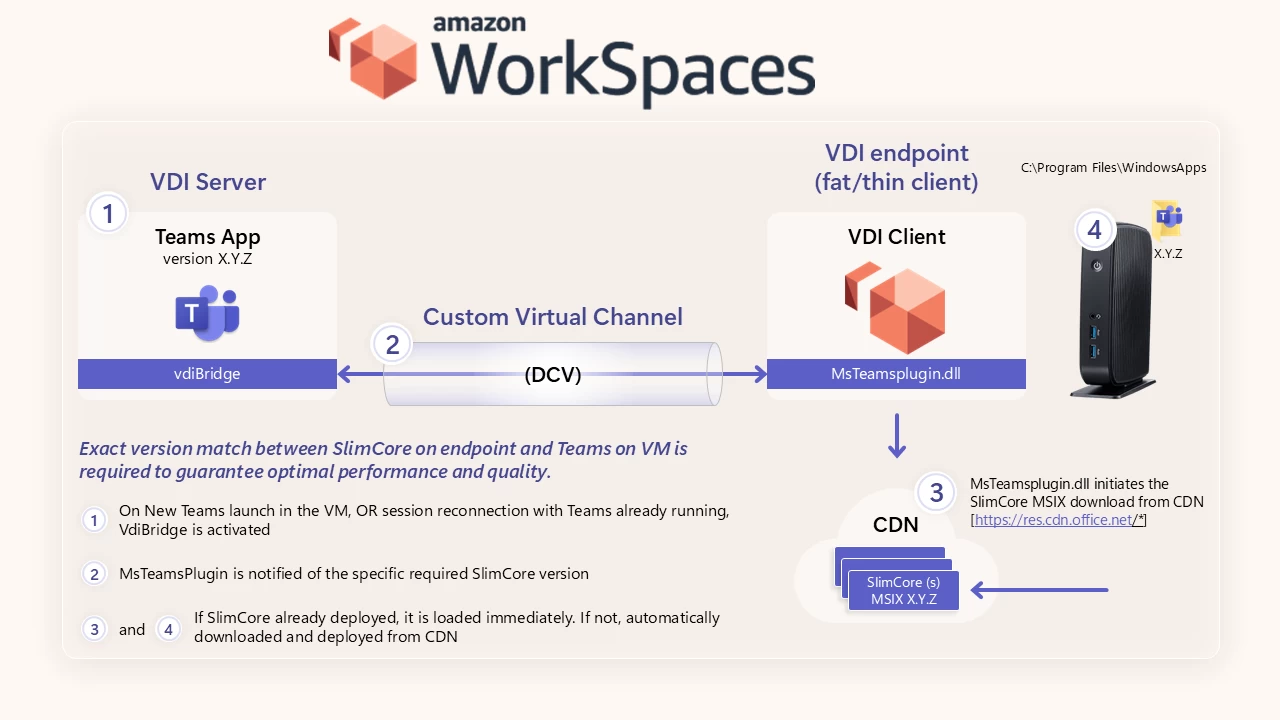
Microsoft's Corporate Vice President Juan Rivera had the following to say regarding the optimization:
Microsoft Teams users expect seamless collaboration experiences across any environment. With Teams VDI2 optimization, we are delivering innovative capabilities that transform virtual desktop performance, offering rich functionality, smooth audio and video experiences, and exceptional reliability. By enabling direct endpoint routing for media traffic, organizations can provide employees with the high-quality Teams experience they expect while maintaining flexibility and optimizing infrastructure costs.
Moving forward, Teams VDI customers can expect better call quality, feature parity with the desktop client, and smoother experiences when it comes to external collaboration. It is important to note that this optimization is exclusive to Teams customers using Amazon Workspaces on Windows, it does not apply to AppStream and other platforms.

















0 Comments
Load the comments and join the conversation!
Read the comments, ask the editors questions, show respect and join the conversation.