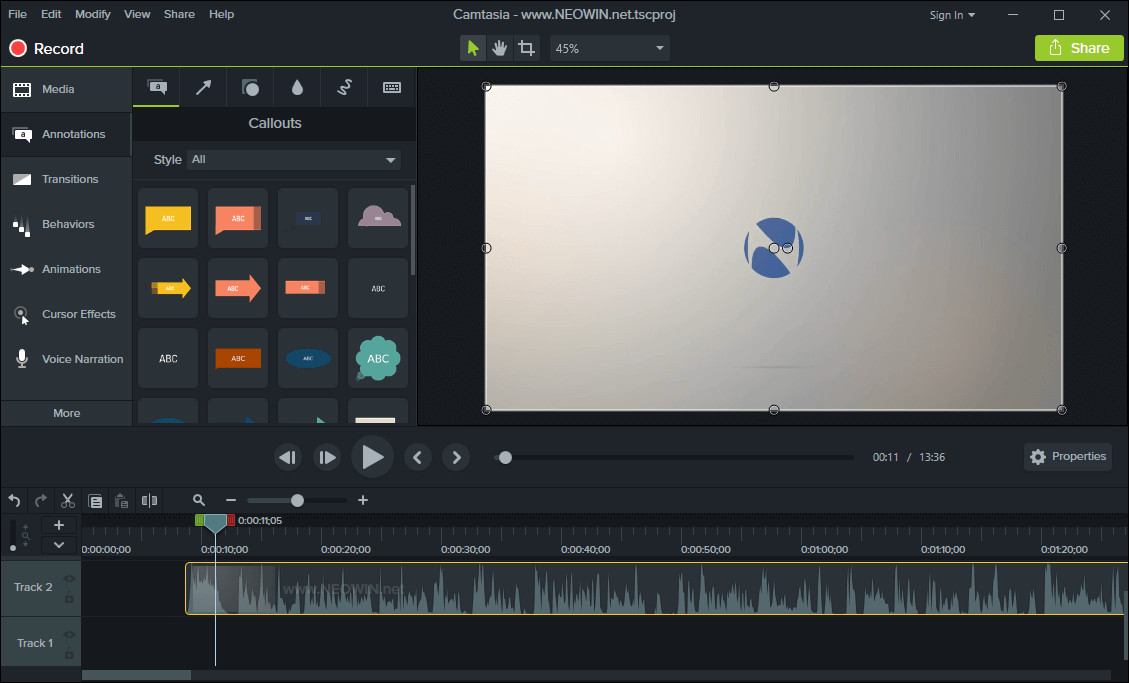
TechSmith Camtasia is the complete professional solution for high-quality screen recording, video editing and sharing. Camtasia 2026 makes editing your videos easier, and faster than ever. The new editor is packed with enhanced video processing, all-new production technology, an innovative library, and stock videos and other creative assets to help you create more polished, professional videos. No video experience needed. Anyone can create informative, engaging videos.
Create professional, eye-catching videos:
- Add special video effects - Apply Behaviors that are perfectly designed to animate your text, images, or icons. Get a crisp, polished look without being a professional video editor.
- Drag-and-drop your edits - What you see is what you get. Every effect and element in your video can be dropped and edited directly in the preview window. And you can edit at resolutions up to beautiful 4K, for clear video at any size.
- Get exceptional performance - Camtasia takes full advantage of your computer’s processor with 64-bit performance. You’ll get fast rendering times and enhanced stability—even on your most complex projects.
Camtasia 2026.0.0 changelog:
New Features
Edit video by editing text with Camtasia Audiate:
- Text-based editing is now only a button click away. Edit as Text will send your media to Camtasia Audiate to edit with text and clean up your audio with professional-grade effects.
Adjust Rev media directly on the canvas:
- Fine tuning of Rev media components now possible on canvas and in properties. Quickly make adjustments to screen, camera, and background without unpacking Rev media.
Add dynamic captions directly to Rev media:
- Add dynamic captions to any Rev media on the timeline, without having to unpack it first. Simply drag the dynamic caption onto the timeline to generate captions for Rev media.
Apply SmartFocus to Rev media for automatic zooms:
- Adding SmartFocus for automatic zooming and panning is easier than ever! SmartFocus is now a screen effect that can be turned on in Camtasia Rev.
Feature Updates
- Updated buttons in Camtasia Home.
- Added support for sketch motion annotation color in group properties.
- Added scrollbar to Screen dropdown in Recorder for accessing options on smaller screen resolutions.
Bug Fixes
- Fixed a bug that Recorder fails to start due to temp folder includes non-EN character.
- Fixed a bug where noise analysis on old Noise Removal effect can fail on TREC audio.
- Fixed a bug that audio-only trec starts before countdown finishes.
- Fixed a bug where videos recorded on some iPhones could be out-of-sync and/or show empty frames near the end.
- Fixed a bug where loudness normalization controls were shown when not applicable.
- Fixed a bug that unpacking Rev media loses media name on timeline.
- Camtasia stays foreground on closing asset preview window.
- Fixed showing a thumbnail for dynamic captions when the transcription work has completed.
- Fixed a crash on range cut over a group of captions.
Download: Camtasia 2026.0.0 (64-bit) | 313.0 MB (Shareware)
View: Camtasia Homepage | Tutorials | Screenshot