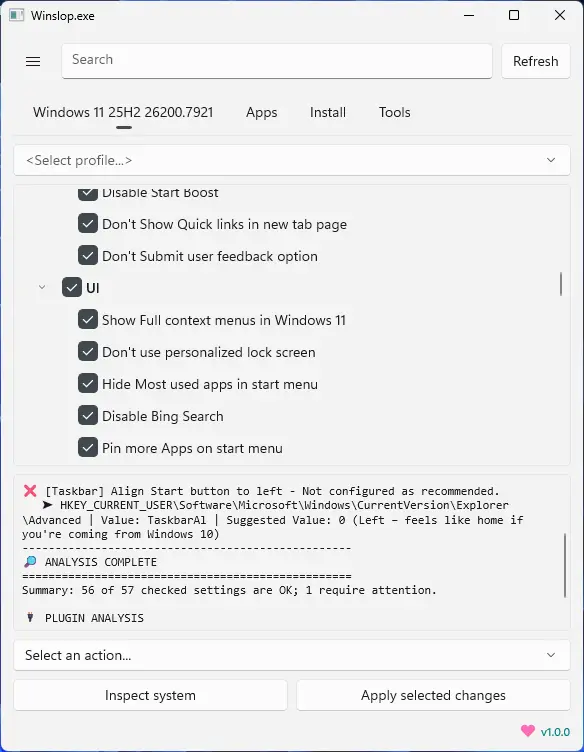
Winslopr, developed by the creator of Flyoobe, is a lightweight Windows utility that removes unnecessary system slop, reduces bloat, and restores full user control. A focused, local fork of CrapFixer, Winslopr shows exactly what changes will occur, allowing users to review and revert actions. It works entirely offline, with no AI, cloud, or telemetry. Perfect for users who want a cleaner, transparent, and minimal Windows experience, Winslopr simplifies system maintenance, optimizes performance, and eliminates forced, opaque, or redundant features while keeping Windows itself intact.
Winslopr key features:
- Removes system slop – eliminates unnecessary or redundant Windows components.
- Reduces bloatware – optimizes resource usage for faster performance.
- Full user control – all changes are transparent, reviewable, and reversible.
- Local and offline operation – no AI, cloud, or telemetry involved.
- Deterministic behavior – predictable, consistent, and safe modifications.
- Fork of CrapFixer – smaller, focused, and easier to maintain codebase.
- Improves system performance – reduces overhead and unnecessary processes.
- Targeted optimization – only removes opaque, forced, or optional slop.
- Visibility of changes – shows exactly what will be modified before applying.
- Lightweight tool – minimal footprint, no unnecessary layers or assistants.
Winslopr 26.03.222 changelog:
Winslop is now Winslopr—same app, same mission, new name that finally belongs to the cleanup hero rather than the Windows chaos.
Reasoning
- Winslop was originally a clever nod to “Windows + Slop,” reflecting the app’s mission to clean up junk in Windows. Over time, the term “Winslop” became widely used online as a slang for Windows itself—memes, rants, and frustrated posts now dominate search results, burying the app in the noise. To reclaim its identity and clarify its purpose, the team opted for a new name that’s both recognizable and descriptive.
What’s new with the name
- Winslopr now stands for Windows Slop Remover—clear, mission-driven, and still playful. Close enough to the original for continuity, but distinct enough to own the brand. The app remains the same under the hood: same debloating tools, same mission, just with a name that points to the solution rather than the problem.
Context
- Microsoft’s recent Windows updates have continued to introduce unwanted features—ads, forced Copilot integrations, Recall, and aggressive update cycles—but Winslopr continues to fight the clutter at user speed. The rebrand is part of a broader effort to differentiate the app from the internet’s use of “Winslop” while reinforcing its identity as a cleanup tool, not just a meme.
Winslopr 26.03.230 changelog:
- [New] Windows 11 25H2 (Build 26200) support verified
- [New] Fresh app icon with a cleaner, more on-brand look
- [New] Close (X) button on the Settings panel
- [New] Pairs well with tools like Chris Titus Tech, W11Debloat or Microsoft PC Manager. If a feature isn"t in Winslopr yet, chances are it"s already available as a plugin or script. Focused scope by design. Winslopr does less on purpose, so it fits into any existing setup
- [Improved] Undo and restore is more reliable
- [Improved] Replaced the Settings SplitView pane with a simpler right-side overlay panel
- [Improved] Settings panel no longer causes the app layout to shift or clip controls when opening, resizing or moving the window
- [Improved] Settings panel has its own glass look
- [Improved] Filter chips and action buttons share one toolbar row on every page
- [Improved] Reduced resize-related UI glitches that could cause controls and inner cards to get clipped.
- [Improved] Search bar is more compact
- [Improved] Debloater in the Apps page with better bloatware detection and faster scan
- [Improved] Reduced memory usage and smaller executable size
- [Improved] Better support for external scripts including W11Debloater and similar tools
- [FIX] Actions menu button no longer gets cut off on narrow windows
- [FIX] Status messages and extension count no longer overwrite each other in the Tools page
- [Updated] Translation es_ES #73
- [Updated] Translation zh-CN #68
- [Added] Translation Portuguese (Brazil) #67
Download: Winslopr 26.03.231 | 43.3 MB (Open Source)
View: Winslopr Website | Screenshot