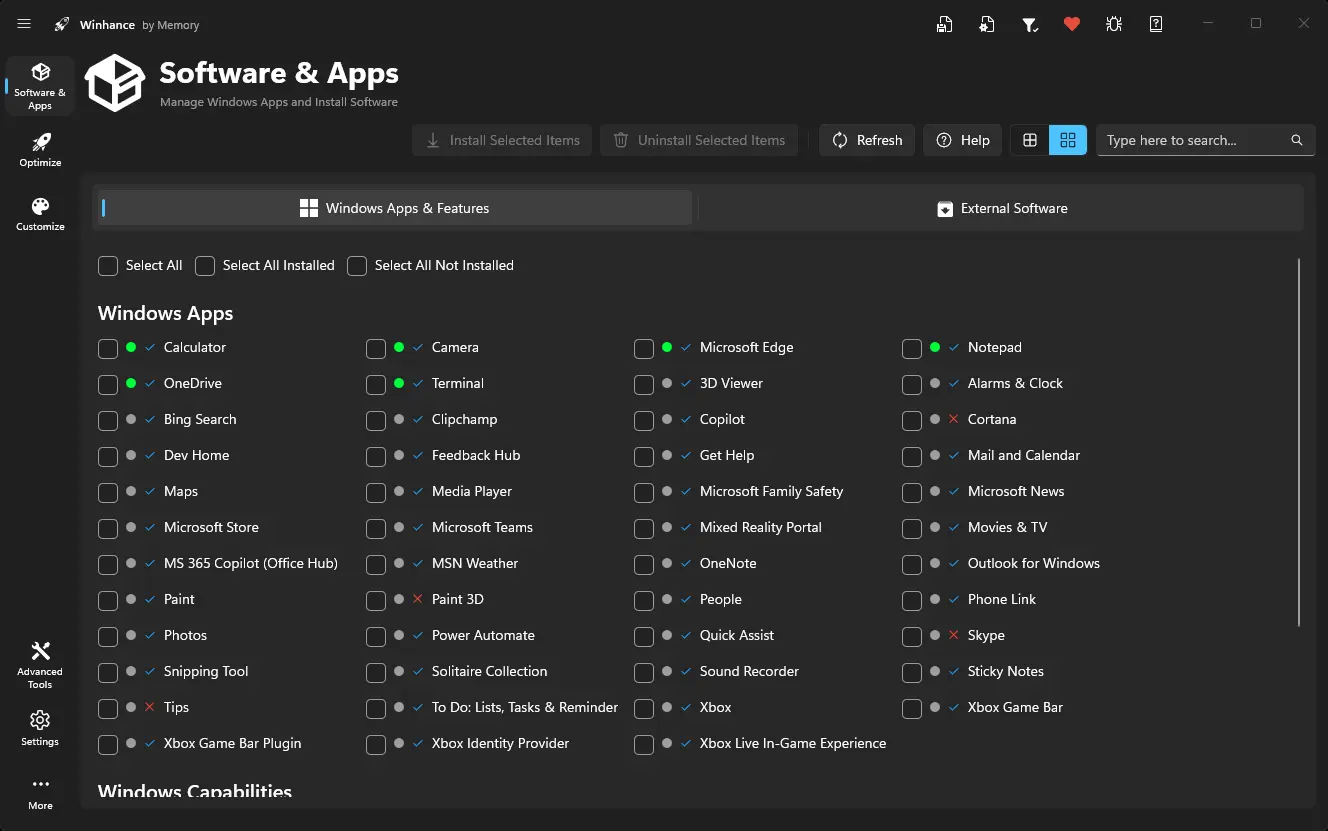
Winhance is an open-source Windows enhancement utility designed to help users debloat, optimize, and customize Windows 10 and 11. It provides a user-friendly interface for removing unwanted apps, legacy components, and optional features safely, giving you more control over your system. With Winhance, you can improve performance, reduce clutter, and enhance privacy without the need for a clean install.
Beyond basic debloating, Winhance offers extensive optimization tools. Users can tweak power plans, adjust gaming and performance settings, control notifications, and manage Windows Update behavior. Privacy-focused settings allow you to limit telemetry and data collection, while system customization options let you personalize the taskbar, Start menu, Explorer, and Windows themes. Winhance also supports installing or removing software efficiently, including external apps via WinGet integration, streamlining both new setups and daily maintenance.
For advanced users and IT professionals, Winhance integrates WIMUtil, a tool for creating custom Windows installation ISOs with automated configuration. You can generate autounattend.xml files, inject drivers, and apply your chosen Winhance settings automatically during installation. Most changes are non-destructive and reversible, with clear explanations in the GUI. Whether you’re optimizing a single PC or managing multiple systems, Winhance delivers a faster, cleaner, and highly personalized Windows experience.
The Winhance.Installer.exe includes both Installable and Portable versions during setup.
Winhance supports both Windows 10 and Windows 11 64-bit versions. It"s regularly updated to ensure compatibility with the latest Windows updates and features.
Winhance key features:
- Debloat Windows – Safely remove unwanted apps, features, and legacy components.
- Optimize Performance – Tune system settings for speed, responsiveness, and gaming.
- Privacy Enhancements – Control telemetry, data collection, and notifications.
- Power Management – Configure power plans and advanced energy settings.
- Windows Update Control – Adjust update behavior for stability and convenience.
- Theme Customization – Switch between light/dark mode and adjust system colors.
- Taskbar & Start Menu Tweaks – Modify layout, icons, and behavior.
- Explorer Customization – Adjust file explorer appearance and functionality.
- Software Management – Install/remove Windows apps and optional features.
- External Apps Installation – Deploy essential apps via WinGet integration.
- Configuration Management – Save, export, and import Winhance settings easily.
- Automation with WIMUtil – Create custom Windows ISOs with integrated settings.
- Autounattend.xml Generator – Automate Windows installations with preconfigured options.
- Driver Integration – Include current system drivers in custom ISOs.
- Non-Destructive Changes – Reversible settings with clear explanations in the GUI.
Winhance 26.04.17 changelog:
New settings and tweaks
- New AI Privacy groups for Windows AI, Microsoft Edge AI, and Microsoft Office AI to give users control over AI-related telemetry and features.
- New AI taskbar pin toggles, AI app removal entries, and AI service/scheduled task controls in Gaming & Performance.
- Smart App Control selector with Off, On, and Evaluation modes.
- VBS and Memory Integrity (HVCI) toggles in the Security section.
- DNS Server selection dropdown for picking a DNS provider.
- Developer Mode and PowerShell Execution Policy settings.
- Driver Co-Installers toggle to block vendor bloatware during device installation.
- Six new Regional Format settings on the Explorer Customize page.
- Shortcut arrow overlay icon can now be removed or restored.
- Per-Monitor Auto Color Management toggle.
- Connected Devices Platform Service toggle in System Services.
- SvcHost split threshold setting.
- Mouse Hover Time and Taskbar Auto-Hide Hover Delay settings.
- MPO (Multi-Plane Overlay) disable and minimum frame rate settings.
- Legacy Notepad file handler toggle for Windows 11.
- Classic auto-login option in netplwiz toggle.
- Disable WebView2 in Windows Search toggle.
- Show All System Tray Icons setting for Windows 11.
- Taskbar Behavior settings from Windows Personalization.
- Show Duplicate Removable Drives navigation pane setting.
- Context menu additions: Compress To, CHKDSK with drive letter prompt, SFC /SCANNOW, Repair Windows Image, and Edit/Run PS1.
- Collapsible parent-child settings for Explorer Navigation Pane folders, plus Downloads and OneDrive options for the Open File Explorer setting.
- Improved touch keyboard service controls and a new Tapi Service registry setting.
- PDFgear, Wise Disk Cleaner, IObit Uninstaller, and Revo Uninstaller added to External Apps with proper registry-based detection.
Modern InfoBadge system
- Replaced the old dot indicators with modern pill-style InfoBadges that show Recommended, Default, New, and Preference status with icons and tooltips.
- Settings can now display multiple badges side by side (for example Recommended + New).
- Added a Preference badge for subjective or locale-dependent settings (regional, theme, sound, gaming, etc.) so they no longer suggest a single "Recommended" choice.
- Added a "NEW" badge to highlight recently added settings, with a NEW Badges toggle in the View menu and an automatic reset on version upgrade.
- Recommended and Default options inside ComboBox dropdowns are now highlighted with pill backgrounds.
- Numeric range settings have one-click buttons to jump to the Recommended or Default value.
Quick Actions and View menus
- Added View menu and Quick Actions dropdowns on the Optimize and Customize pages, replacing the old Technical Details toggle.
- Bulk apply all recommended settings or reset all settings to defaults in one click.
- Overview badge pills on feature cards summarize how many recommended changes are pending per section.
Technical details overhaul
- Rewrote the technical details panel with dedicated sections per setting type instead of a flat list.
- Now displays PowerShell scripts, registry content, current and default AC/DC power values, scheduled task default state, and setting dependencies.
- Section headers, dependency names, and inline GUIDs are now localized.
Bug Fixes
- Fixed the app hanging on startup during software detection.
- Edge removal no longer creates a broken MSEdgeHTM registry key, and the protocol redirect has been improved to prevent broken file associations.
- Xbox Game Bar removal now redirects the ms-gamebar protocol so Windows no longer prompts to reinstall it from the Store.
- Added a 30-second timeout to DISM capability and feature detection to stop the app from hanging.
- Background App Permissions converted to a Selection control with corrected registry values.
- Fixed toggle state detection for binary registry values and for settings whose registry keys do not exist.
- Fixed badge rendering and toggle state for inverted-policy settings.
- WIMUtil XML card logo is now theme-aware.
- Corrected autounattend binary byte formatting and per-subkey enumeration.
- Badge labels now refresh correctly when the language is changed.
Improvements
- The system restore point on first launch is now optional instead of forced.
- All new strings translated across 27 supported languages.
- Winget binaries updated to the latest stable release.
Download: Winhance 26.04.17 | 57.8 MB (Open Source)
Links: Winhance Website | Github | Screenshot