I don’t know about you, but I have been using Gemini as my main AI assistant, in large part due to the fact that I can create custom gems easily. Gemini also seems to have far fewer restrictions than ChatGPT - but I’m sure Google will make up for it in the future once it has captured the market by giving up never ending ads, just as it does with YouTube.
While I find Gemini to be very good for my needs, one issue I’ve run into on the Android app is that it can get pretty laggy. I am not talking about the lag from long conversations, I am referring to the lag you experience when just navigating to gems and trying to start a conversation, or if things are really getting bad, just interacting with the main Gemini chat. It’s not always an issue, but much of the time it is. I have figured out the main source of this lagging and I want to show you what I did to resolve the issue.

The first thing I tried was disabling the Gemini Apps activity which saves all your chat history. I didn’t delete the history, just disabled activity and instantly I saw everything speed up. Actually though, this is overkill, there’s no need to stop chat history being saved. By disabling the Gemini Apps activity, the apps that Gemini can invoke got disabled. This got me thinking, maybe I can just disable the apps individually. Lo and behold, this suffices, so you can keep your chat history, and you can probably enable a few apps if you really need them, but the fewer you have, the faster the whole experience is.
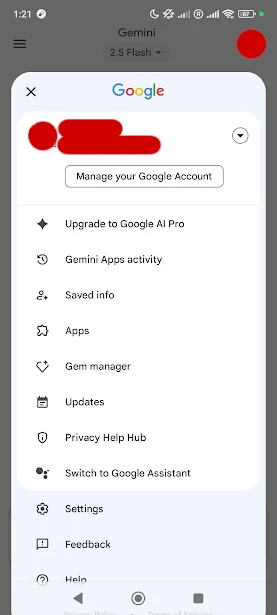
Disabling the apps in Gemini is super straight forward, all you need to do is open the Gemini app on Android, press on your profile picture in the upper right, and then press Apps. Here you can toggle the different apps that you want to allow. I’ve switched them all off because I find them super annoying, but if you need any of them, just leave the ones you need enabled.
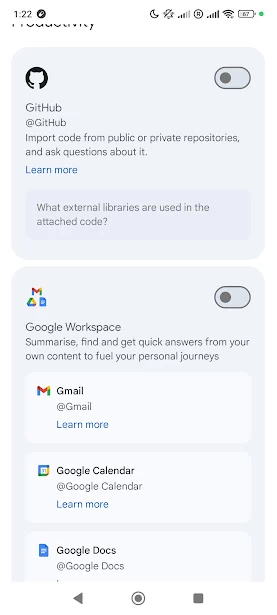
From my testing, this method doesn’t seem to prevent Gemini getting a bit slower for longer messages, but disabling the apps in Gemini will still help the app to feel faster. If you’re getting bothered by slower answers the longer your chat goes on, you should just start a new chat to put the spring back into Gemini’s step.
Let us know in the comments if this has helped you. I have not had the opportunity to try Gemini on iOS and don’t know if it slows down like it does on Android, if it does, try disabling the Gemini apps there too, if they are available, and it may help with the experience.