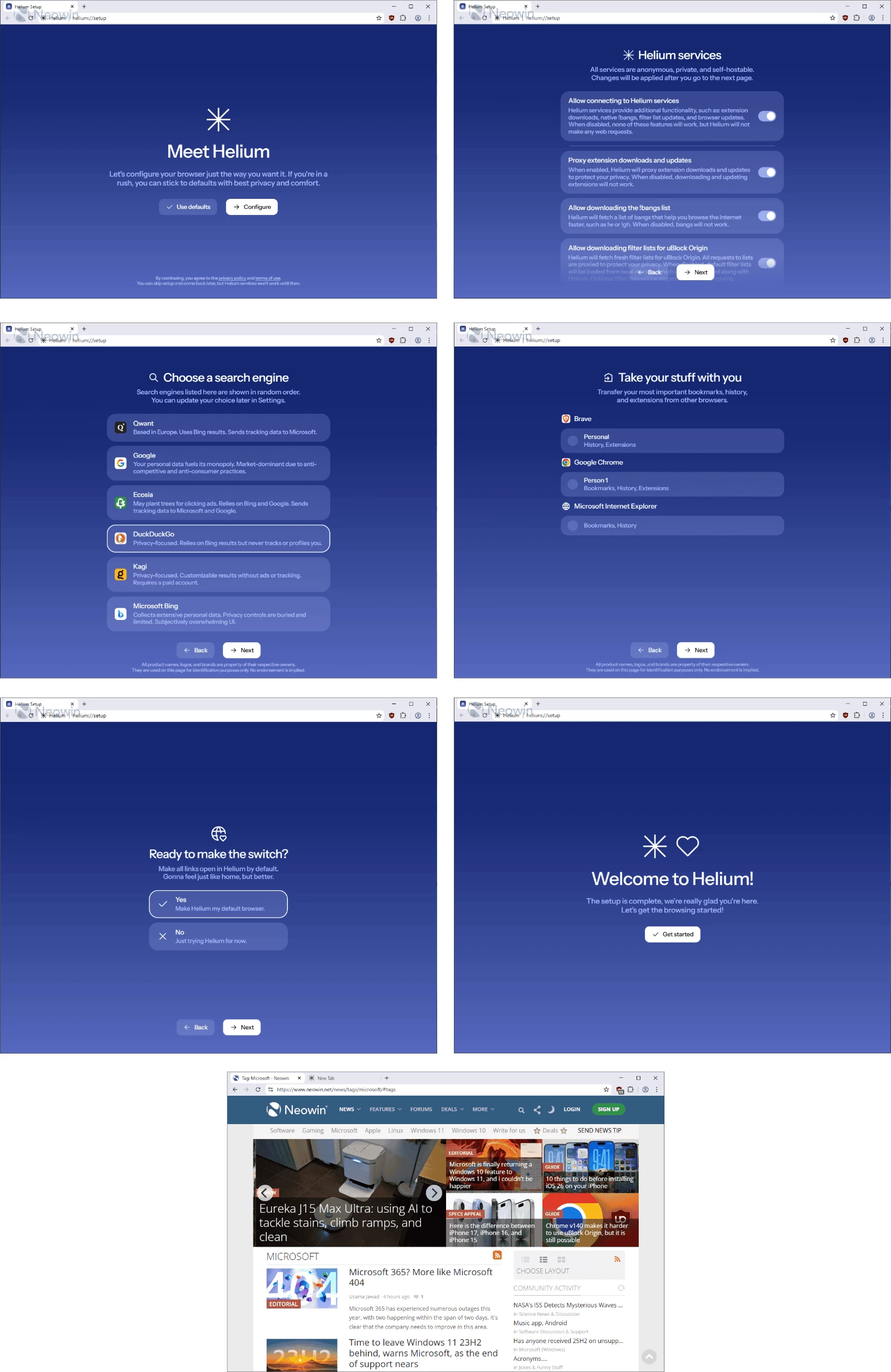
Helium is a private, fast, and honest Chromium-based web browser — built for people, with love. It offers the best privacy by default, unbiased ad-blocking, and a clean experience free from bloat and noise. Proudly based on Ungoogled-Chromium, Helium removes Google’s clutter while keeping a fast, efficient development pipeline. With thoughtful touches like native !bangs and split view, Helium is a people-first, fully open-source browser that puts control back in your hands.
Privacy, security, and control come first. Ads, trackers, and third-party cookies are blocked automatically, HTTPS is enforced everywhere, and all Chromium extensions work seamlessly — while Google can’t track your activity. Helium’s 13,000+ offline-ready !bangs let you jump straight to sites or AI tools like ChatGPT instantly. Open-source, people-first, and unbiased, Helium delivers a browsing experience that’s fast, secure, and free from noise, ads, and compromises.
Helium Browser key features:
Performance
- Fast, efficient, and lightweight — built on Chromium’s optimized engine.
- Energy-saving and consistent — stays fast over time without slowing down.
- No bloat — stripped of unnecessary components for maximum speed.
- Minimalist interface — compact, clean, and distraction-free.
- Customizable toolbar — hide elements you don’t need.
- Smooth and stable — no flicker, lag, or animation glitches.
- Comfort-focused experience — intuitive and unobtrusive.
Privacy & Security
- Best privacy by default — blocks ads, trackers, phishing, and third-party cookies.
- Unbiased ad-blocking — powered by community filters and uBlock Origin.
- No telemetry or analytics — zero background web requests on first launch.
- Strict HTTPS enforcement — warns for insecure sites.
- Passkeys supported — modern authentication made simple.
- No built-in password manager or cloud sync — your data stays yours.
Extension Compatibility
- Full Chromium extension support — including MV2 extensions.
- Anonymized Chrome Web Store requests — Google can’t track extension installs.
- Extended MV2 support — maintained for as long as possible.
Smart Features
- Native !bangs — browse faster using 13,000+ offline-ready shortcuts.
- AI integration — use !chatgpt and others directly from the address bar.
- Offline functionality — bangs work without an Internet connection.
Philosophy
- People-first design — open source, transparent, and community-driven.
- No ads, no noise, no bias — privacy and honesty over profit.
Helium Browser 0.9.1.1 Update: Vertical tabs and a range of new enhancements
Helium Browser has been updated to version 0.9.1.1, bringing a series of notable changes and improvements. Among the key highlights of this release is the long-awaited vertical tabs feature, which allows users to organize tabs more efficiently on the side of their browser window.
In addition to vertical tabs, this update includes several under-the-hood improvements and fixes, as well as refinements to the browser"s layout system. Here"s a breakdown of what"s new:
Key Changes:
Helium Windows
- helium 0.9.1.1 update (#142)
- Windows fixes including command ID refresh and UI enhancements
- CI improvements: Migration to Azure trusted signing and update of signing process
- Depots & README updates: Added shoutout and removed signpath-mandated text
Helium Chromium
- Vertical tabs implementation: Introduced new layout options, including vertical tabs and layout switching
- Refined UI elements: Adjustments for tab strip alignment and top container button padding
- Compact layout: Unflagged compact layout mode and introduced layout state controller for better UI flexibility
- Bug fixes: Addressed issues with PWA toolbar height on macOS and fixed alignment in vertical tab mode
Other Fixes and Enhancements:
- Optimized the performance and drag behavior across tabs in vertical mode
- Improvements to the omnibox and location bar for a cleaner and more functional interface
- Chromium updates: Brought in the latest Chromium 145.0.7632.75, which improves browser stability and security
Helium Browser Update: A new stable release is out! Helium Browser has moved from version 0.9.1.1 to 0.9.2.1, bringing improved stability, bug fixes, and performance enhancements.
Helium Windows
- build.py: un-async name substitution (#152)
- build.py: limit max number of namesub workers to 32 (#151)
- build.py: update to use new name substitution api (#150)
- update: helium 0.9.2.1 (#149)
- patches/helium: workaround for huge toolbar with vertical tabs (#148)
- chore: remove signpath policy (#145)
- ci/main: make release creation optional (#144)
Helium Chromium
- revision: bump to 2 (#919)
- helium/ui/vertical: tab indicator reposition & minor fixes (#918)
- helium/ui/vertical: fix top & bottom gaps
- helium/ui/vertical/bottom: fix disabled state text color
- helium/ui/vertical/tab: show indicator before title
- helium/ui/vertical: draw a rounded corner on top of contents (#912)
- helium/ui: remove all layout separators, not just the top one (#908)
- utils/name-substitution: replace fake async with process pool (#909)
- helium/ui: disable ink ripple effect on all platforms & webui (#907)
Download: Helium 64-bit | Portable 64-bit |~100.0 MB (Open Source)
Download: Helium ARM64 | Portable ARM64
Links: Helium Home Page | macOS | Linux | Screenshot