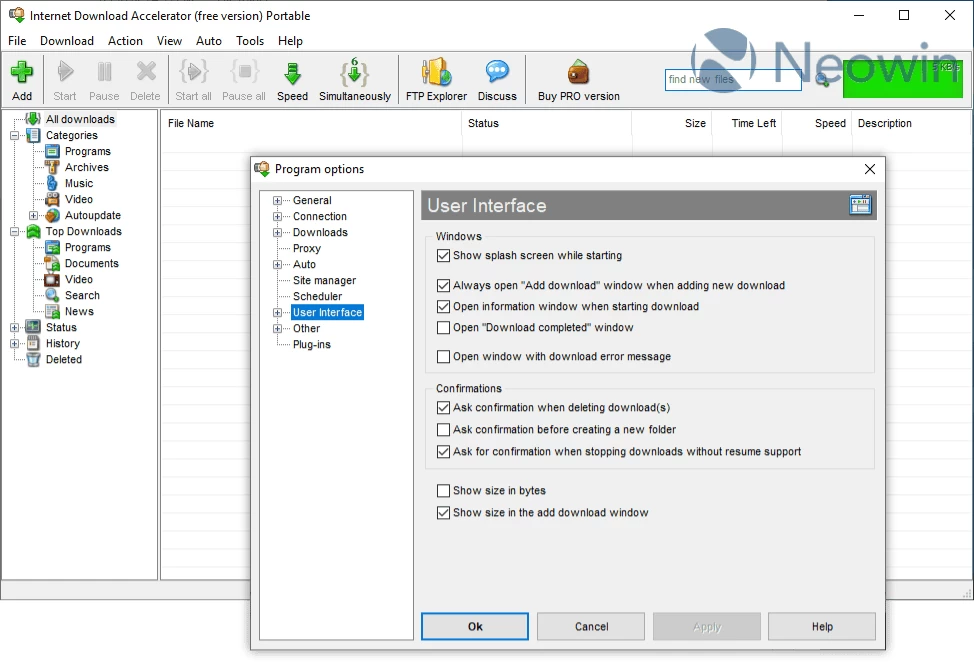
Internet Download Accelerator lets you to noticeably increase the speed of file download from the Internet using HTTP, HTTPS, FTP and BitTorrent protocols. The acceleration is achieved by splitting a file being downloaded into several parts and downloading these parts at the same time. Internet Download Accelerator resumes broken downloads from where they left off from both HTTP, HTTPS, FTP and BitTorrent servers.
To increase usability Internet Download Accelerator integrates with Chrome, Firefox, Edge, Mozilla, Opera, Internet Explorer, Netscape, Safari, Yandex.Browser, Vivaldi and others, replacing the standard download modules. Moreover, the program monitors the system clipboard and detects URLs in the clipboard. With IDA you can download and save video from popular video services.
You may use Internet Download Accelerator for non-commercial purposes.
Internet Download Accelerator key features:
- dynamic multi-threaded download;
- download files using BitTorrent protocol (.torrent and magnet links); new
- resumes interrupted downloads from where they were stopped, from HTTP, HTTPS, FTP servers, and BitTorrent;
- scheduled operation, PC shutdown, sleep or stand-by after completing download;
- optimal settings for work with various connection types (dial-up, ISDN, ADSL, LAN) at various speed;
- FTP Explorer;
- support for download mirrors. Searching for and adding download mirrors;
- ability to download video and mp3 from popular video services;
- ability to download 8K, 4K and FullHD video from popular video services;
- ability to download 180° and 360° spherical videos;
- download video with subtitles;
- sending links to download from messengers (Telegram);
- watch video while downloading;
- power and useful tool for management of download categories;
- work with ZIP archives: option to preview the contents of ZIP archives before download, option to download only files selected from an archive, option to check ZIP archives and recover corrupted files as well as option to unpack archives;
- work with RAR archives: option to check RAR archives, option to unpack archives;
- detailed log-file for every download;
- site manager for passwords and download folders management;
- download speed control, automatic mode for the most comfortable browsing on the Web. Manual mode for dynamic control of download speed;
- option to set priorities for downloads;
- possibility to download html-pages with images;
- download entire folders (including subfolders) via FTP;
- content recognition when working through HTTP;
- work with command-line;
- dial for dial-up connection;
- search for files, programs, archives and documents in MyTopFiles.com file catalog;
- Smart Pause/Start. Ability to temporarily stop current downloads with option to start them later in the same order and state;
- rich options of tuning connection parameters HTTP, HTTPS and FTP;
- work behind HTTP and FTP proxy-servers, support for NTLM and NTLM-proxy authentication. IDA can automatically detect and use your browser"s proxy-server settings;
- support for FTP over SSL/TSL;
- option to play streaming audio and video files while they are being downloaded. Automatic receipt of information about MP3 files when starting download;
- downloads history;
- option of dragging selected text from browser or another program onto the floating window. IDA will find links in the text and offer you to start download;
- ability to drag download description text from another programs. Automatic insertion of the text selected on a page opened in IE into the download description.
- search in the download list;
- option of automatic synchronization of files on servers and your computer (autoupdate);
- checking downloaded files for updates (manually or automatically);
- marking downloaded files as unread;
- wide download list export/import options. Supported formats: *.txt, *.txtd, *.lst, *.urls, *.ion;
- ability to check MD5 sum of downloaded files.
- integration with Microsoft Internet Explorer, Firefox, Google Chrome, Microsoft Edge New, Apple Safari, Vivaldi, Mozilla, Netscape, Opera, Yandex.Browser and others;
- monitoring the clipboard;
- integration with anti-virus programs;
Internet Download Accelerator 7.3.1 changelog:
- Added the ability to set the desired audio language for downloaded videos;
- Added the ability to download any available audio tracks for video;
- Bugs fixed.
Download: Internet Download Accelerator 7.3.1 Build 1745 | 8.5 MB (Free, paid upgrade available)
Download: Internet Download Accelerator Portable | 7.8 MB
View: Internet Download Accelerator Website | Screenshot