JetBrains has announced a new feature for Rider, its cross-platform IDE for .NET and game developers that supports languages like C# and F#.
Available in Rider 2025.3 EAP 6 build 253.27642.42, the IDE"s Monitoring tool window can now detect issues like slow-running MVC actions, an unusual number of database connections, inefficient request handling, and excessive database connections.
This update adds real-time database and ASP.NET performance issue detection for developers working on Windows, macOS, and Linux. The feature is also configurable, allowing you to set specific thresholds for what counts as a performance problem in the settings.
It can also show you live charts for CPU usage, memory allocation, and garbage collection, with performance alerts appearing right below the graphs.
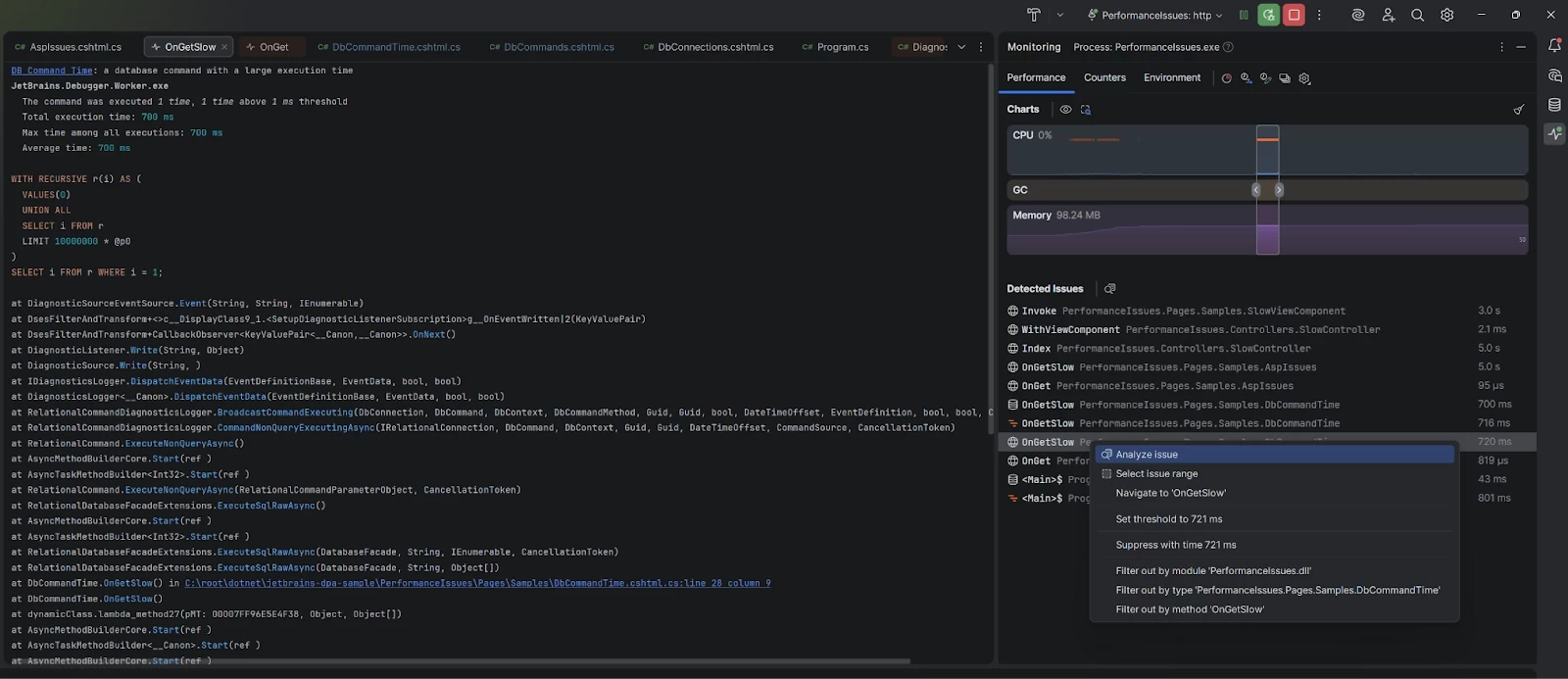
JetBrains says that for those with a dotUltimate subscription, you"ll be able to get more detailed information:
If you have a dotUltimate subscription, these general issue types will be replaced with names of the specific methods responsible. A dotUltimate subscription will also let you investigate each entry further using the bundled dotTrace profiler, allowing you to explore call stacks, query details, and execution times with just a couple clicks.
As mentioned previously, this functionality is only available in the Rider Early Access Program (EAP). To enter the program, you first need to download the JetBrains Toolbox App. This application manages all your JetBrains IDE installations and makes it simple to add pre-release versions.
Inside the Toolbox App, you can find Rider and select the option to install other versions. From there, you just pick the latest EAP build. You can install it right alongside your stable Rider installation without any conflicts. You do need a JetBrains Account to use EAP builds, but a paid license is not required for the program itself.
Just remember that these EAP versions are development builds, so they can be unstable and expire 30 days after they are released. JetBrains also uses this program to gather feedback for bug reports and feature requests.