One reason people choose Microsoft Office over LibreOffice, apart from the fact that the proprietary OOXML document format it uses is far more popular than LibreOffice’s Open Document Format, is the ribbon interface.
The ribbon interface, introduced way back in Office 2007 (and redesigned in 2021), features large, tabbed toolbars that group commands by functionality. Its design seems to have inspired other developers like Avid Tech"s Sibelius, MathWorks" MATLAB, and yes, LibreOffice, which offers a "Tabbed" UI variant mimicking the ribbon.
But LibreOffice says that users who prefer to use Microsoft Office because of the ribbon interface, instead of its open source alternative, are simply wrong. It argues that the ribbon interface should not even be regarded as a standard, "nor a good example of ergonomics".
According to LibreOffice, its UI is simply better and "more thoughtful" than what Microsoft has to offer in Office because, at least, you can customize it, and that unlike Microsoft Office and its popular alternatives like WPS and OnlyOffice (which it says just copied Microsoft"s UI), it did not take the easy way out.
There are several UI modes in LibreOffice: the ribbon style (mentioned earlier), the classic interface with toolbars, a compact tabbed variant, a compact grouped bar, a single contextual toolbar, and a sidebar-focused layout.
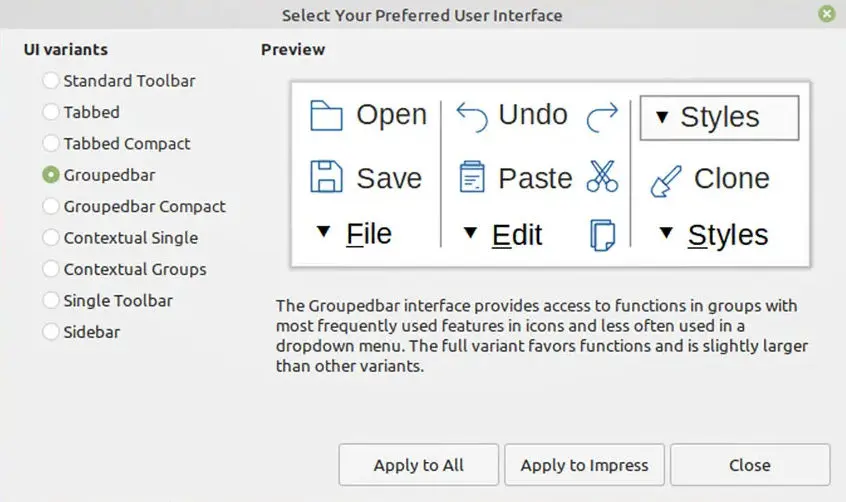
According to LibreOffice, there is no evidence that the ribbon offers "superior usability", especially for experienced users who might find it less efficient.
Incidentally, the characterisation of ribbon-style interfaces as "modern" or "standard", used by several users, is not based on any objective usability parameter or design principle, but is the result of Microsoft"s dominance in the market and the huge investments made when the ribbon was introduced in Office 2007 as a new paradigm for productivity software.
The idea that "modern" equals "similar to a ribbon" is a normalisation effect: the Microsoft interface has become a benchmark because of its ubiquity, not because of its proven advantages in terms of usability. Added to this is the fact that many users evaluate office software through the lens of familiarity with Microsoft Office and consider deviation from it as a problem rather than a design choice.
There are other things LibreOffice believes it does better than Microsoft Office. These include options for macros in Basic, Python, and JavaScript, no ads or user profiling, full access to the source code, data privacy, and the big one, native support for the ODF format, which it argues prevents vendor lock-in, unlike Microsoft"s OOXML.