At Ignite 2025, Microsoft announced Project Opal, a new AI feature in Microsoft 365 Copilot that can perform user-described tasks in a secure, observable computing environment. The goal is to help employees automate repetitive, manual work so they can focus on high-impact tasks.
For example, Project Opal can navigate websites, capture and organize screenshots, and validate documentation. Employees can use it to submit timesheets or apply for holiday leave in their internal timesheet portals. Another use case is automating onboarding checklists, such as adding new employees to distribution lists by accessing internal portals, or ordering new devices and accessories through the appropriate channels.
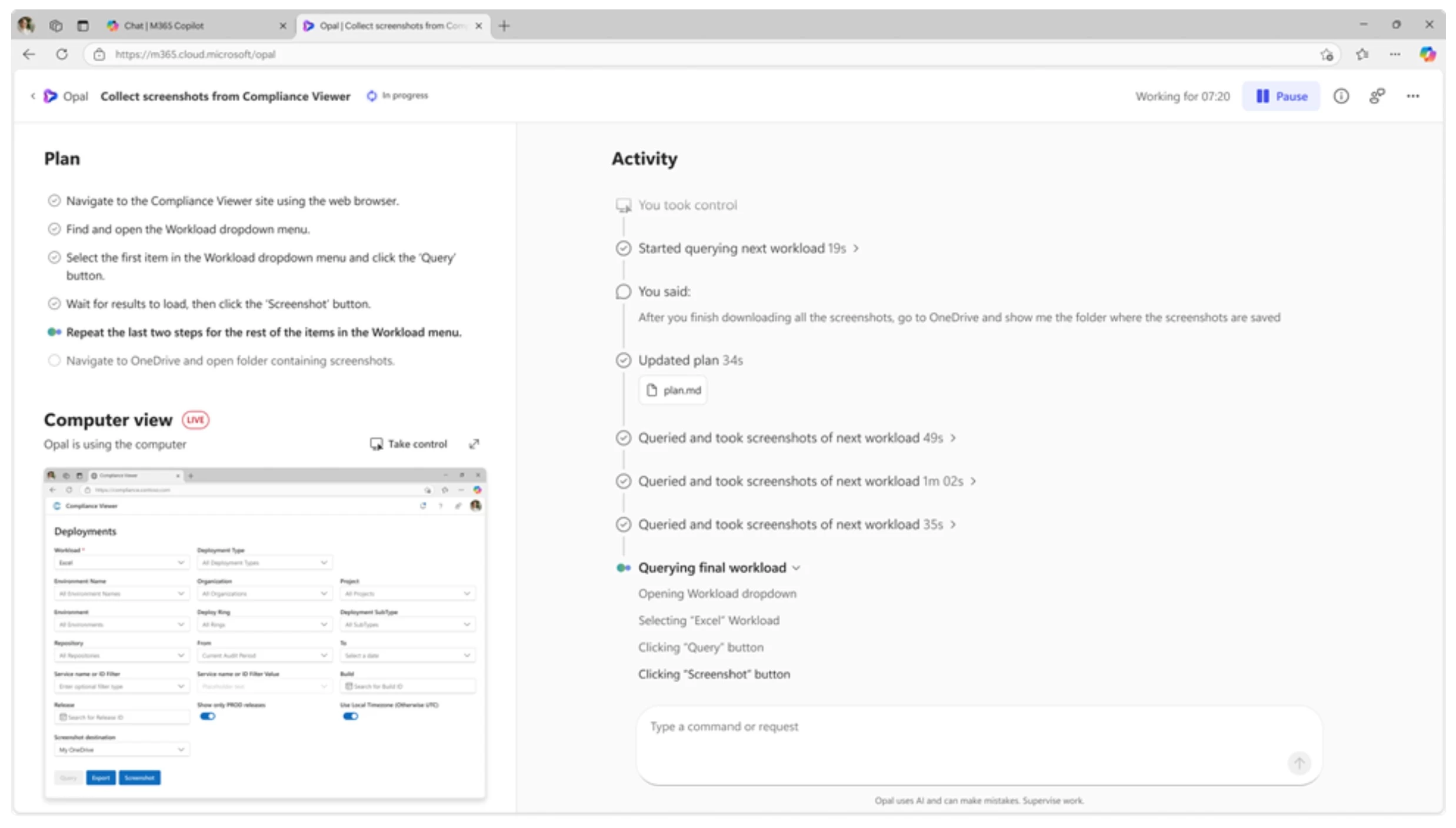
Here’s how Project Opal works:
- In the Microsoft 365 Copilot app on desktop or web, users can select the Project Opal option from the Frontier module in the left rail.
- A new browser window will open with Project Opal’s home page, which displays a list of previously completed jobs.
- To start a new job, users can select New, enter their prompt, and click Start.
- Based on the prompt, Project Opal will generate a plan and then launch a Windows 365 Cloud PC environment.
- Using the AI model’s Computer Use capability, it will begin performing the user-requested task.
- Users can view the progress in the activity view, pause and take control at any time, and even modify the plan if needed.
Microsoft highlighted that Project Opal also comes with the following observability, security, and steerability features, which are critical for using it inside enterprise environments.
- Computer-Use: Project Opal executes certain steps using Microsoft Edge browser in a Windows 365 for Agents Cloud PC, which is Entra-joined and Intune-enrolled. It can only navigate to sites allowed by the organization, and the user can take control at any time.
- Real-Time Observability: Project Opal"s job view includes a detailed plan, a live computer view, and an activity timeline that shows every action and user interaction.
- Steerability: If Project Opal needs a password to access a website, it will let users know in the activity timeline or browser notifications.
- Admin Controls & Security: Organizations can set what Project Opal can access via allow lists, configure scenario starters, and add context for better decision-making. They can also disable Project Opal completely and manage it through the Microsoft 365 Admin Center.
Project Opal is now available via the Frontier program for organizations with a Microsoft 365 Copilot license.