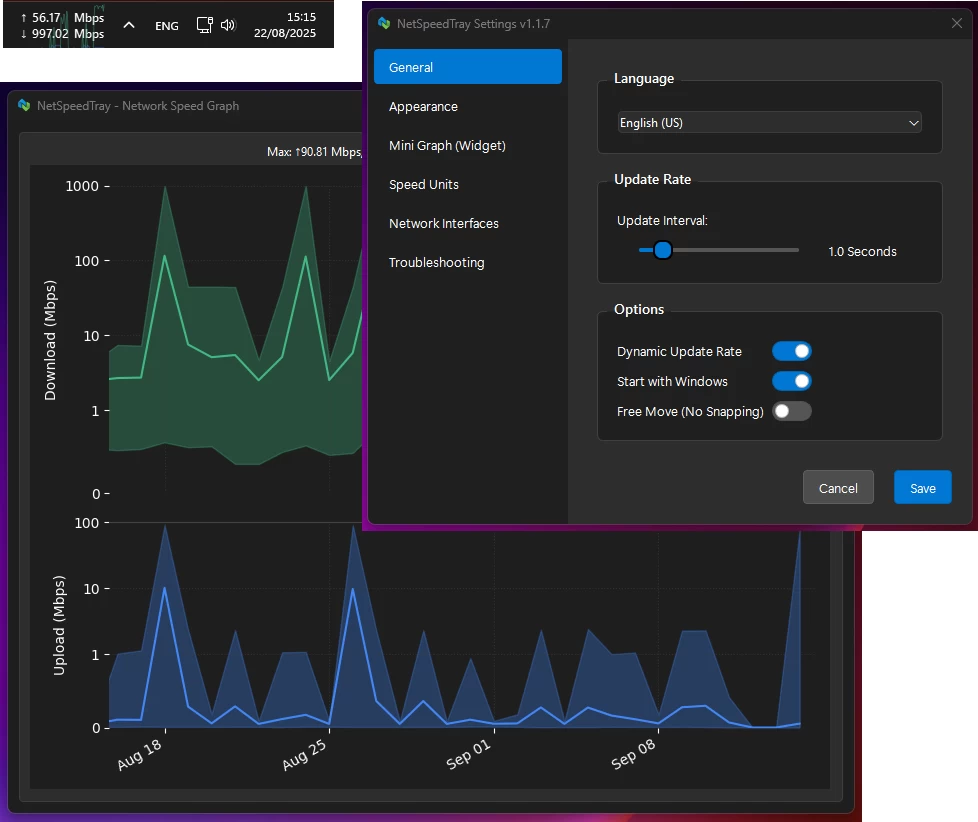
NetSpeedTray is a lightweight, open-source Windows network monitor that shows live upload and download speeds directly on the Taskbar. Designed for efficiency, it quietly sits in the system tray, conserving CPU and battery with dynamic updates. It blends seamlessly with Windows 10/11, adapts to light/dark themes, and auto-positions to avoid overlaps. Features include accurate interface detection, customizable display, optional mini-graph, color coding, granular font and unit control, detailed per-interface history graphs, safe data management, and easy CSV export—bringing the network monitoring Windows forgot.
NetSpeedTray key features:
Lightweight & Efficient
- Runs quietly in your system tray without consuming resources. Features a "Dynamic Update Rate" that lowers refresh frequency when the network is idle to save CPU and battery life.
Native Look & Feel
- Blends seamlessly with Windows 10/11 UI. Smart detection for light and dark taskbar themes ensures text is always visible.
Intelligent & Adaptive Positioning
- Automatically finds empty space next to your system tray and shifts to make room for new icons, preventing overlaps.
Seamless OS Integration
- Behaves like a native Windows component.
- Hides instantly with auto-hiding taskbar
- Hides when a fullscreen app is active
Smart Network Monitoring
- Accurate by Default: Auto mode identifies your main internet connection and ignores noise from VPNs or virtual adapters.
- Easy Interface Selection: Switch effortlessly between Auto, All, or Selected network interfaces via intuitive radio buttons.
Total Visual Customization
- Free Move Mode: Unlock and place the widget anywhere on your screen.
- Optional Mini-Graph: Real-time graph of recent network activity with adjustable opacity.
- Color Coding: Customize colors and speed thresholds to quickly see network status.
Granular Display Control
- Text & Font: Adjust font family, size, weight, and alignment.
- Units: Automatic (B/s, KB/s, MB/s) or fixed Mbps display.
- Precision: Set decimal places and always show them for uniform appearance.
Detailed & Intelligent History Graph
- Smart Scale: Logarithmic scale shows low-level traffic and large spikes clearly.
- Per-Interface Filtering: View speed history for specific adapters (Wi-Fi, Ethernet, VPN).
- Safe & Efficient Data Management: Adjustable retention, automatic cleanup, optimized database.
- Easy Data Export: Export raw data to .csv or save high-quality graphs for reports.
NetSpeedTray 1.1.8 changelog:
Security & Trust
- Digitally Signed Release: NetSpeedTray is now officially signed with a trusted code signing certificate.
- No More Warnings: This eliminates the "Unknown Publisher" / SmartScreen warning when downloading and installing the application.
- Guaranteed Integrity: The signature guarantees that the executable has not been tampered with since it left our build server.
- Security Patches: We have updated critical dependencies (including fonttools and pandas) to their latest secure versions to resolve reported vulnerabilities.
- Hardened Build Process: Implemented strict input sanitization in our build pipeline to prevent script injection attacks.
Localization
- Russian Language Support: Added complete professional translation for the Russian language (Русский).
- Native Locale Names: The settings menu now displays languages using their native names (Endonyms) for better accessibility.
Automation & CI/CD
- Fully Automated Pipeline: We have moved to a robust CI/CD workflow using GitHub Actions. Every release is now built, tested, and packaged in a clean, isolated environment.
- Automated Versioning: The application version is now dynamically injected from Git tags directly into the executable and installer. This ensures the "File Version" in Windows Properties always matches the release tag perfectly.
- Quality Gates: Automated unit tests are now executed before every build. If a test fails, the build is stopped immediately, ensuring only stable code reaches the release stage.
Download: NetSpeedTray 1.1.8 | 138.0 MB (Open Source)
Download: NetSpeedTray Portable | 164.0 MB
View: NetSpeedTray Home Page | Screenshot