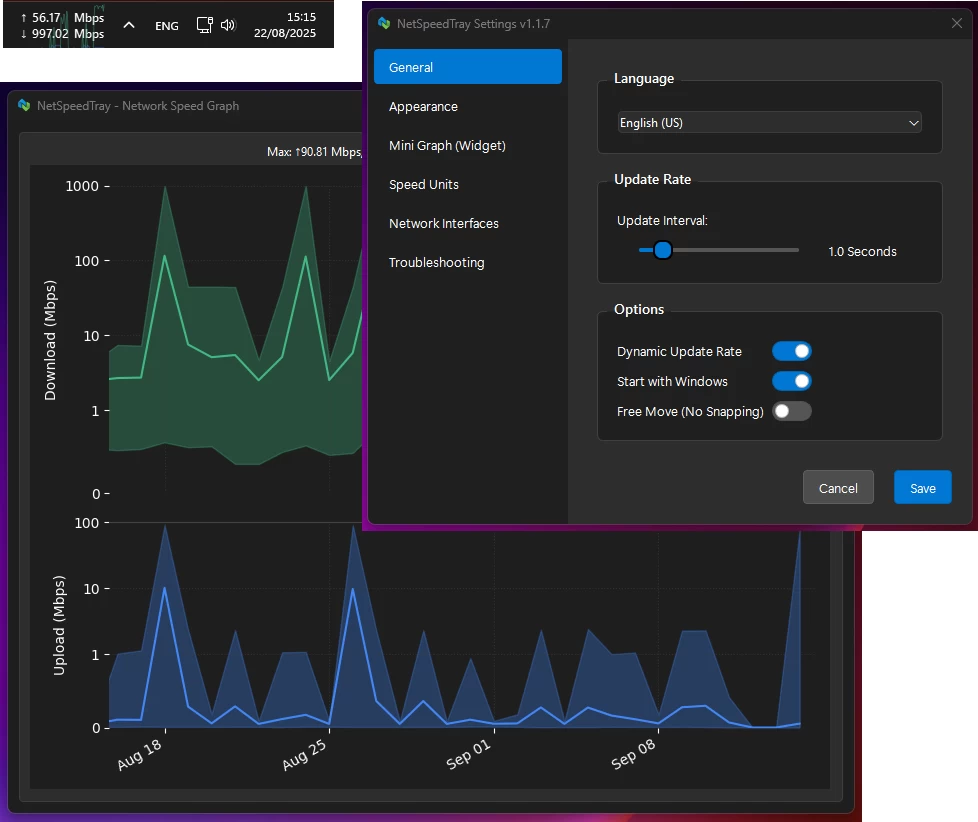
NetSpeedTray is a lightweight, open-source Windows network monitor that shows live upload and download speeds directly on the Taskbar. Designed for efficiency, it quietly sits in the system tray, conserving CPU and battery with dynamic updates. It blends seamlessly with Windows 10/11, adapts to light/dark themes, and auto-positions to avoid overlaps. Features include accurate interface detection, customizable display, optional mini-graph, color coding, granular font and unit control, detailed per-interface history graphs, safe data management, and easy CSV export—bringing the network monitoring Windows forgot.
NetSpeedTray key features:
Lightweight & Efficient
- Runs quietly in your system tray without consuming resources. Features a "Dynamic Update Rate" that lowers refresh frequency when the network is idle to save CPU and battery life.
Native Look & Feel
- Blends seamlessly with Windows 10/11 UI. Smart detection for light and dark taskbar themes ensures text is always visible.
Intelligent & Adaptive Positioning
- Automatically finds empty space next to your system tray and shifts to make room for new icons, preventing overlaps.
Seamless OS Integration
- Behaves like a native Windows component.
- Hides instantly with auto-hiding taskbar
- Hides when a fullscreen app is active
Smart Network Monitoring
- Accurate by Default: Auto mode identifies your main internet connection and ignores noise from VPNs or virtual adapters.
- Easy Interface Selection: Switch effortlessly between Auto, All, or Selected network interfaces via intuitive radio buttons.
Total Visual Customization
- Free Move Mode: Unlock and place the widget anywhere on your screen.
- Optional Mini-Graph: Real-time graph of recent network activity with adjustable opacity.
- Color Coding: Customize colors and speed thresholds to quickly see network status.
Granular Display Control
- Text & Font: Adjust font family, size, weight, and alignment.
- Units: Automatic (B/s, KB/s, MB/s) or fixed Mbps display.
- Precision: Set decimal places and always show them for uniform appearance.
Detailed & Intelligent History Graph
- Smart Scale: Logarithmic scale shows low-level traffic and large spikes clearly.
- Per-Interface Filtering: View speed history for specific adapters (Wi-Fi, Ethernet, VPN).
- Safe & Efficient Data Management: Adjustable retention, automatic cleanup, optimized database.
- Easy Data Export: Export raw data to .csv or save high-quality graphs for reports.
NetSpeedTray 1.2.5 changelog:
Major reliability
- phantom-speed filtering (IQR, delta clamping, rolling averages, smarter Y-axis), hardware-aware link-speed clamping (dynamic ceilings up to 100 Gbps), and multi-tier history queries now ensure accurate graphs with complete data. Widget sizing and positioning are guarded by new WidgetConstraints, and config migrations raise/log on invalid versions instead of silently corrupting settings.
New feature
- the “keep widget visible in fullscreen” toggle keeps the mini-graph on top of fullscreen apps when enabled.
Bug fixes
- graph+UI tweaks (legend toggle removal, panel sizing, Y-axis margins, clipped peaks, DPI-aware positioning, short-unit layout), smoother multi-monitor/drag behavior, and better font scaling for vertical taskbars.
Testing & quality
- added 50+ new unit tests, positioning-edge-case coverage across ultrawide/mixed-DPI setups, improved config/version guards, widget sizing checks, new build helper (build-exe-only.bat), and refactored renderer/graph logic for thread safety
NetSpeedTray 1.2.6 changelog:
Visual & UI Precision
- High-DPI Alignment Fix: Re-engineered the vertical centering logic for Windows 11. The widget now calculates the true visible taskbar region, ensuring perfect alignment even on 150%+ display scaling.
- Intelligent Layout Width: Fixed a precision bug in short_unit_labels that caused text truncation. Your speed values will now always fit perfectly within the widget frame.
- Graph Peak Protection: Improved the placement of "Peak" tags in the history graph. They now intelligently "flip" and clamp to prevent being cut off at the edges of the plot.
- Unified Appearance Settings: Consolidated arrow styling into the main Appearance page for a faster, more intuitive setup flow.
Robustness & Reliability
- Widget Guardrails: Added hard size constraints (MAX_WIDTH/MAX_HEIGHT) to prevent the widget from ever growing large enough to obscure system elements.
- Smart Update Logic: Unified the "Force MB" and "SMART" update modes to eliminate unit-switching jitter and reduce unnecessary CPU wakeups.
- Shell Resilience: Resolved a rare race condition where the widget could fail to re-anchor after an explorer.exe restart or display hardware change.
- Log Noise Reduction: Demoted "Spike detected" messages to DEBUG level to keep your production logs clean.
Quality Assurance
- Test Suite Synchronization: All core database and positioning tests have been updated to match the new v4 schema and peak-preserving query logic, ensuring a green light for the CI/CD pipeline.
- Positioning Coverage: Expanded unit tests in test_position_manager.py to cover complex screen geometry scenarios.
Download: NetSpeedTray 1.2.6 | 106.0 MB (Open Source)
Download: NetSpeedTray Portable | 125.0 MB
View: NetSpeedTray Home Page | Screenshot