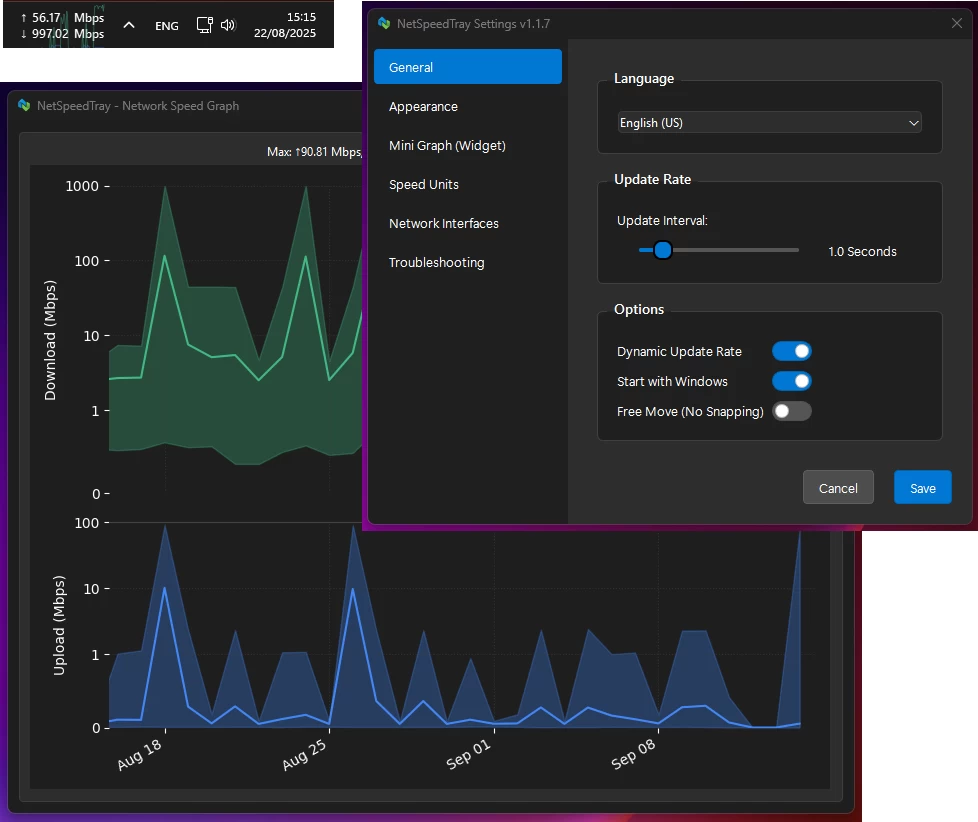
NetSpeedTray is a lightweight, open-source Windows network monitor that shows live upload and download speeds directly on the Taskbar. Designed for efficiency, it quietly sits in the system tray, conserving CPU and battery with dynamic updates. It blends seamlessly with Windows 10/11, adapts to light/dark themes, and auto-positions to avoid overlaps. Features include accurate interface detection, customizable display, optional mini-graph, color coding, granular font and unit control, detailed per-interface history graphs, safe data management, and easy CSV export—bringing the network monitoring Windows forgot.
NetSpeedTray key features:
Lightweight & Efficient
- Runs quietly in your system tray without consuming resources. Features a "Dynamic Update Rate" that lowers refresh frequency when the network is idle to save CPU and battery life.
Native Look & Feel
- Blends seamlessly with Windows 10/11 UI. Smart detection for light and dark taskbar themes ensures text is always visible.
Intelligent & Adaptive Positioning
- Automatically finds empty space next to your system tray and shifts to make room for new icons, preventing overlaps.
Seamless OS Integration
- Behaves like a native Windows component.
- Hides instantly with auto-hiding taskbar
- Hides when a fullscreen app is active
Smart Network Monitoring
- Accurate by Default: Auto mode identifies your main internet connection and ignores noise from VPNs or virtual adapters.
- Easy Interface Selection: Switch effortlessly between Auto, All, or Selected network interfaces via intuitive radio buttons.
Total Visual Customization
- Free Move Mode: Unlock and place the widget anywhere on your screen.
- Optional Mini-Graph: Real-time graph of recent network activity with adjustable opacity.
- Color Coding: Customize colors and speed thresholds to quickly see network status.
Granular Display Control
- Text & Font: Adjust font family, size, weight, and alignment.
- Units: Automatic (B/s, KB/s, MB/s) or fixed Mbps display.
- Precision: Set decimal places and always show them for uniform appearance.
Detailed & Intelligent History Graph
- Smart Scale: Logarithmic scale shows low-level traffic and large spikes clearly.
- Per-Interface Filtering: View speed history for specific adapters (Wi-Fi, Ethernet, VPN).
- Safe & Efficient Data Management: Adjustable retention, automatic cleanup, optimized database.
- Easy Data Export: Export raw data to .csv or save high-quality graphs for reports.
NetSpeedTray 2.0 - the widget is now a true part of the taskbar.
- Since v1.0 the speed readout lived in a separate always-on-top window perched over the taskbar - which meant it could fall behind the taskbar, flicker when you clicked around the shell, and vanish the moment you opened the Start menu or a system flyout (sometimes until you clicked into another window). This release re-architects how the widget sits on the desktop: it"s now Z-order-docked to the taskbar, so the Windows shell can no longer cover it. After years of chasing this, the widget is finally rock-solid - it stays put through the Start menu, system flyouts, the tray overflow, taskbar clicks, Explorer restarts, sleep/resume, and monitor changes. It doesn"t just sit over the taskbar anymore; it feels like a real part of it. That"s the major version bump.
- And there"s a new home for everything beyond the readout: the Monitor. The two older windows - the history Graph and the App Activity list - are replaced by one calm, unified Monitor with three tabs (Overview · Network · Hardware). It opens on a glanceable Overview of tiles and sparklines, drills into honest statistics you can export, surfaces network latency and the per-app connections behind your traffic, and shows per-process CPU/RAM/GPU usage - all sharing one graph engine and one timeline. It"s the half of the app most people never found, finally given a front door.
- This release also folds in the entire (previously unreleased) v1.3.4 stabilization work: a broad sweep of bug fixes - including a critical logging fix - correctness hardening, the project"s first CI pipeline, and a big jump in test coverage (196 → 722 tests).
Changelog highlights:
- Taskbar integration rebuilt – the widget is now owned by the taskbar, staying visible above the Start menu, Quick Settings, tray overflow, and after Explorer restarts.
- Smoother desktop experience – eliminated taskbar-click flicker with near-instant hide/show transitions when entering or leaving fullscreen.
- More resilient – automatically recovers after sleep, wake, docking/undocking, KVM switching, and monitor changes.
- New Monitor window – open with a double-click or from the tray, featuring Overview, Network, and Hardware tabs.
- Fast Overview dashboard – lightweight live tiles for CPU, GPU, RAM, VRAM, network, data usage, and top network talkers without loading charts.
- Advanced monitoring – interactive network and hardware graphs with per-app/process insights, NIC filtering, and customizable graph modes.
- Detailed statistics & export – view distributions, percentiles, peak/off-peak usage, and export reports as ZIP, CSV, or JSON, plus a new command-line CSV exporter.
- Native Windows 11 experience – Fluent design, dark title bar, rounded corners, remembered window state, and full keyboard navigation.
- Usage tracking & data caps – monitor daily, weekly, and monthly usage, set monthly caps with optional 80%/100% alerts, and track usage with an authoritative counter.
- Network latency monitoring – optional connectivity checks with simple Good/OK/Slow status, using your gateway by default for privacy.
- Secure one-click updates – downloads are now verified with Windows signature validation and publisher pinning before installation.
- More customization – configurable widget click actions, new arrow style options, live settings previews, Cycle mode scrolling, and additional tray controls.
- Starts automatically by default – new installations now launch at sign-in while preserving existing users" preferences.
- Quality-of-life additions – widget hover now shows data usage, plus an in-app temperature monitoring guide for new users.
- Major reliability fixes – resolved broken file logging, corrected speed color thresholds across units, improved multi-monitor window positioning, fixed sensor freezes, high-speed text truncation, Cycle mode clipping, monitoring failures, and widget dragging behavior. [full release notes]
Download: NetSpeedTray 2.0.0 | 88.4 MB (Open Source)
Download: NetSpeedTray Portable | 102.0 MB
View: NetSpeedTray Home Page | Screenshot