Syncthing, a file sync app that keeps your folders up-to-date across multiple devices, has always stood apart. Unlike platforms like Google Drive and Dropbox, Syncthing does not use a central server. Instead, it operates on a peer-to-peer (P2P) network where your data is directly and securely encrypted between your own machines.
The app just got its first 2.x series releases, version 2.0, and as the dev team notes, it introduces multiple major changes.
Starting with the biggest change, the database backend has migrated from Google"s LevelDB to SQLite. This means if you have a large setup with tons of files, the first launch of version 2.0 will trigger a one-time migration that could take a while. The switch to SQLite offers benefits like being easier to understand and maintain, which should hopefully lead to fewer bugs down the road.
In previous versions of Syncthing, information about deleted items was kept in the database forever. Now 2.0 is changing this with a new policy that forgets deleted files after six months. If your workflow requires that deletions remain tracked for longer, there is a --db-delete-retention-interval= flag you can pass when you run syncthing serve, allowing you to set a custom duration or disable the feature entirely.
As for logging, there"s a new log level called WARNING, which now sits between INFO and ERROR. The INFO level itself has become more detailed, indicating the specific sync actions Syncthing is taking, which provides a clearer picture of what is happening under the hood.
The command-line interface also received a significant overhaul. The application drops support for old single-dash long options, so a command like -home must now be written as --home. More importantly, some options have become subcommands.
For example, --device-id, which you could use to get your device"s ID in previous versions, has been moved to its own separate subcommand under syncthing device-id.
Unfortunately, a few platforms will no-longer get pre-built binaries, including Windows on ARM, NetBSD, and Solaris. The dev team cites "complexities related to cross compilation with SQLite" as the reason for this change.
The team also canned the rolling hash detection of shifted data, stating that the feature never really provided a meaningful performance benefit and that scanning is more efficient without it. Other changes include:
- Using multiple connections by default between v2 devices for better performance.
- No longer creating a "default folder" on the first startup.
- A change in how conflict resolution works, allowing a deletion to be the winning outcome.
Syncthing 2.0 brings several new features like UDP portmapping for QUIC, which should improve connectivity for users behind certain types of firewalls. This is complemented by the new default behavior of using multiple connections between devices, with one stream dedicated to metadata and two for data, so large file transfers will not block index updates. For security, sync connections can now use modern Ed25519 keys.
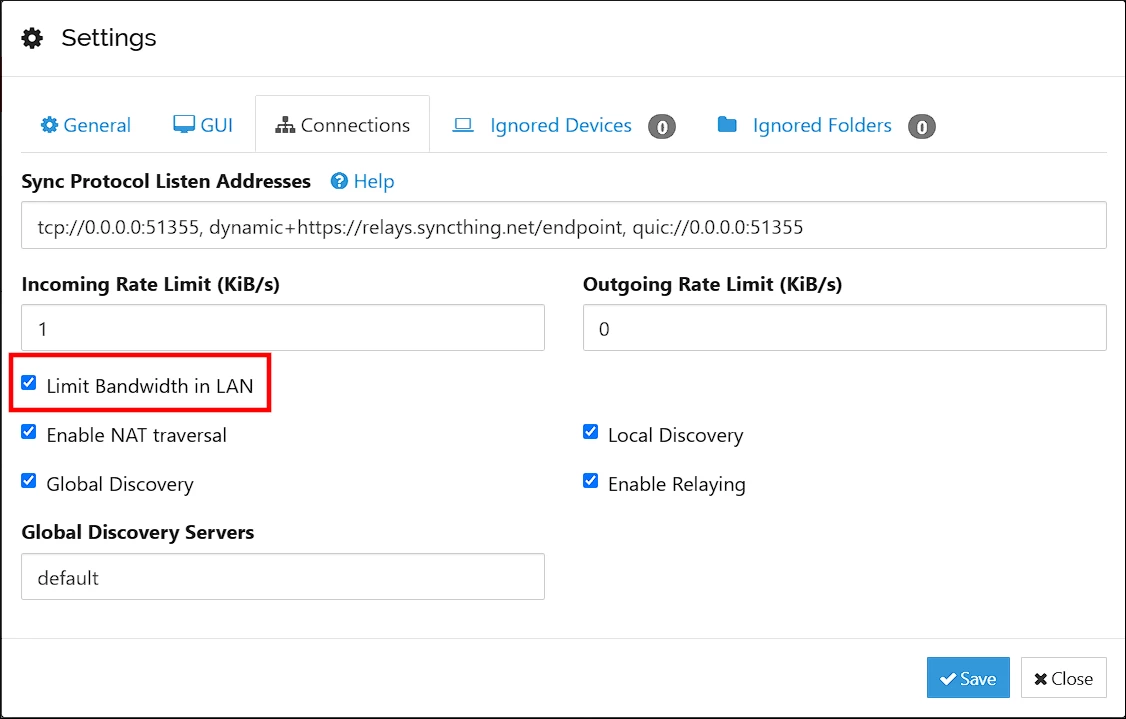
Power users who monitor their systems will appreciate that folder and device information is now exposed as metrics. The developers even added a handy option in the GUI to limit bandwidth usage on the local network.
As for bug fixes, there"s plenty, like better handling of connection deadlocks and several fixes to improve stability on Android, including one that addresses an issue with discovering local gateways on Android 14 and newer.
The developers also patched up the GUI, preventing it from showing connection errors for paused devices and stopping the "Sync Waiting" status from flashing unnecessarily. Windows users also get a fix for an error that could pop up when checking file system properties on modern versions of the OS.
If all this sounds interesting, you can check out the full changelog and download a binary for your preferred platform from the GitHub Releases page. The full documentation for 2.0 is available here.