UGREEN is a company we"ve reviewed several products for, most recently of which we took a look at the DXP4800 Pro NAS that is targeted at homelabs and small businesses. This time around, I will be taking a look at the 17-in-1 Maxidok, yes you read that right, it"s not a typo... seventeen-in-one, and yes, it really is called Maxidok.
Before we get underway, here is a disclaimer: UGREEN provided a free sample without any review pre-approval.
Here are the full specs of it:
| UGREEN Revodok Maxidok 17-in-1 Thunderbolt 5 Docking Station | |
|---|---|
| Model (SKU): | 85590F |
| Dimensions: | 113.2 x 113.2 x 53 mm (self measured) |
| Weight: | 883 g (self weighed, with SSD installed) |
| Number of Ports: | 17 |
| USB & Data Ports: | 2x Thunderbolt 5 (120Gbps): x2 3x USB-A (10Gbps): x3 3x USB-C (10Gbps): x3 |
| Upstream Power (to Host): | 140W Max (28V, 5A) |
| Downstream Power (to Devices): | 2x Thunderbolt 5: 15W (5.0V, 3A) |
| NVMe M.2: | 1x PCIe 4.0 X4 (2230/2242/2260/2280) M Key, B+M Key |
| I/O (front): |
|
| I/O (rear): |
|
| Ethernet: | 2.5 GbE |
| SD Card Reader Speed: | 312 MB/s |
| Audio Ports: | 3x 3.5mm (In/Out) |
| Working Temperature: | 32 °F - 104 °F (0 °C - 40 °C) |
| Storage Temperature: | -4 °F - 158 °F (-20 °C - 70 °C) |
| Power Input: | 24V 10A, 240W |
| Warranty: | 12 months |
| (MSRP) Price: | $499.99 |
Annoyingly, I had to consult several different sources for the complete specifications, because the official website only lists what they deem to be the most important specifications. Even more annoyingly I had to Google details about the warranty, because this is not disclosed anywhere on the official website (just the terms, not the length) apparently, for NAS devices, it is two years (which is disclosed properly), but for all other UGREEN stuff, it is 12 months. Even the official UGREEN Amazon listing does not have details about the warranty, with the linked page stating:
Please contact the seller directly for warranty information for this product. You may also be able to find warranty information on the manufacturer’s website.
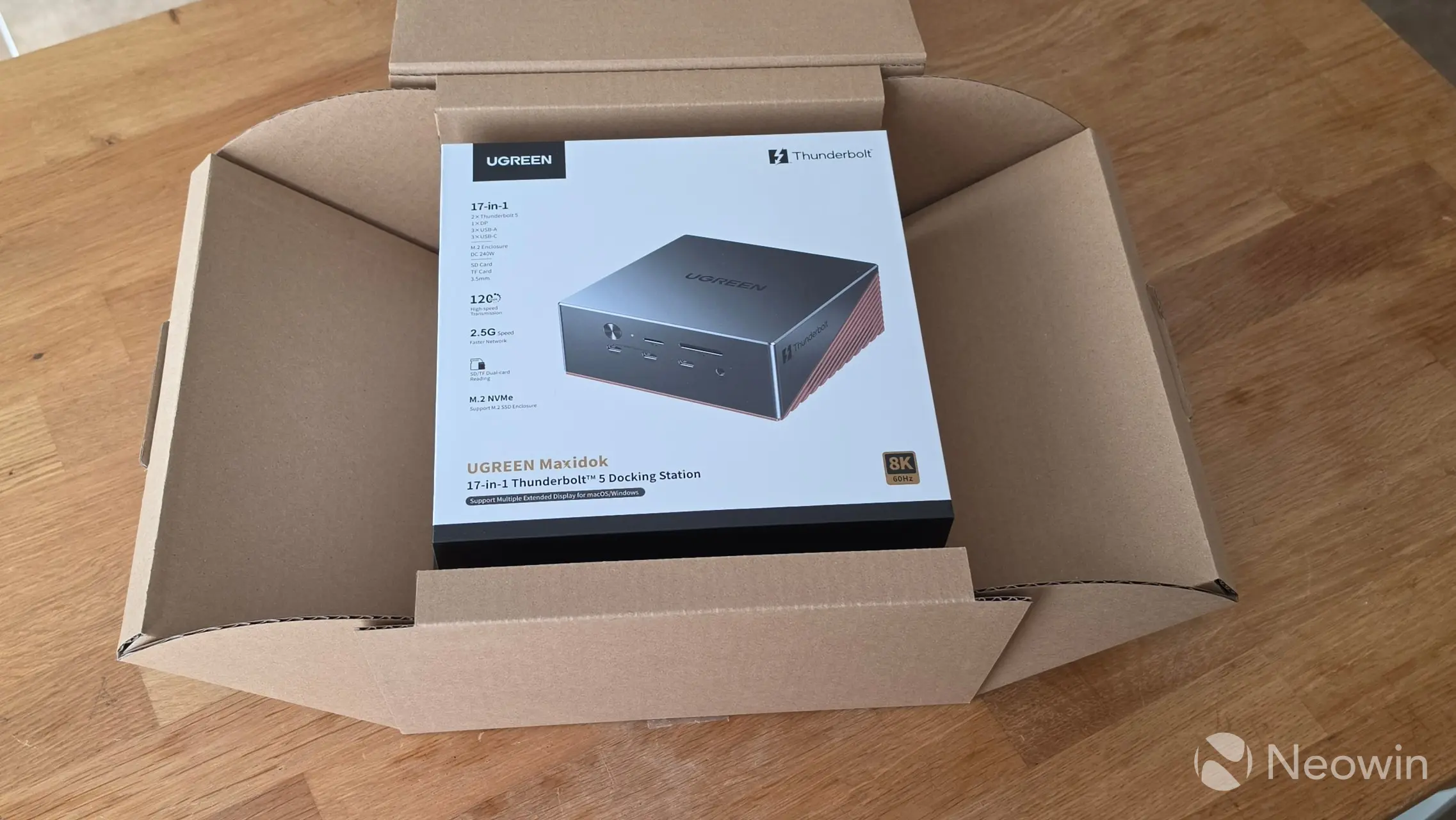
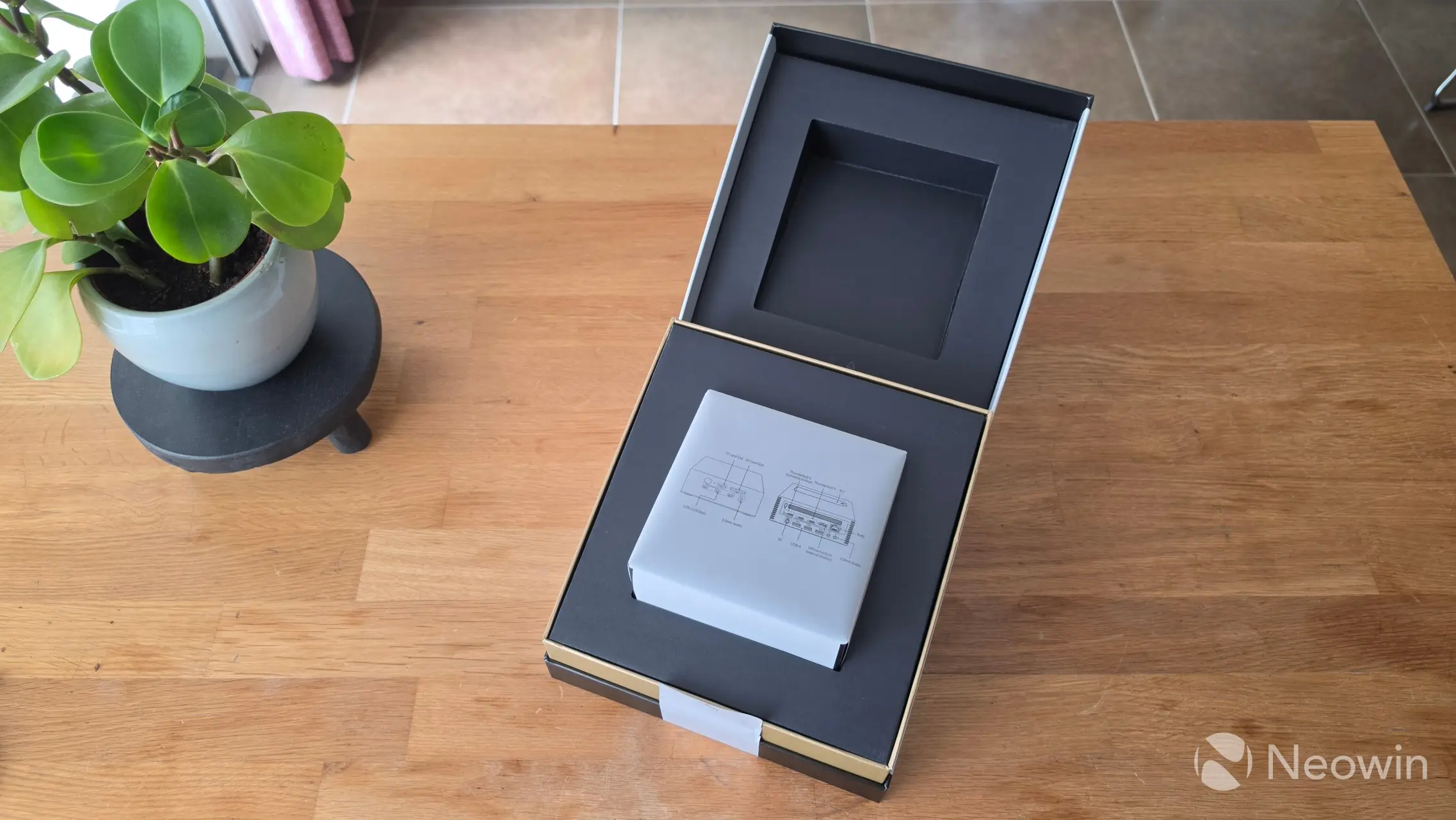
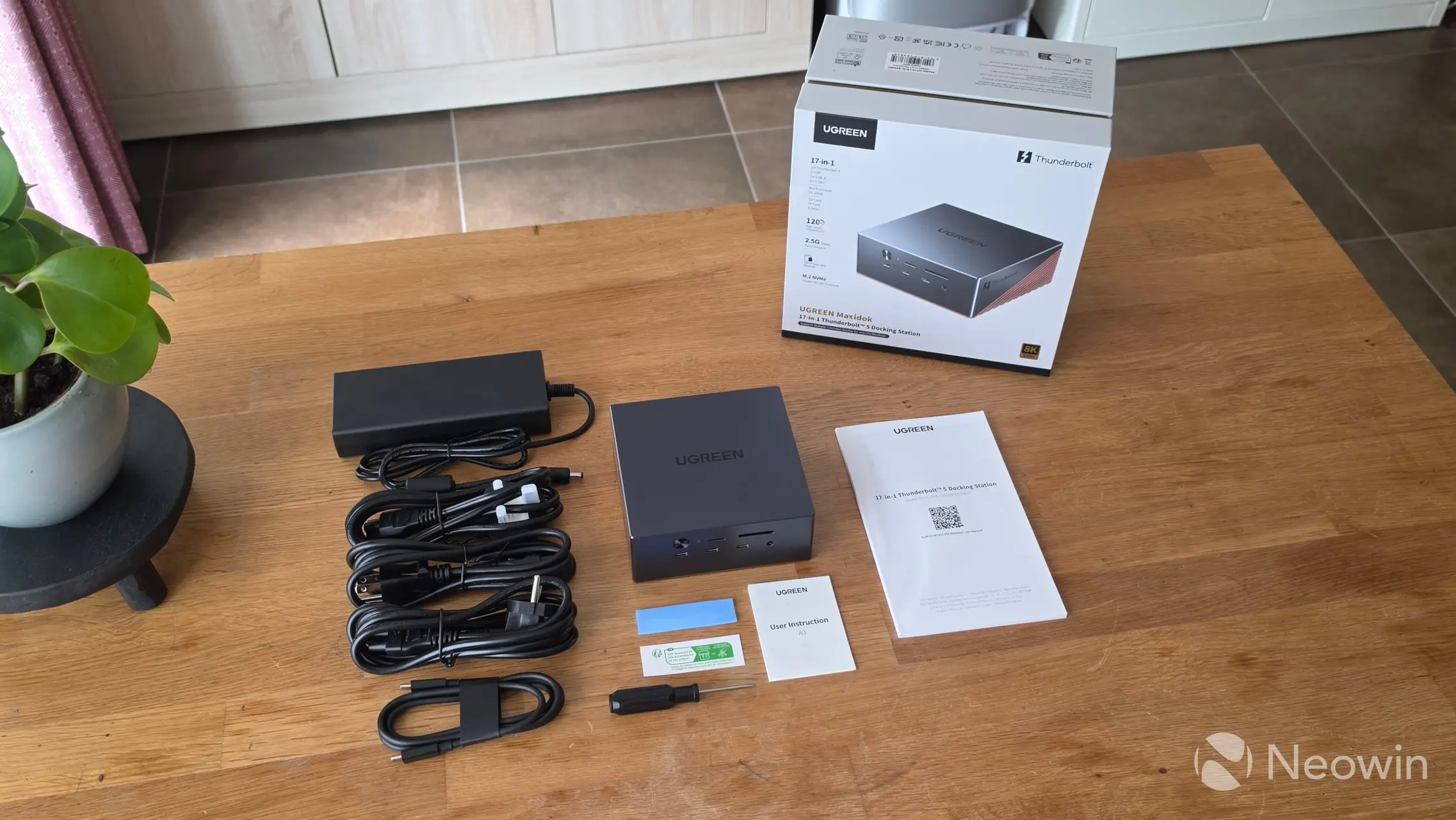
With that out of the way, the Maxidok comes in a square cardboard box that opens the same way as the new NVIDIA founders edition outer boxes, which was kind of cool. It contains another box with the details of the Maxidok printed around the sides. That box can be opened like it is a lid, and then you can find the 17-in-1 Maxidok sitting on a cardboard shelf, with two cardboard boxes of accessories and the user manual in several different languages.
What"s in the box
- UGREEN Revodok Maxidok 17-in-1
- 1x Thunderbolt 5 Cable 0.5m
- 3x AC Power Cable (US/CA, EU, UK)
- 1x External PSU
- Screwdriver
- M.2 Screw
- 1x Thermal Silicone Pad
- User Manual
UGREEN does not have a link to the online User Manual so I had to find it at the Amazon listing, which you can view here.
So who is the Maxidok targeted at? Below, I"ve copied UGREEN"s highlights of the Maxidok:
- 17-in-1 All-in-One Connectivity: 17-in-1 all-in-one docking station with complete connectivity for data, video, network, storage and charging.
- Ultra-Fast Data Transfer: Ultra-fast bandwidth up to 120Gbps, twice the speed of Thunderbolt 4 for smooth file transfer and multitasking.
- Built-in M.2 Storage Expansion: Built-in M.2 NVMe PCIe Gen4 x4 slot for high-speed storage expansion without disassembly.
- Flagship Multi-Display Support: Supports multi-screen display up to 8K@60Hz, delivering professional-grade visual experience.
- 240W Total System Power: 240W total power output with 60W fast charging, stable power for all your devices.
However, on the product page, they also state "Up to 8TB of high-speed SSD expansion gives you instant access to your 4K footage and other large files," which seems to indicate it"s a perfect choice for influencers or those that work on video editing projects.
Design
The Maxidok kind of looks like a Mini PC, and as shown in the images below, it has a two-tone grey/copper color. It has a good heft to it as well, coming in at 883 grams with an SSD installed. All of the grey (including the bottom plate) is plastic, and the copper colored parts of the Maxidok are (an unspecified type of) metal.
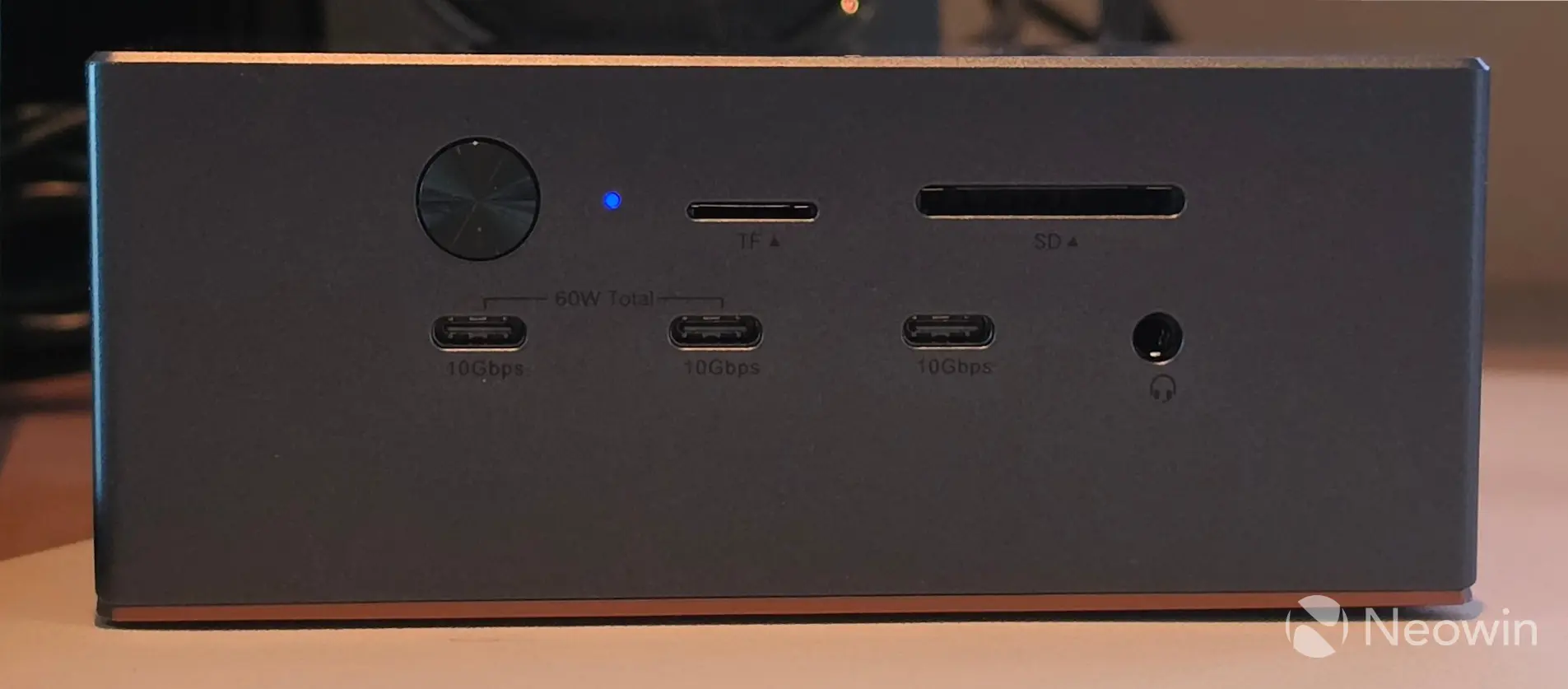
Around the front, you have the power button and power led, TF & SD 4.0 Card Reader, below that three USB-C 3.2 Gen 2 (10 Gbps) ports and an audio 3.5mm jack port.
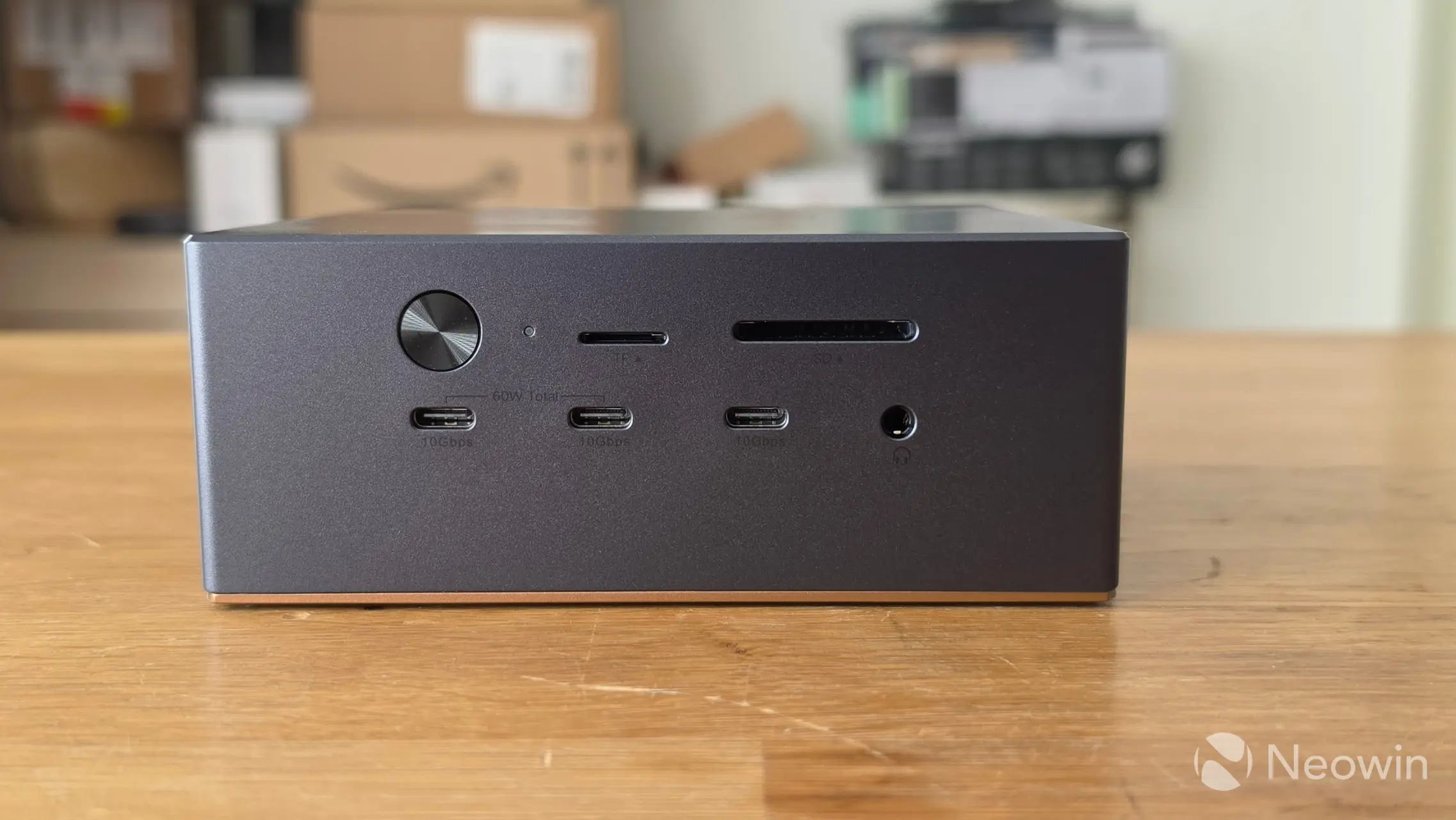
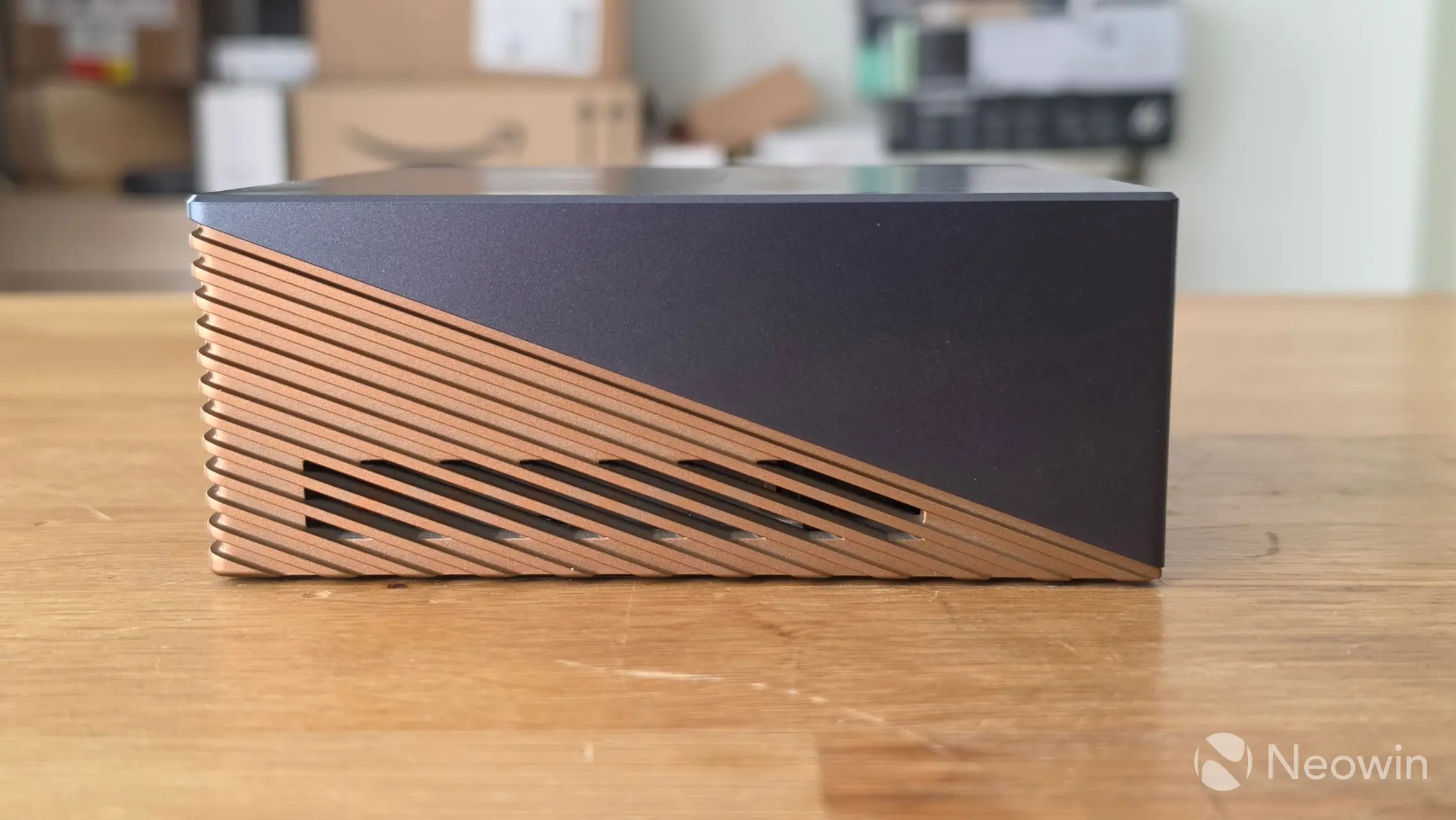
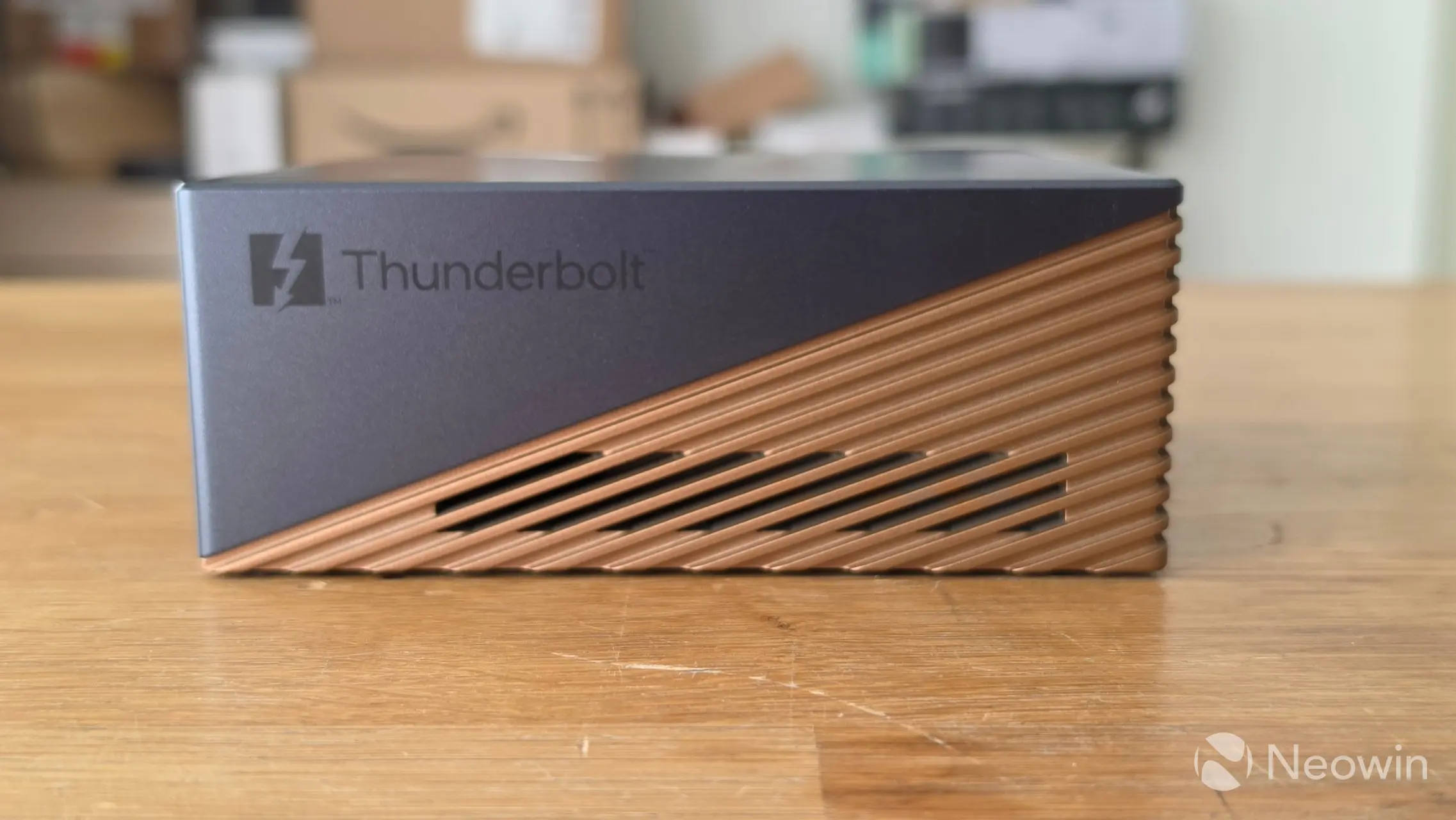
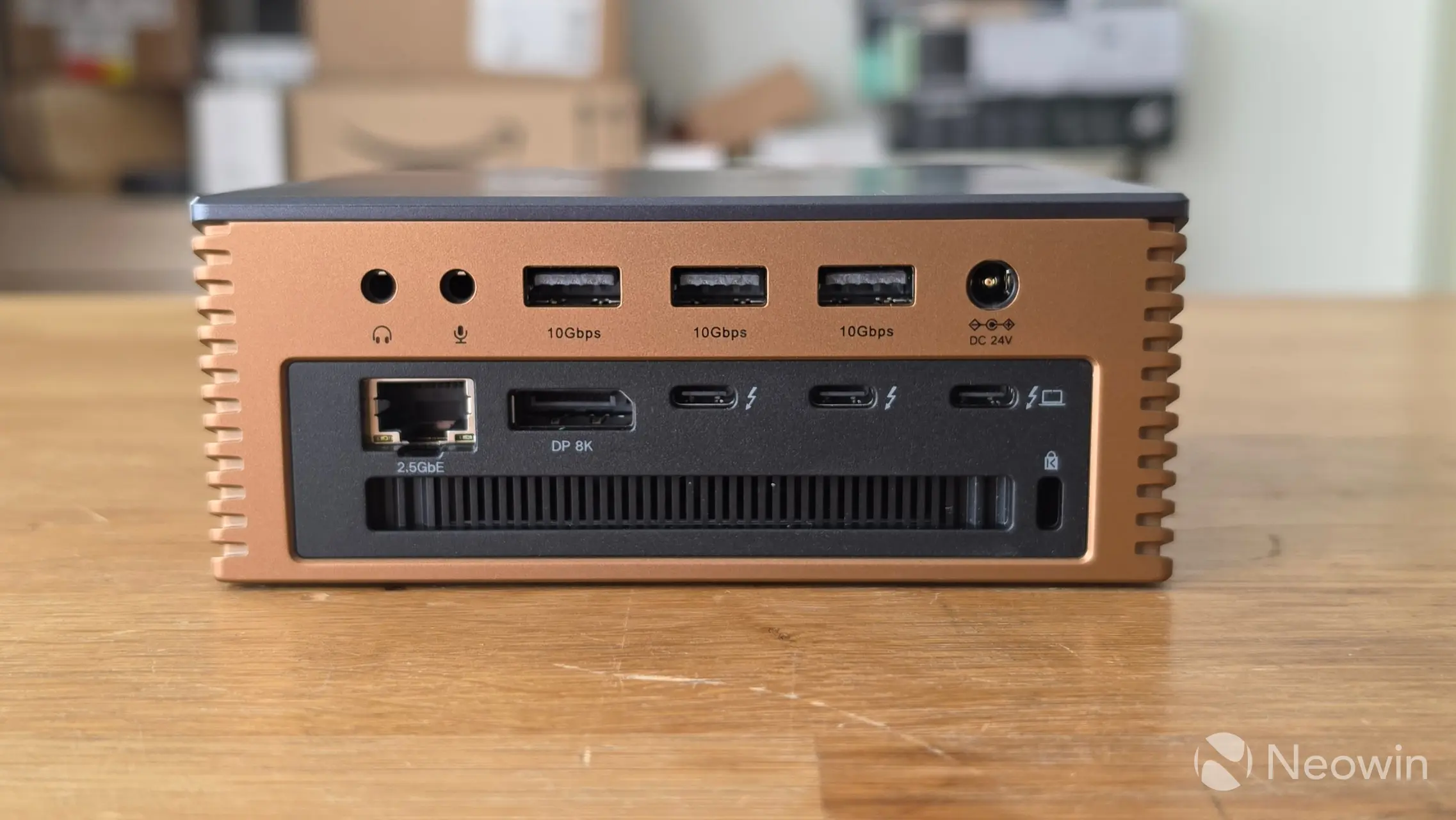
On the left and right sides, there is a grill for heat dissipation, along with a Thunderbolt 5 logo on the right of the Maxidock.
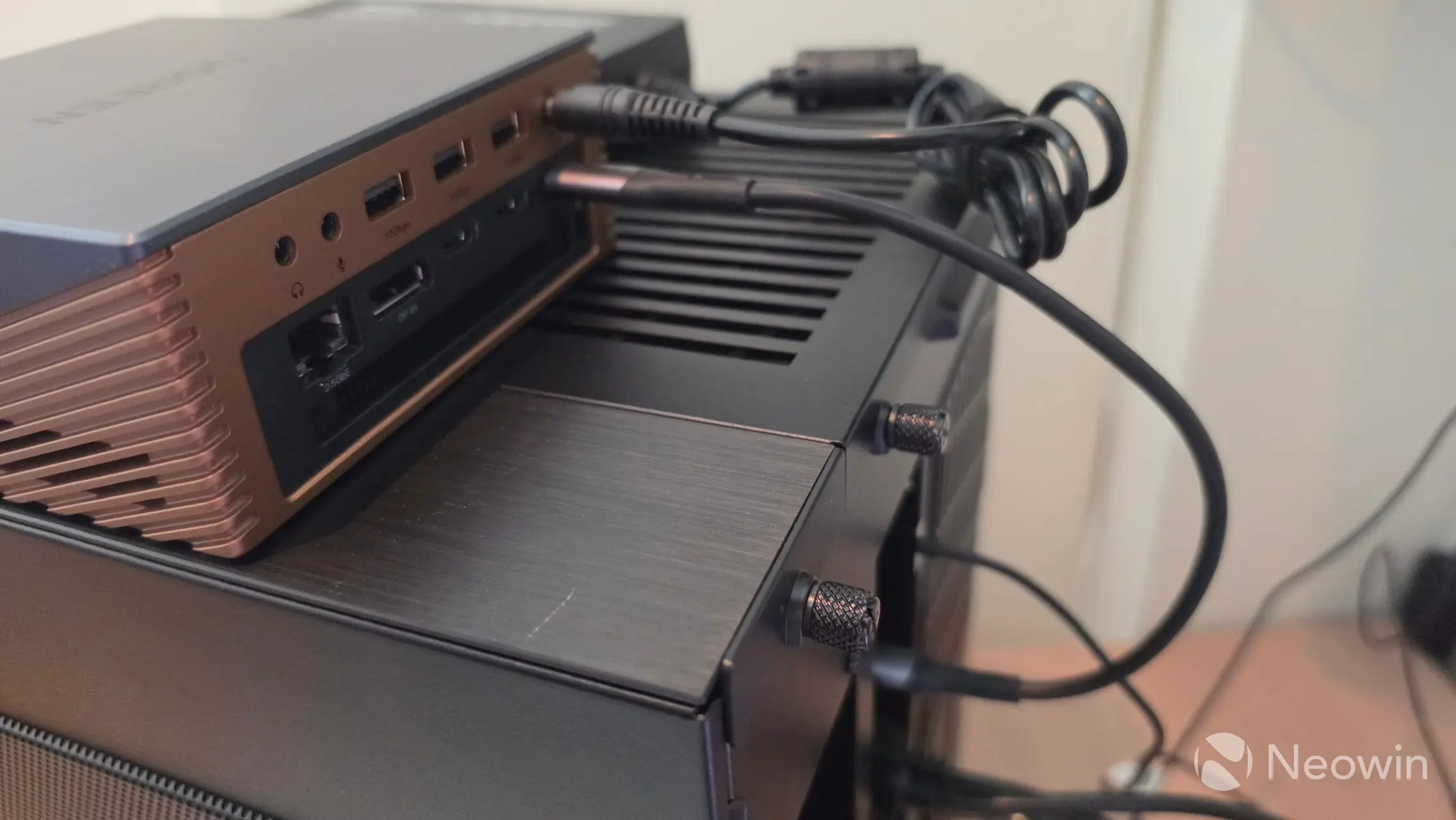
Around the back from left to right, there are audio in/out ports, three USB-A 3.2 Gen 2 (10 Gbps) ports, DC12V barrel port, below that a 2.5 GbE LAN port, DisplayPort 2.1, two Thunderbolt 5 ports, and a Thunderbolt 5 host port. Along the bottom, there"s another grill for heat dissipation and a Kensington lock port.
| Top | Bottom |
|---|---|
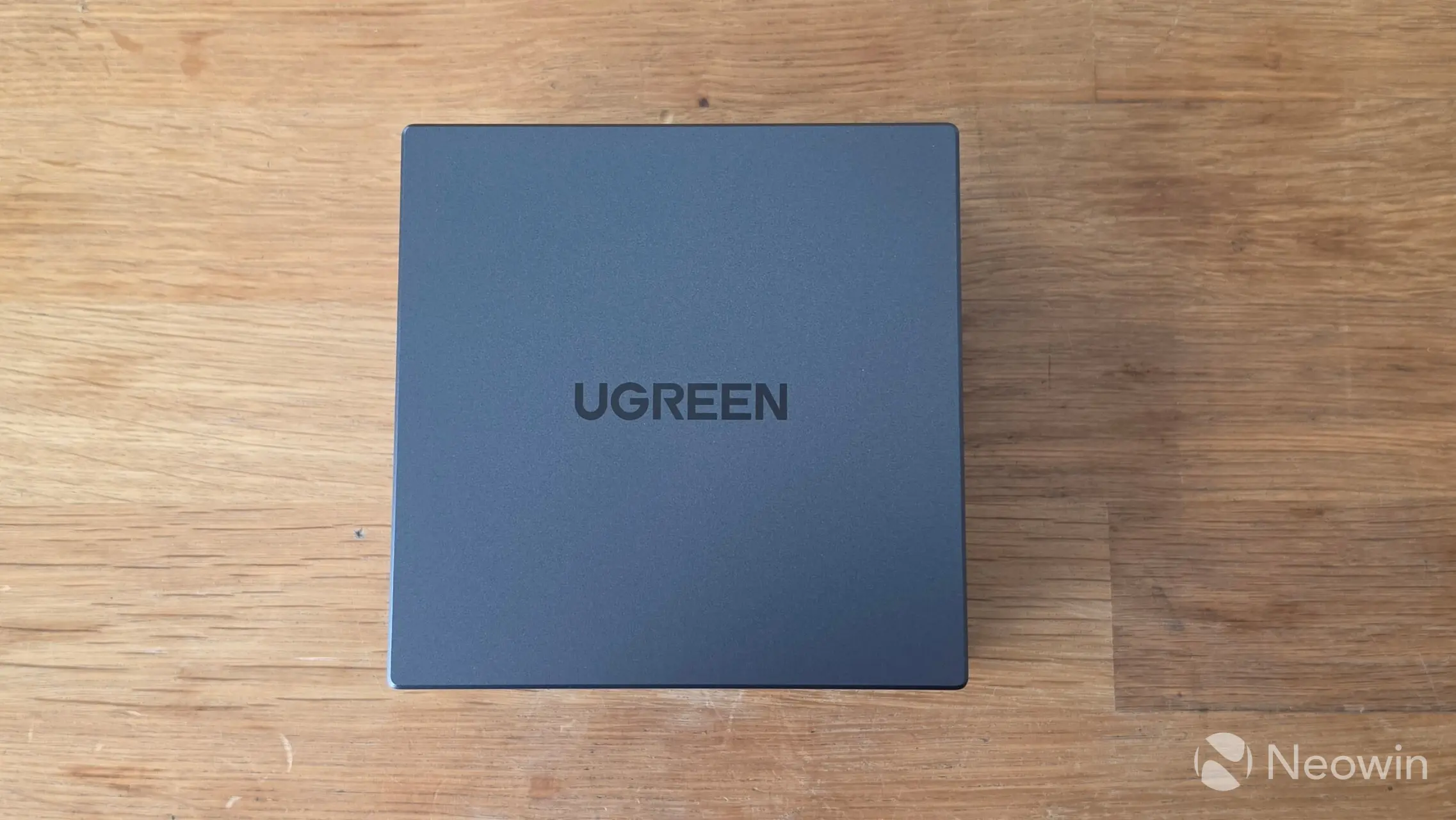
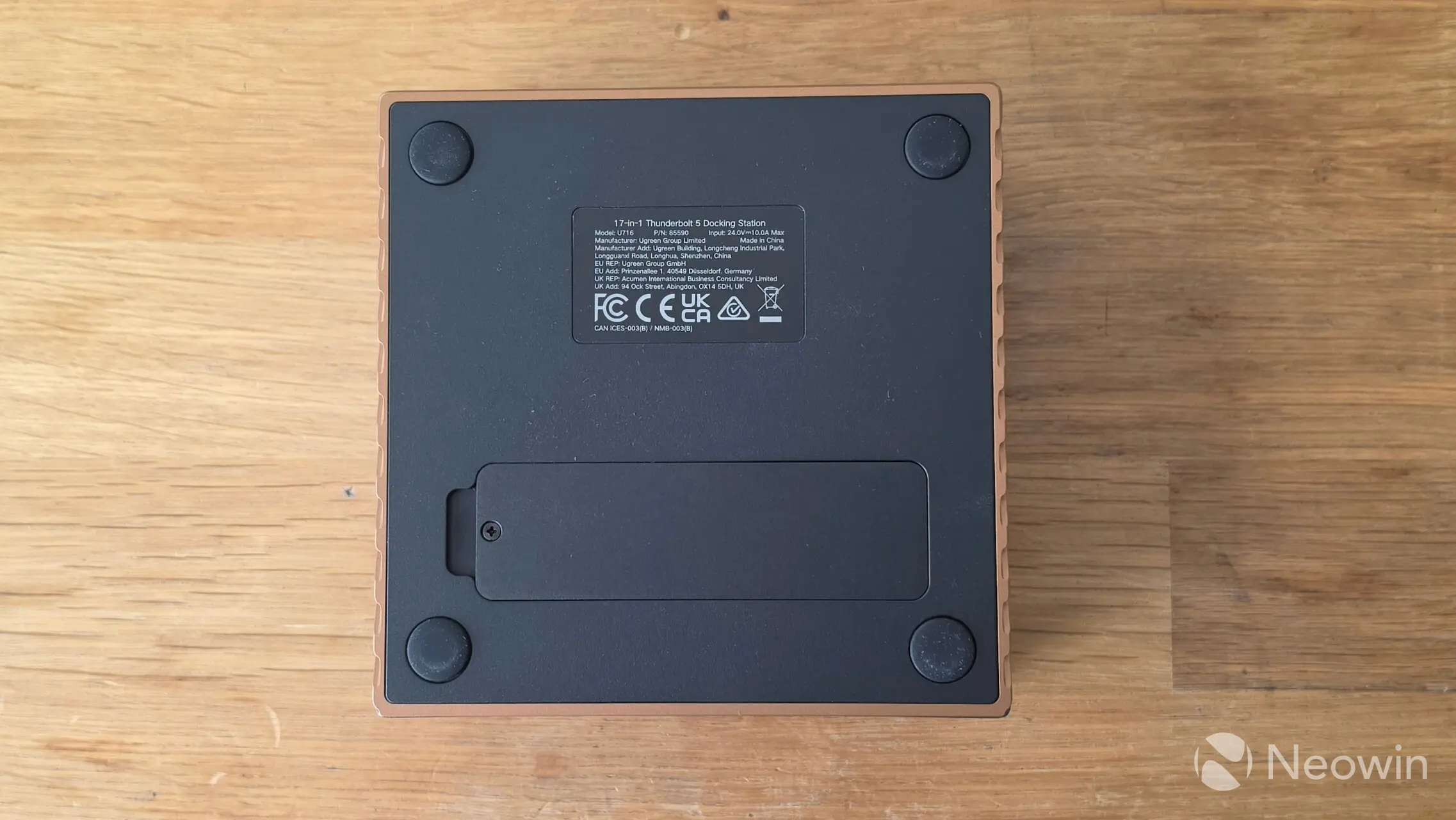
Lastly, above, you can see the views from the top and bottom. The top has the UGREEN logo stamped on it, which thanks to the darker use of grey for the lettering, doesn"t look overbearing. On the bottom, there"s the four rubber feet and SSD access cover along with a sticker with product details and safety certifications. Overall it looks quite premium, which kind of goes hand in hand with its nearly $500 MSRP.
Teardown
| tl;dr it"s not possible to do a teardown |
|---|
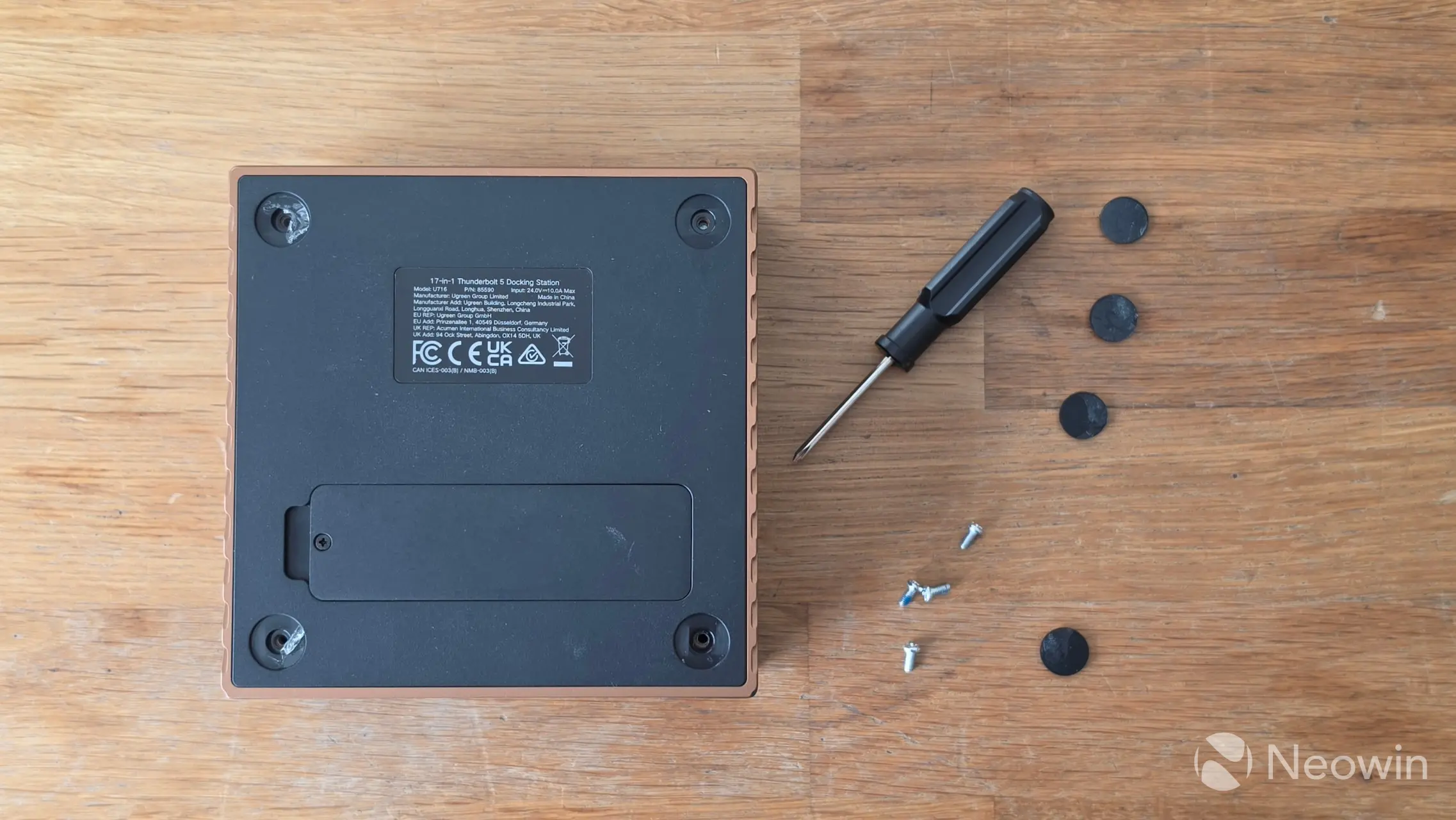
At first, I attempted to do a teardown by removing the four glued-on rubber feet and screws, but I soon discovered that it wasn"t possible because it appears like the base is glued together, as it would not budge. I decided that there"s nothing to manage in the internals anyway, since it is only possible to manage an SSD on this device, no normal person would need to gain access to the rest. Even the PSU is external, so there"s your answer, no teardown.
Installation
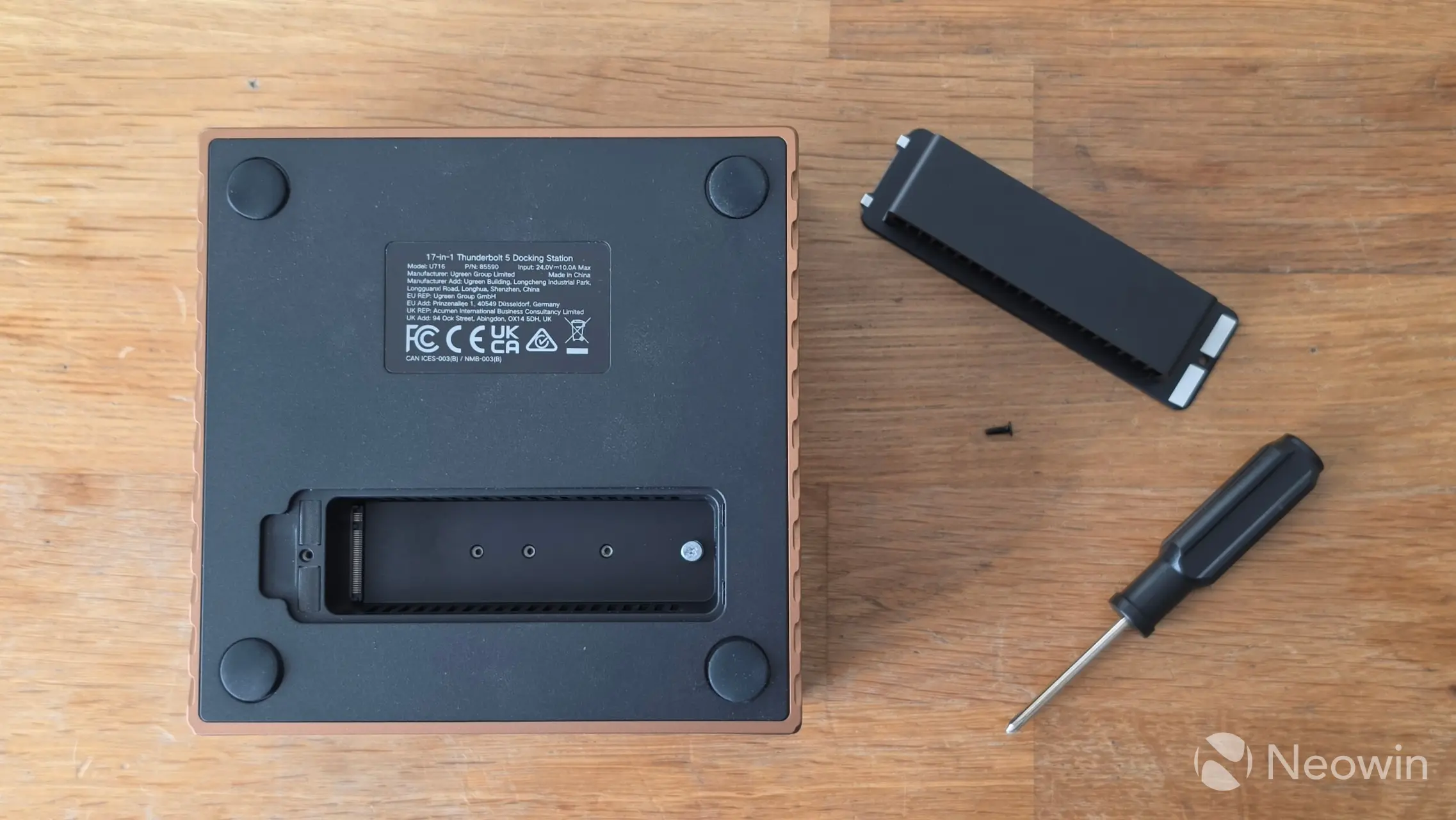
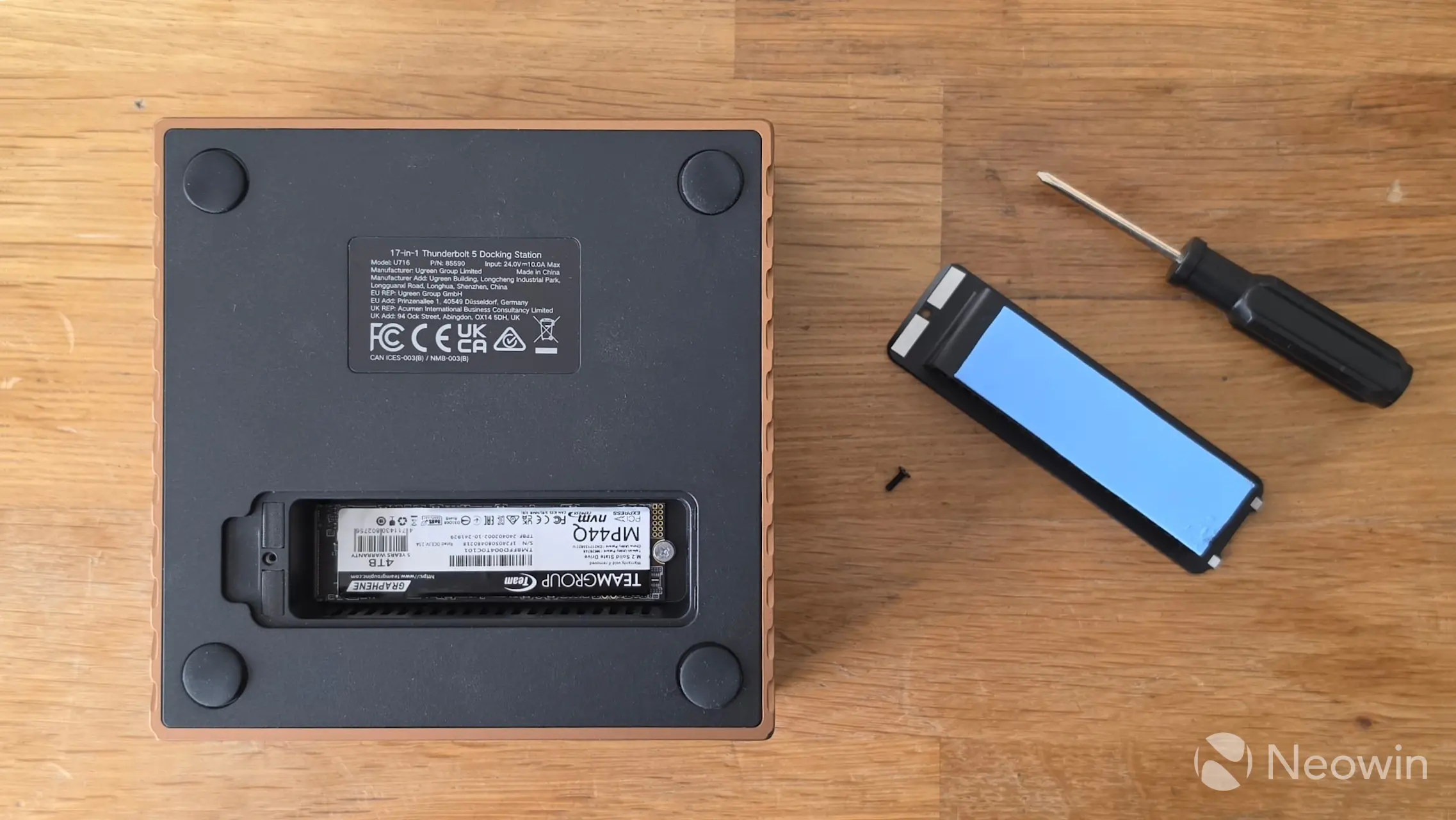
For our review, I used a TEAMGROUP MP44Q 4TB NVMe (PCIe 4.0) (Amazon|Newegg) SSD that TEAMGROUP supplied us with. Installation is easy; simply unscrew the Philips screw on the bottom of the Maxidok and remove the cover to access and install your 2280 M.2 NVMe with an M2 screw. The M.2 slot supports 2230/2242/2260/2280 M Key, and B+M Key style SSDs and helpfully, the M.2 nut also catches onto the SSD when installing which makes it far easier to screw in the tiny M.2 screw.
I opted to install the thermal pad onto the cover, which doubles as a heat sink, as shown in the image above.
Test System
Our recently updated test system (which is called TITAN) consists of the following:
- Lian Li O11 Dynamic Mini V2 Flow (Amazon|Newegg)
- Intel Core Ultra 7 270K Plus (Amazon|Newegg)
- ASUS ProArt Z890 Creator WiFi (BIOS 3103) (Amazon|Newegg)
- Montech CENTURY II 1200W (Amazon|Newegg)
- Lian Li GA II Lite 360 Performance (Amazon|Newegg)
- Thermal Grizzly KryoSheet - 44x37 (Amazon|Newegg)
- 2x 16GB G.Skill Trident Z5 RGB (7200 MT/s in XMP) (Amazon|Newegg)
- Sabrent Rocket 4 PLUS 2TB NVMe SSD (Amazon|Newegg)
- PNY RTX 5080 Slim OC (Amazon|Newegg)
- Windows 11 25H2 Professional Build 26200.8246 (Neowin Deals)
- NVIDIA driver 595.79 (Studio)
Benchmarks
For our benchmarks, hwinfo.com provided a commercial license of HWiNFO, and UL Solutions provided us with a Professional (commercial use) license for 3DMark.
The included cable doesn"t work over Thunderbolt 5
Before we get underway, it"s important to note that the Maxidok was not detected using the included Thunderbolt cable over the Thunderbolt 5 port on the ASUS Proart Z890 Creator Wi-Fi. So I used the 30cm Thunderbolt 5 cable that shipped with the ORICO X50, and then the Maxidok was detected. I reported this to UGREEN, who are investigating my findings.
Drive speed
| CrystalDiskMark 9 | ||
|---|---|---|
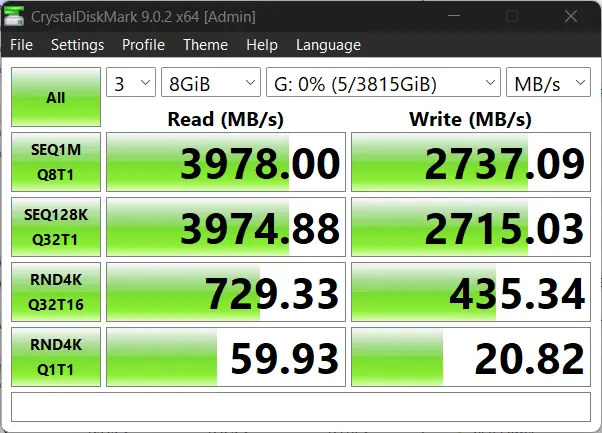
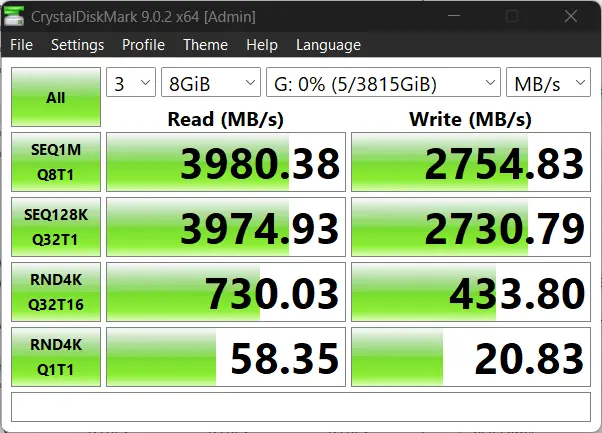
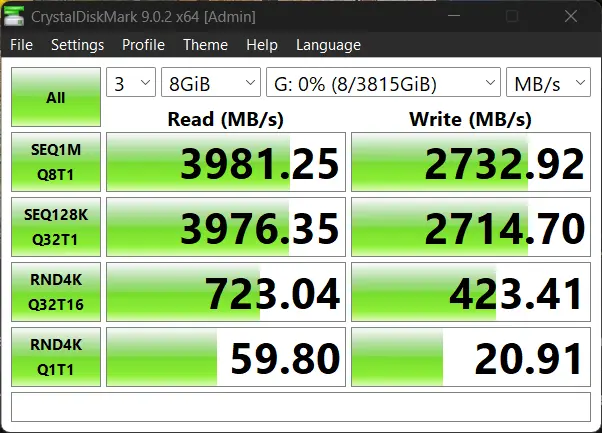
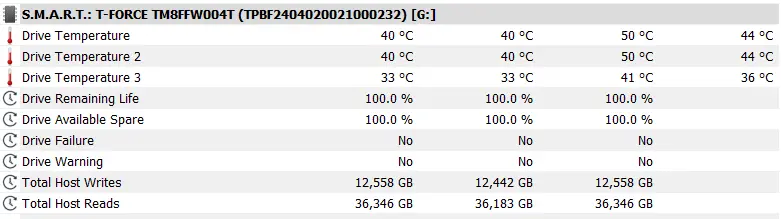
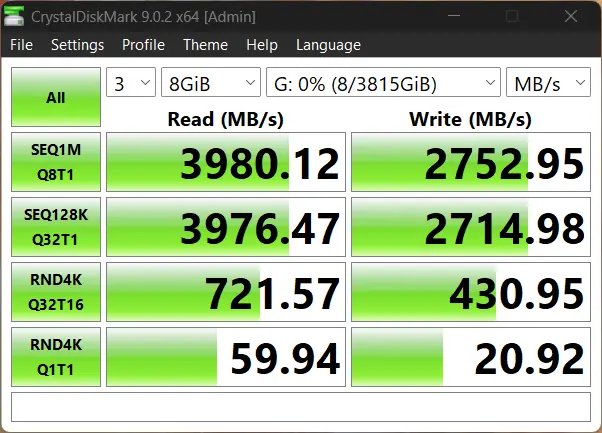
I ran CrystalDiskMark 9.0.2 in Windows 11 with the Maxidok attached to a Thunderbolt 5 port three times with an 8GB workload, and also recorded the disk temperature using HWiNFO. The enclosure never went above 41C with disk averages of 44C showing off how great the heat sink and thermal pad was performing.
Although the product page touts 120Gbps and PCIe Gen4x4 speeds, I was only able to get a maximum speed of PCIe Gen3x4 with our MP44Q 4TB NVMe. The sequential reads are a lot slower on this. The same SSD did perform at PCIe Gen4x4 speeds using the same Thunderbolt 5 cable in the aforementioned TerraMaster D1 SSD Pro, so we can rule out any possible issues with the cable or SSD.
AS SSD
I also did a run of AS SSD and the performance figures confirm what we"re seeing with CrystalDiskMark. Again the sequential read speed is much slower on the UGREEN Maxidok.
Next we test gaming and how the enclosure can affect it.
Storage
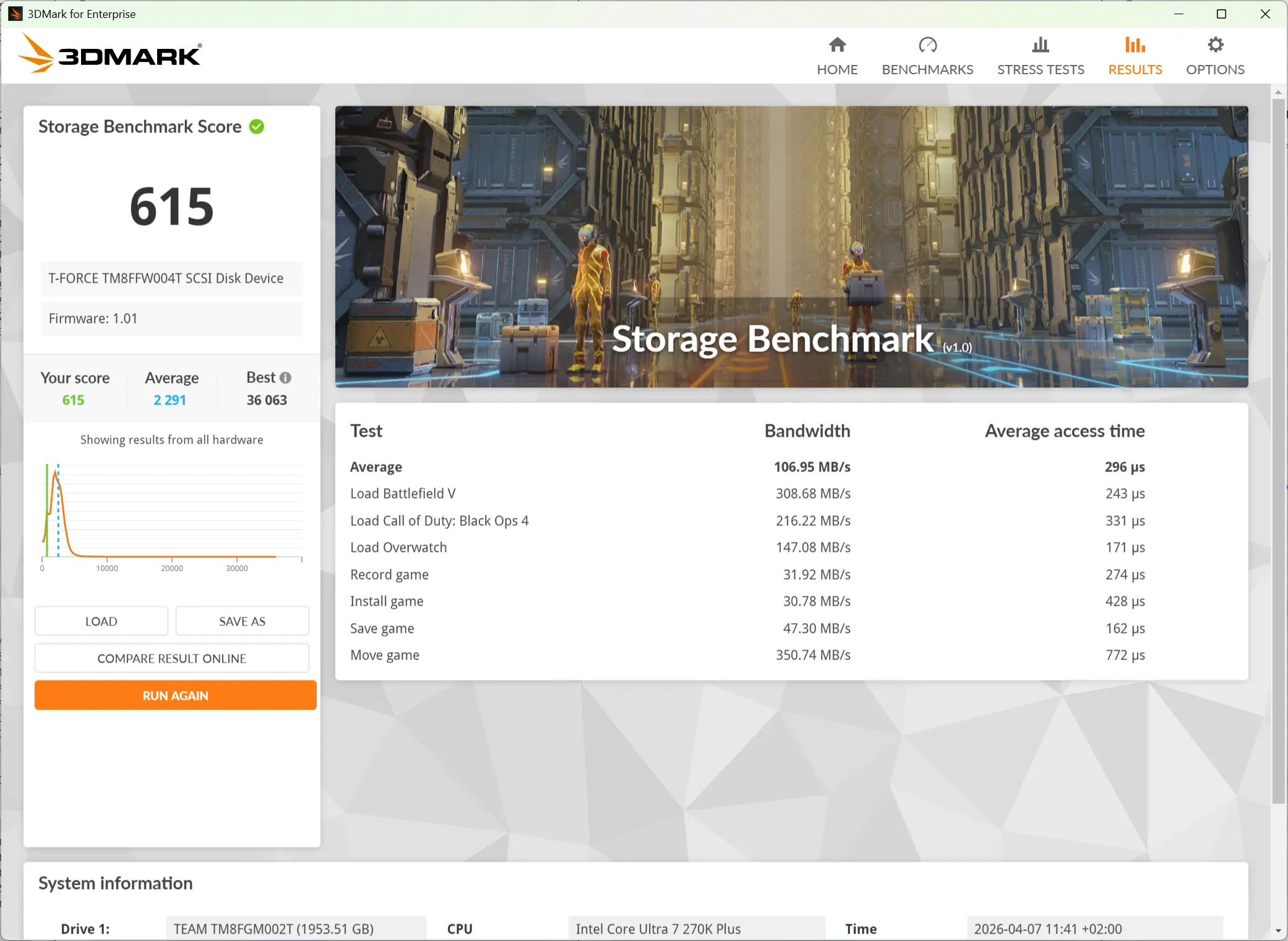
I ran the Storage Benchmark from the 3DMark suite. This is a feature test that measures the impact of the storage disk on the various gameplay actions. It comprises game file copying/moving, installing, loading, 1080p60 OBS gameplay recording, and saving.
As you can see in the data above, the Maxidok does well in all the areas above with the best showing in the "Move Game" test as it reached nearly ~1242 MB/s. There were several differences we noticed between the D1 Pro and the Maxidok. While the latter came was faster in our game load tests, the former was much better at other things like game installations, game saves, and recordings. Regardless, this should not lead to any issues in typical everyday scenarios.
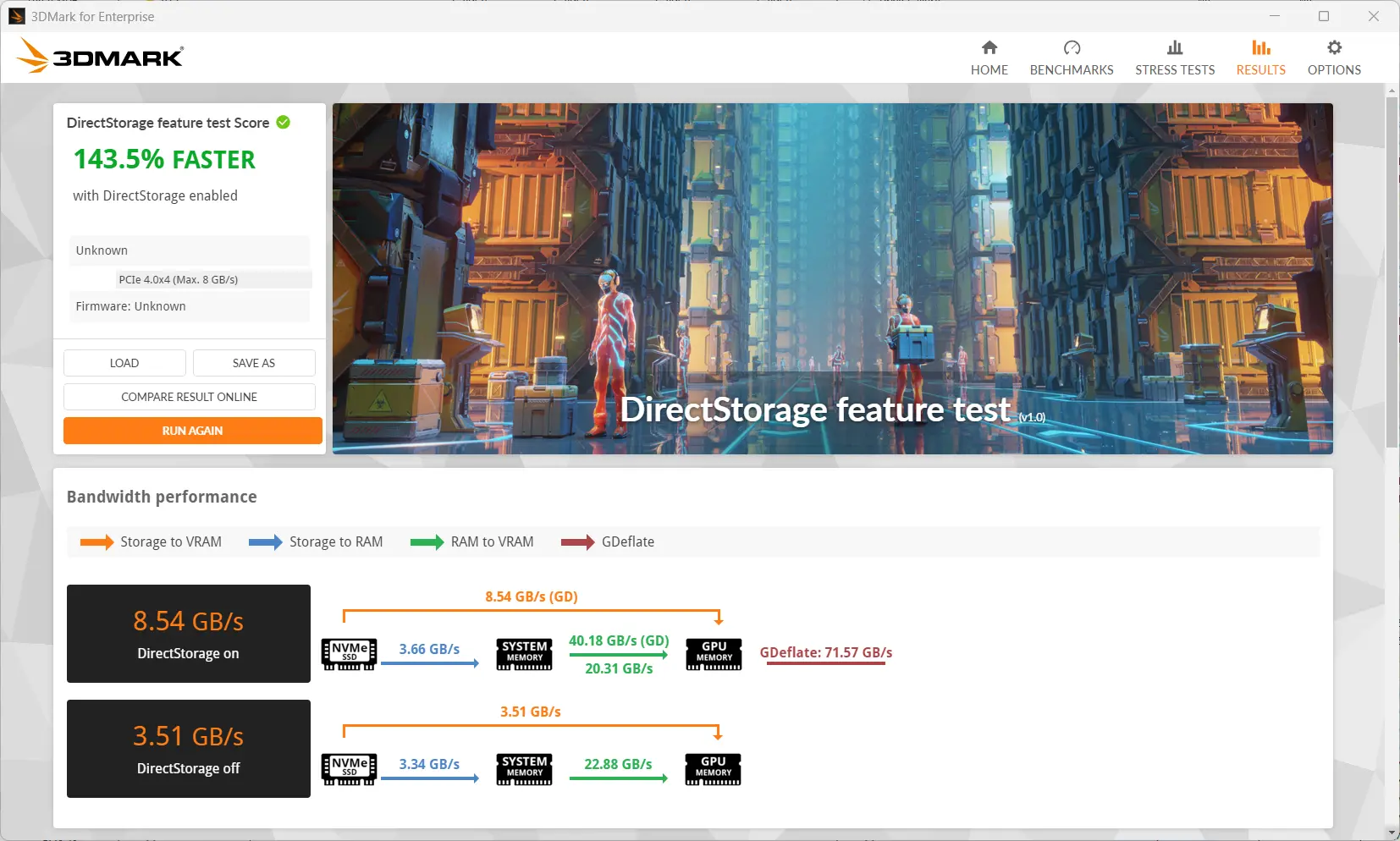
Our final synthetic benchmark was the DirectStorage feature test that measures game data transfer speed with and without DirectStorage. The DirectStorage feature allows faster data movement during gaming by removing as much of the OS overhead as possible, and this leads to faster game asset loading that, in turn, helps to improve the overall gaming experience.
The test clearly shows a huge boost in throughput (more than double) with DirectStorage enabled. While that is indeed great, DirectStorage is very much game-dependent, and so the title itself has to support the feature, and unfortunately, its adoption so far has been very limited.
Gaming
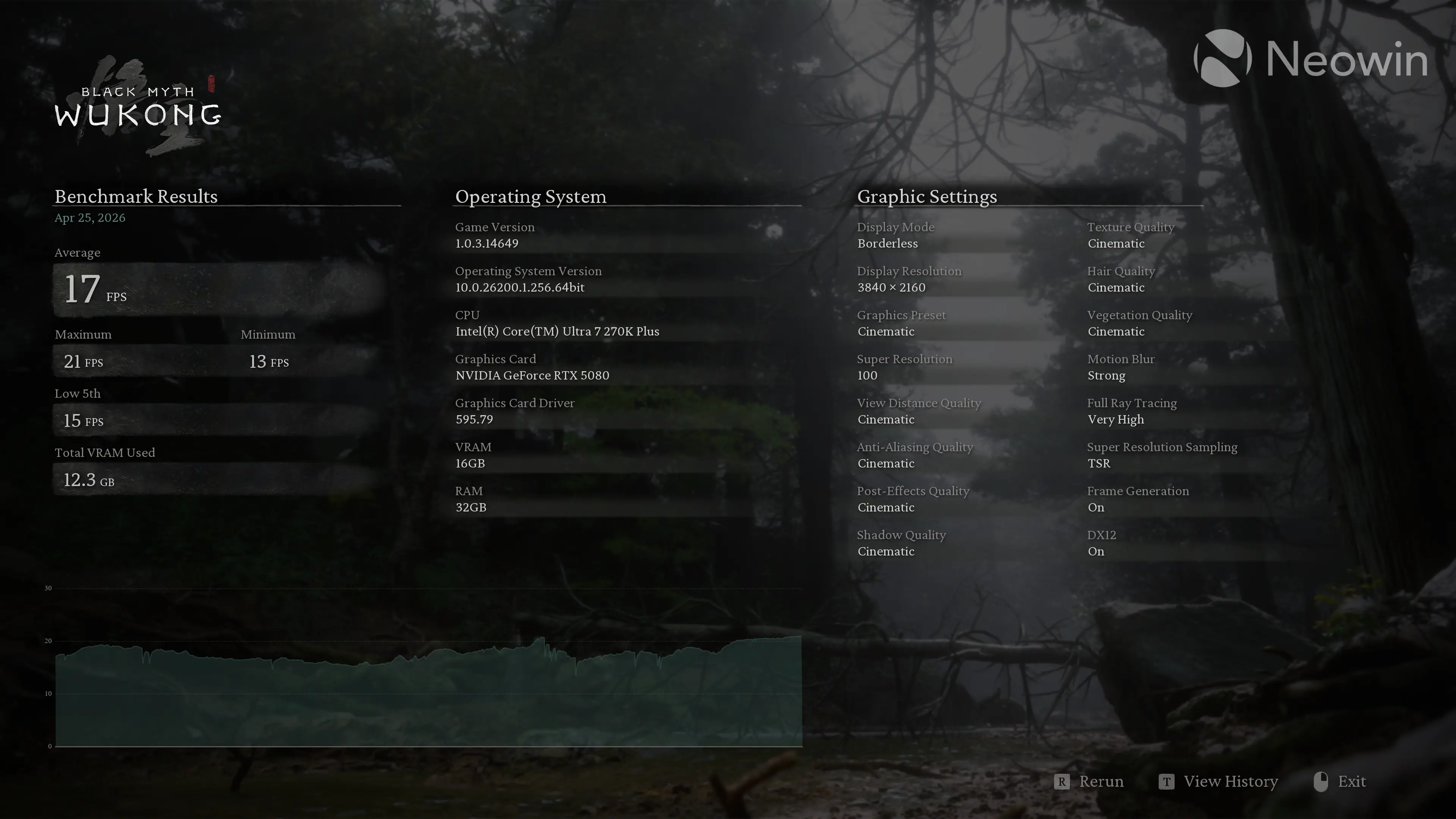
Real world gaming, you say? Yes. I decided we needed another testing scenario, so I fired up Steam and added a new library location pointing to the Maxidok. Then I moved Black Myth: Wukong to it, which utilizes high-quality textures heavily, especially in its character models and environment details.
With TSR ON and Super Resolution set to 100, at 4K screen resolution, the title saw the Maxidok hit nearly 13.5 GB of dedicated VRAM usage on the PNY RTX 5080. Exceeding the available 16GB buffer would have put additional strain on the SSD, though it"s worth noting that the scenario is not realistic as we tested these at settings which are unplayable in real-life for most people, as the framerate averaged 17 FPS. This was more of an academic exercise.
Interestingly, the average GPU memory controller load today was much higher at ~27% compared to ~20.5% on the D1 SSD Pro. Perhaps this indicates lower data transfer efficiency on the UGREEN Maxidok.
During our Black Myth: Wukong benchmark testing, the temperature of the T-FORCE MP44Q did not exceed 40°C.
It"s not the cable reducing Thunderbolt 5 speeds
I also tried the shortest Thunderbolt 5 cable I have that got shipped with the TerraMaster D1 SSD Pro (20 cm) which is not only impractical, but also returned the same results over a CrystalDiskMark benchmark.
Laptop use
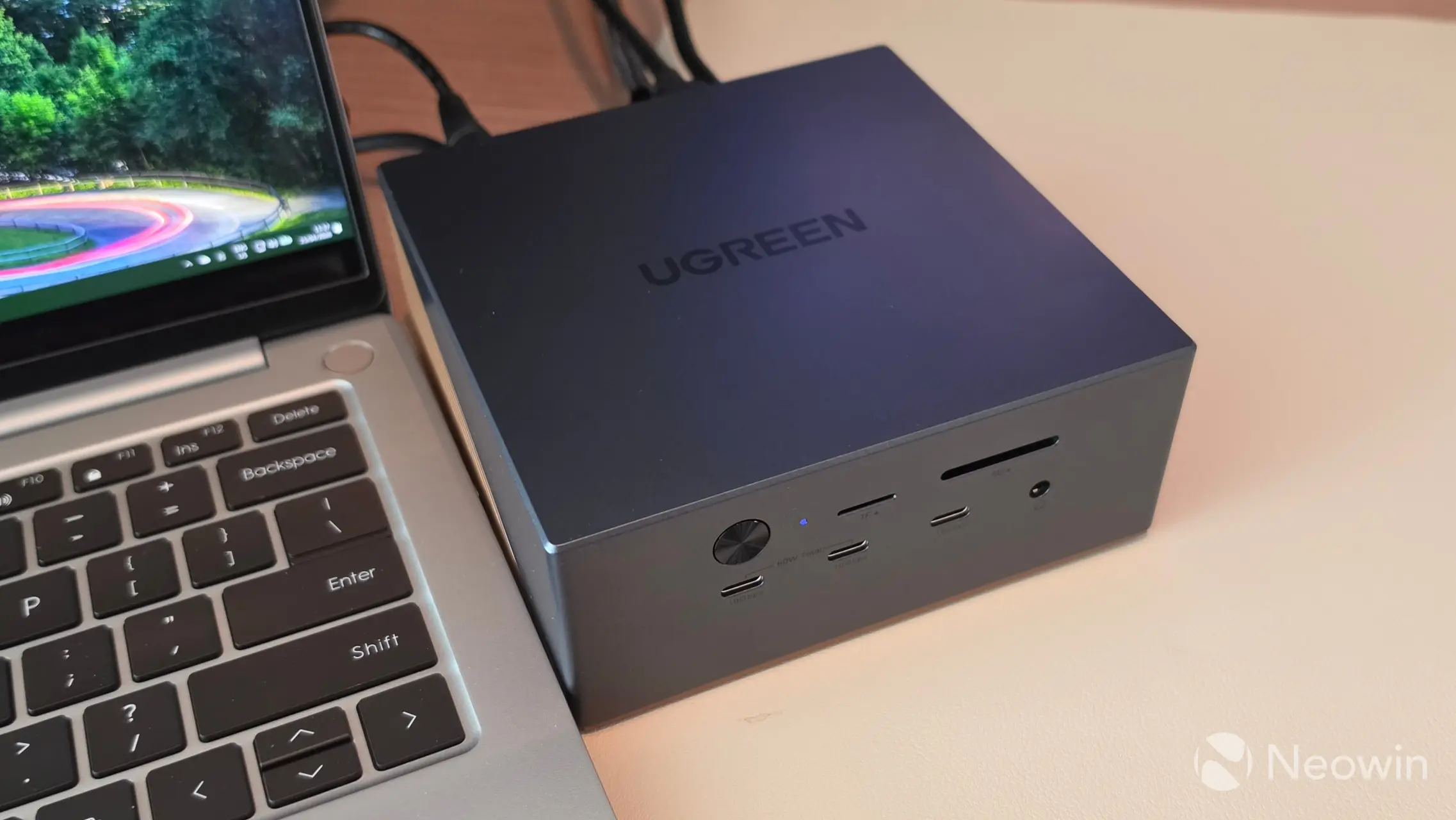
Yes, so now that we have tested the Thunderbolt 5 capabilities of the Maxidok, we now come to where this thing is actually designed for, hooking up to a laptop.
For my testing, I used the GEEKOM X14 Pro laptop that I reviewed back in February, and also because it includes a 40Gbps USB4 port at Thunderbolt 4 speeds.
| CrystalDiskMark | ||
|---|---|---|
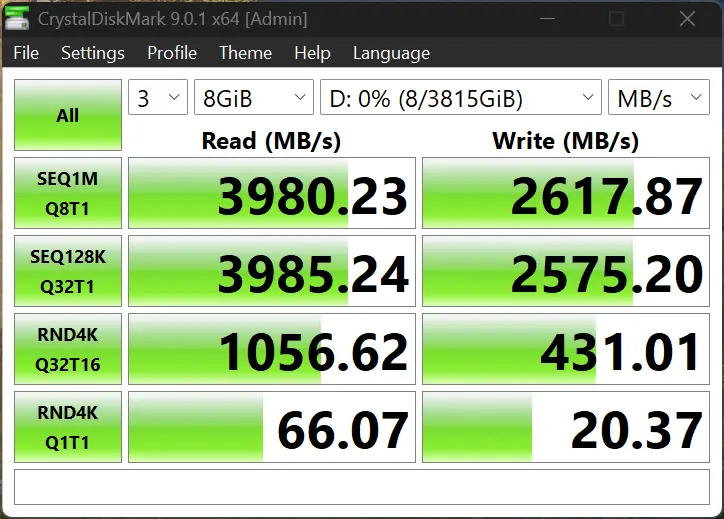
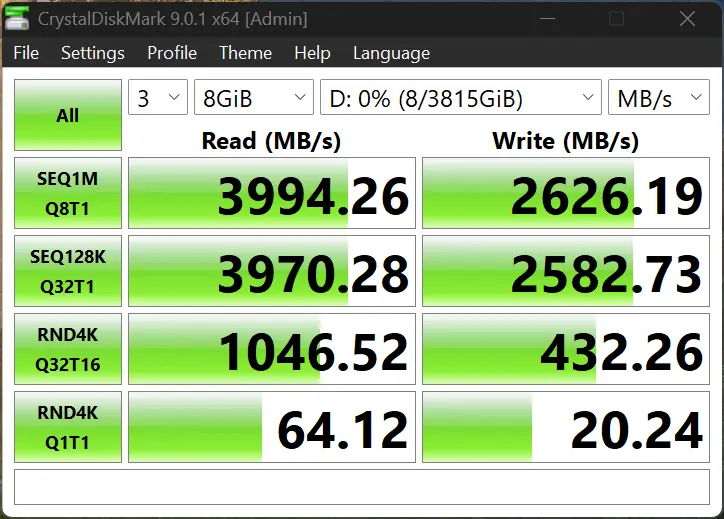
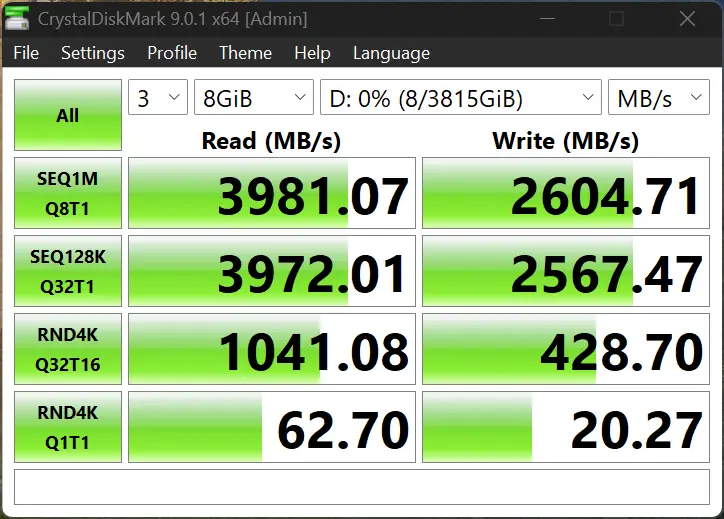
Interestingly, the CrystalDiskMark test fared better here than with the same test over Thunderbolt 5 on the test PC, reaching a maximum 3994.26 MB/s read, but with a slightly worse write speed of 2626.19 MB/s. Random 4K reads also did far better at 1056.62 MB/s (compared to 730.03 MB/s) with writes only slightly lower.
Next, I did a local file transfer over my 10 GbE LAN between the Maxidok and my NAS and achieved a maximum speed of 156 MB/s, which translates to ~1.22 Gbps, and is just under half the 2.5GbE port of the Maxidok.
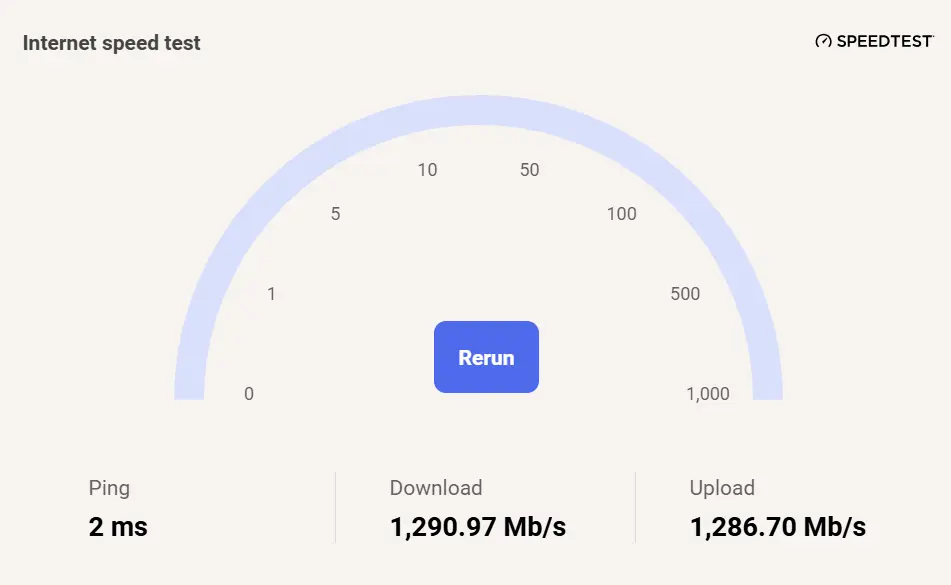
Next, I ran the Windows 11 linked Internet speed test, which we wrote about a few days ago, and this pretty much confirmed the file copy test with the Internet speed test maxing out at 1,290.97 Mb/s over my 4 Gbit connection, and is only slightly higher than the file copy speed. It"s important to note that everything is going through that one host cable, but even so it should theoretically support up to 40 Gbps, so I am not sure why it is so much lower than the 2.5 GbE"s rated port.
I didn"t have a TF or SD 4.0 card handy to test that function, but I think it goes without saying that these ports are well under the speeds of Thunderbolt 4, or 5 and will work as expected, just like USB 3.2 Gen2 10Gbps ports would.
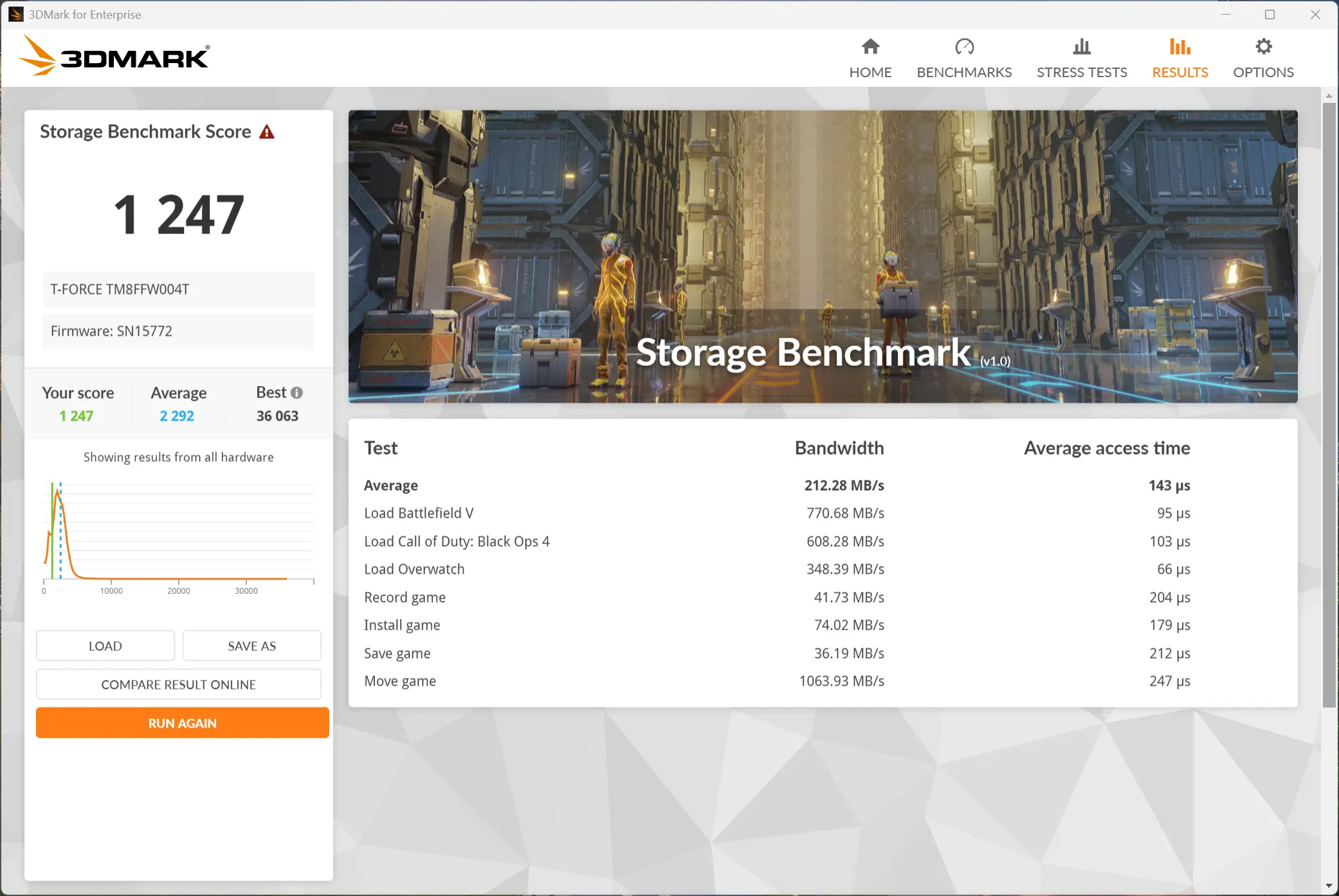
In addition, I ran the 3DMark Storage Benchmark, and as you can see in the data above, the Maxidok is acceptable in all the areas above with the best showing in the "Move Game" test as it reached 1063.93 MB/s. The data transfer rates were significantly slower but again it won"t adversely affect users in typical gaming scenarios.
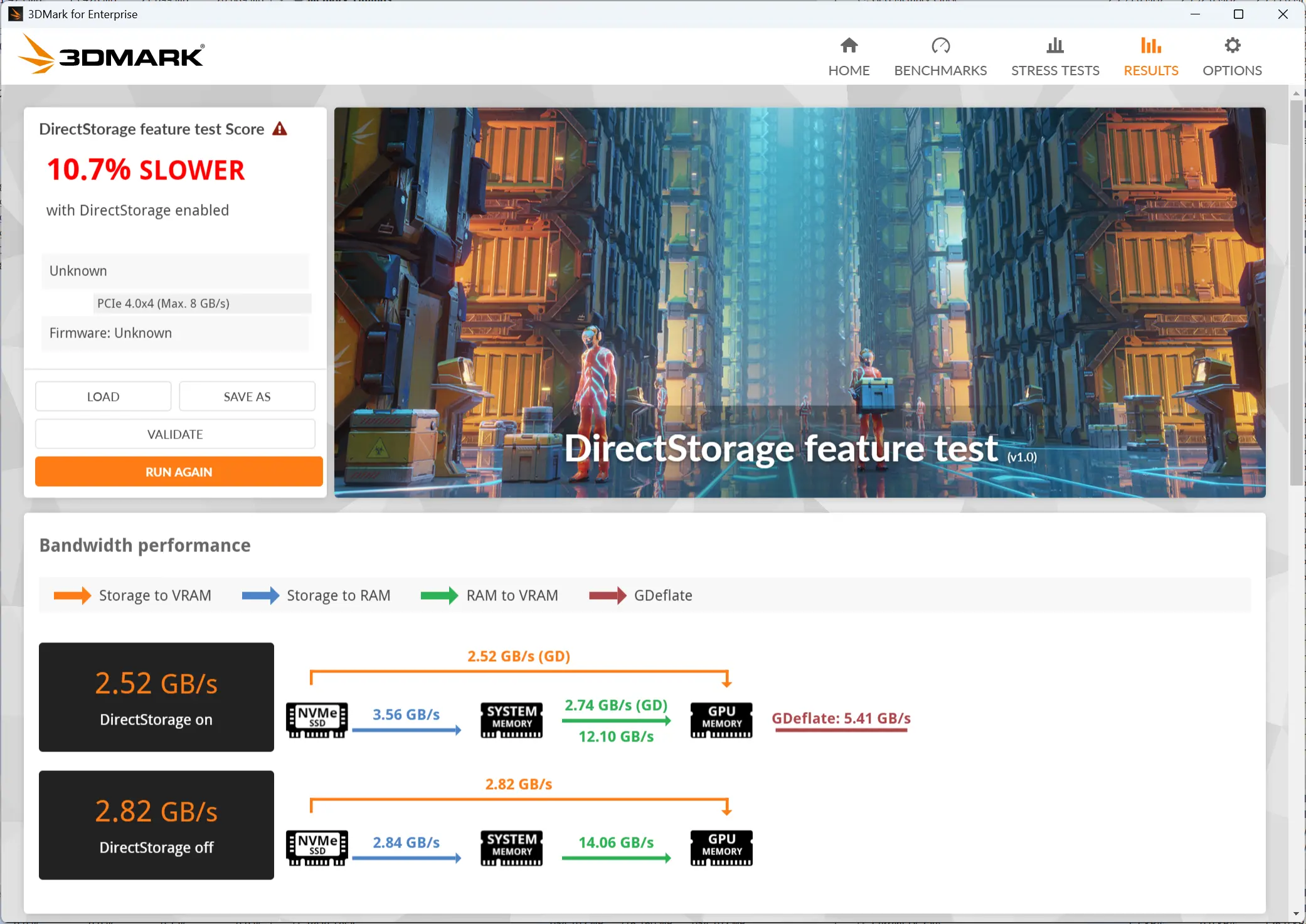
Our final synthetic benchmark on the laptop was the DirectStorage feature test that measures game data transfer speed with and without DirectStorage. The DirectStorage feature allows faster data movement during gaming by removing as much of the OS overhead as possible, and this leads to faster game asset loading that, in turn, helps to improve the overall gaming experience.
Surprisingly, we see a significant regression in this case in the DirectStorage test. We expected a better showing here as we thought a technology like DirectStorage should help a resource-strained system like this laptop (say); however that wasn"t the case.
Gaming
The GEEKOM X14 Pro doesn"t have a strong enough iGPU to really test the gaming aspect of the Maxidok, for that you would want to have a laptop with a dedicated Nvidia or AMD GPU on board, which is what I feel this Maxidok is targeted toward.
Conclusion
This most definitely has a specific use case, first of all it only makes sense to purchase this if you"re future-proofing, or the device you are connecting it to already supports Thunderbolt 5, because that aspect of the Maxidok adds to the higher pricing in comparison to Thunderbolt 4 docks, (but not by much) and only if you can find a decent all-in-one with the M.2 option. In addition, this would really only appeal to expanding connectivity of a laptop, which is probably why UGREEN went with a DisplayPort instead of HDMI which is almost always included in modern laptops.
The Maxidok isn"t cheap at an MSRP of $499.99, but as we"ve come to expect from many Chinese brands, the MSRP really seems to be a "here"s what we could ask" price, while launching it significantly cheaper, as is the case here.
I do like the Maxidok, although I wasn"t happy that the included cable didn"t work over Thunderbolt 5, or that the PCIe Gen4x4 M.2 slot did not live up to the advertised speeds, although even at the PCIe Gen3x4 speeds that I measured, it is acceptable as an external host of your Steam library or game data which also means it can greatly expand the storage option, and LAN speed of a laptop.
In addition, my testing of the 2.5GbE port did not even exceed the Wi-Fi 6E speeds (theoretical 1.2-2.4 Gbps) of just using a decent Wi-Fi, and that"s before you learn that most modern laptops are now shipping with Wi-Fi 7 that can achieve double the Maxidok"s rated port at around 5 Gbps. That sadly means that the LAN port becomes largely redundant, unless you have really poor Wi-Fi and rely on a wired connection.
Where to buy
Although the Maxidok"s MSRP is $499.99, it is already available for quite a bit cheaper (up to 22% off) through the Amazon links below.
- UGREEN Revodok Maxidok 17-in-1 for $389.99 on Amazon US (22% off)
- UGREEN Revodok Maxidok 17-in-1 for £356.98 on Amazon UK (15% off)
- UGREEN Revodok Maxidok 17-in-1 for €419.99 on Amazon DE (with €40 in-page coupon)
As an Amazon Associate, we earn from qualifying purchases.