Microsoft is finishing this week with two new Windows 11 preview builds. One is available in the Dev Channel (26200.5733), and one in the Beta Channel (26120.5733). Both share the same changelog with a new feature for File Explorer, fixes for Start menu crashes, and more.
Here is the changelog:
[File Explorer]
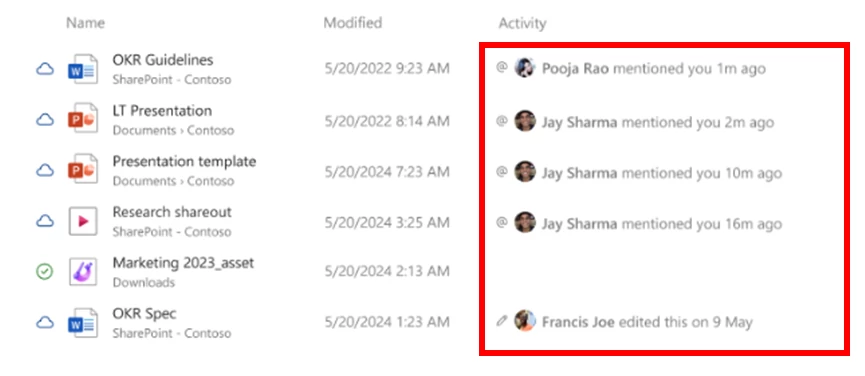
- For Windows Insiders signed in with a work or school account (Entra ID), File Explorer will begin showing people icons under the “Activity” column on File Explorer Home and on “Recommended” at the top of File Explorer Home. When you hover or click over a people icon, it will display the Live Persona Card for that person from Microsoft 365.
[Settings]
- We are removing the “Manage or clear your Bing search history” entry from Settings > Privacy & security > Search under Search history. You can manage your Bing search history directly through the Privacy dashboard, accessible via the Privacy resources link under Related settings on that settings page.
[Start menu]
- Fixed an issue which was causing the Start menu to crash for some Insiders in the last couple builds.
[Taskbar & System Tray]
- Fixed an issue where If you accidentally clicked down and slid your mouse on the taskbar preview thumbnail, clicking it would stop working.
[Lock screen]
- Fixed an underlying crash which could result in widgets on the lock screen not displaying in the last couple builds – you also couldn’t add new ones.
[Input]
- Fixed an issue in the previous flight which was leading to multi-finger touchpad gestures not working in the previous flight.
Here is the list of known bugs:
[General]
- Some Windows Insiders may experience a rollback trying to install this update with a 0x80070005 in Windows Update. We’re working on a fix for Windows Insiders impacted. If you are impacted, using Settings > System > Recovery > “Fix issues using Windows update” may resolve the issue.
- [NEW] We’re working on the fix for an underlying issue with dao360.dll resulting in some apps crashing after the previous flight.
[Start menu]
- [NEW] For Insiders with the new Start menu, you may unexpectedly see a category generated for every letter of the alphabet with blank icons, when opening the Start menu in the “All” section after updating to this build. Switching to a different view and then switching back should resolve the issue.
[File Explorer]
- [NEW] In dark mode, the red color used for a low space drive in This PC may be unexpectedly light colored in this build. Some of the other colors may also be incorrect, including that black is used for space remaining instead of a more visible color.
[Click to Do (Preview)] The following known issues will be fixed in future updates to Windows Insiders:
- Windows Insiders on AMD or Intel®-powered Copilot+ PCs may experience long wait times on the first attempt to perform intelligent text actions in Click to Do after a new build or model update.
[Live Captions]
- Live captions may crash when attempting to use live translation on a Copilot+ PC.
[Xbox Controllers]
- Some Insiders are experiencing an issue where using their Xbox Controller via Bluetooth is causing their PC to bugcheck. Here is how to resolve the issue. Open Device Manager by searching for it via the search box on your taskbar. Once Device Manager is open, click on “View” and then “Devices by Driver”. Find the driver named “oemXXX.inf (XboxGameControllerDriver.inf)” where the “***” will be a specific number on your PC. Right-click on that driver and click “Uninstall”.