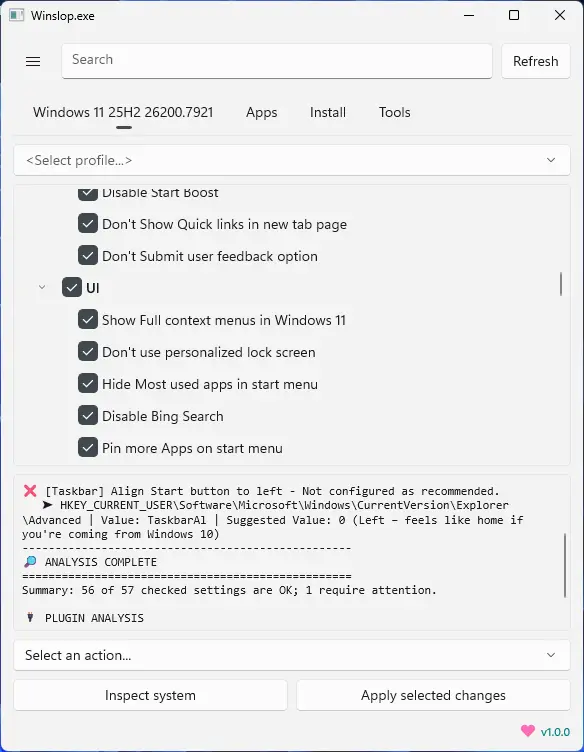
Winslop, developed by the creator of Flyoobe, is a lightweight Windows utility that removes unnecessary system slop, reduces bloat, and restores full user control. A focused, local fork of CrapFixer, Winslop shows exactly what changes will occur, allowing users to review and revert actions. It works entirely offline, with no AI, cloud, or telemetry. Perfect for users who want a cleaner, transparent, and minimal Windows experience, Winslop simplifies system maintenance, optimizes performance, and eliminates forced, opaque, or redundant features while keeping Windows itself intact.
Winslop key features:
- Removes system slop – eliminates unnecessary or redundant Windows components.
- Reduces bloatware – optimizes resource usage for faster performance.
- Full user control – all changes are transparent, reviewable, and reversible.
- Local and offline operation – no AI, cloud, or telemetry involved.
- Deterministic behavior – predictable, consistent, and safe modifications.
- Fork of CrapFixer – smaller, focused, and easier to maintain codebase.
- Improves system performance – reduces overhead and unnecessary processes.
- Targeted optimization – only removes opaque, forced, or optional slop.
- Visibility of changes – shows exactly what will be modified before applying.
- Lightweight tool – minimal footprint, no unnecessary layers or assistants.
Winslop 26.03.155 changelog:
- [NEW] Search is now hidden by default. Just click the magnifying glass in the title bar to show it whenever you need it
- [NEW] Support menu: share Winslop with friends via the native Windows share dialog as it opens straight from the Support button in the sidebar
- [IMPROVED] Settings page got a fresh look with cleaner, wider cards
- [IMPROVED] Extensions section now shows Plugins, Tools and Winslop Legacy as separate entries with quick-launch buttons
- [IMPROVED] Quick access to Winslop Legacy added to launch the classic version straight from Settings
- [IMPROVED] App info and compatibility details are now neatly tucked away under the About section
- [FIXED] Scrollbar in Settings no longer covered part of the content
- [FIXED, CRITICAL] App installs from the Install page were sometimes interrupted by a winget prompt. Added --source winget to prevent multi-source conflict prompt during install and upgrade
- [IMPROVED] First-time notice about the WinUI 3 rebuild is now a small banner you can dismiss, so no more popup
- [IMPROVED] Internal app folders renamed for consistency, there is no user action needed
- [ADDED] Add zh-TW (Traditional Chinese, Taiwan) translation for WinUI 3
- [UPDATED] Updated localization and support for Chinese, French, Spanish, and Russian
Download: Winslop 26.03.155 | 43.3 MB (Open Source)
View: Winslop Website | Screenshot