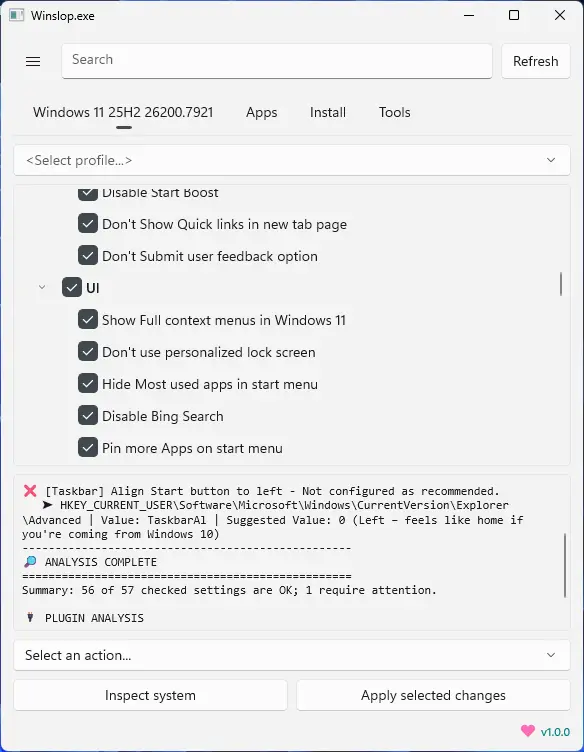
Winslopr, developed by the creator of Flyoobe, is a lightweight Windows utility that removes unnecessary system slop, reduces bloat, and restores full user control. A focused, local fork of CrapFixer, Winslopr shows exactly what changes will occur, allowing users to review and revert actions. It works entirely offline, with no AI, cloud, or telemetry. Perfect for users who want a cleaner, transparent, and minimal Windows experience, Winslopr simplifies system maintenance, optimizes performance, and eliminates forced, opaque, or redundant features while keeping Windows itself intact.
Winslopr key features:
- Removes system slop – eliminates unnecessary or redundant Windows components.
- Reduces bloatware – optimizes resource usage for faster performance.
- Full user control – all changes are transparent, reviewable, and reversible.
- Local and offline operation – no AI, cloud, or telemetry involved.
- Deterministic behavior – predictable, consistent, and safe modifications.
- Fork of CrapFixer – smaller, focused, and easier to maintain codebase.
- Improves system performance – reduces overhead and unnecessary processes.
- Targeted optimization – only removes opaque, forced, or optional slop.
- Visibility of changes – shows exactly what will be modified before applying.
- Lightweight tool – minimal footprint, no unnecessary layers or assistants.
Winslopr 26.04.02 changelog:
- [NEW] Compact Spacing Mode. Because WinUI 3 has a talent for turning pixels into margins, Winslopr now brings back a denser, more compact layout, especially nice for users coming from the old WinForms version. Same modern WinUI 3 base, less UI bloat
- [New] Friendly Tools Detection Winslopr now checks your Plugins / Scripts folders on startup and greets any familiar faces, W11Debloat, Chris Titus WinUtil, and more. They play well together. Winslopr doesn"t try to do everything. For the gaps, these tools have your back
- [Improved] Works best on Windows 11 25H2 Verified and tested. Older builds still work, but 25H2 is where it shines
- [Fix] Icons missing on Windows 10 Segoe Fluent Icons is a Windows 11 exclusive. On Windows 10 all icons showed up as empty boxes, not great. Fixed with a proper font fallback to Segoe MDL2 Assets #75
- [Improved] Cleaner UI layout Toolbar controls (filters, profile picker) are now inside the content Card where they belong
- [Added] Turkish language support tr-TR is now part of the family. Settings > Language.
Download: Winslopr 26.04.02 | 43.3 MB (Open Source)
View: Winslopr Website | Screenshot