Writing formulas in Microsoft Excel requires specialized skills and is time-consuming even for experts. This involves getting the syntax correct, using the right function, referencing the correct cells, and more. Typically, users spend time on the web to look for samples and correct their mistakes.
To solve the above problems, Microsoft is introducing a new Copilot feature in Excel called formula completion. Thanks to the power of state-of-the-art AI models, formula completion can suggest and auto-complete formulas as soon as users type “=”.
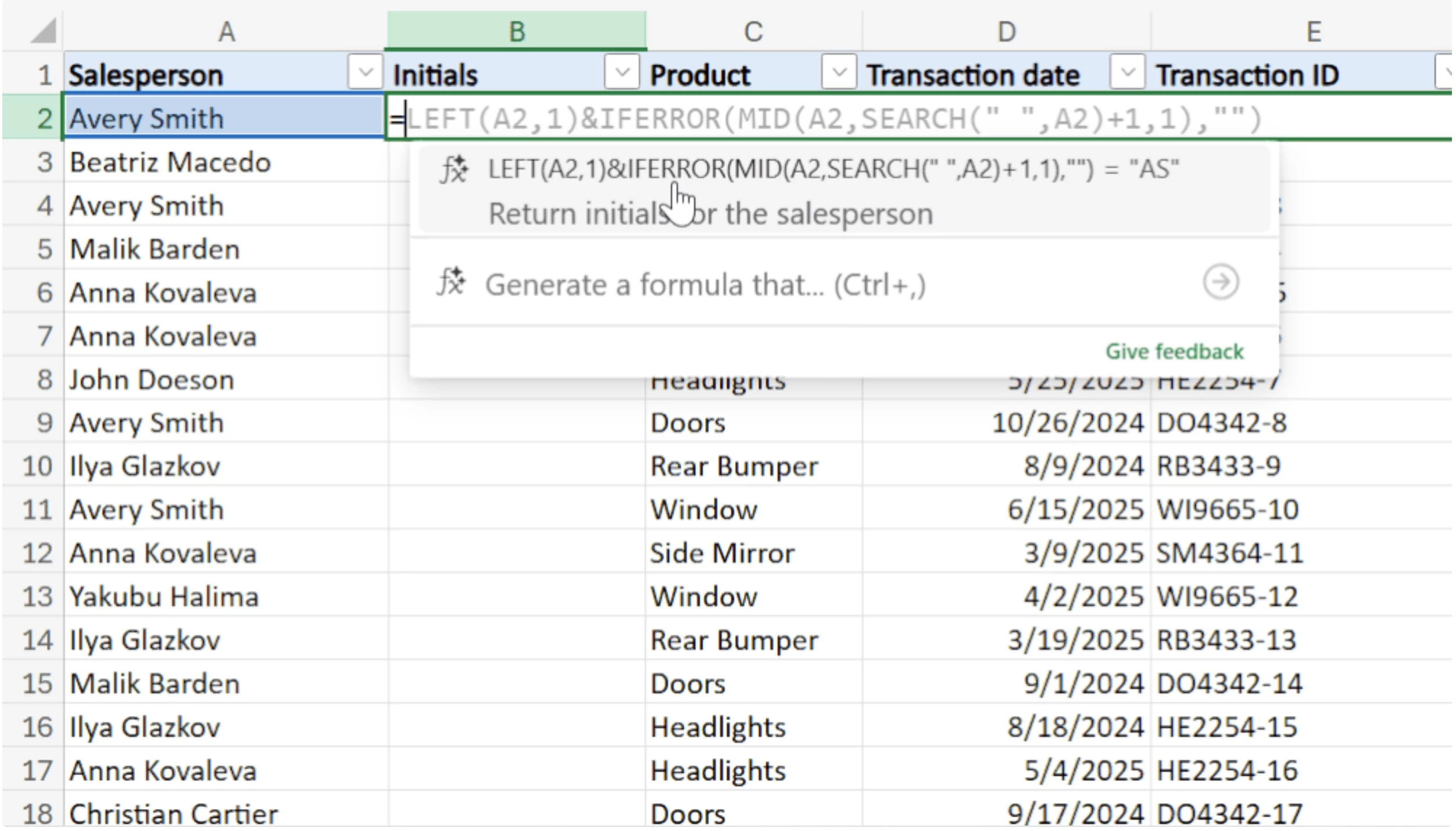
Here"s how the feature works:
- Suggestions: As soon as users type “=” in a cell, Copilot analyzes the context of the workbook using headers, nearby cells, formulas, and tables, and suggests a formula suggestion. Along with the suggestion, users will also get a preview of the result and a short textual description of the formula’s intent.
- Auto-completion: As users start typing more characters after "=", Copilot will update its suggestions in real time until an appropriate match is found.
Right now, this new formula completion feature cannot offer suggestions for formulas that reference data from other worksheets. However, Microsoft may support this feature via updates. Microsoft provided the following tips to make the most of formula completion:
- If you type “=” and nothing appears right away, just wait a few seconds—Copilot’s suggestions may take a moment to load. It’s worth the wait! As Copilot generates the formula, a progress indicator will be displayed along the lower border of the cell.
- Formula completion works best when there are clear labels/headers that help clarify the required context. Adding descriptive labels in the header or nearby cells greatly assists the process.
- Struggling to find the correct formula? Try refining the context and including additional details in adjacent cells or headers for better results.
- Feeling that "=" doesn’t give you the expected formula? Begin typing additional characters, and formula completion will offer suggestions that correspond to your input.
This new formula completion feature is now rolling out for Copilot users on Excel for the web for US-English only. It will also be coming to Excel Desktop with support for additional languages in the future.