.jpg)
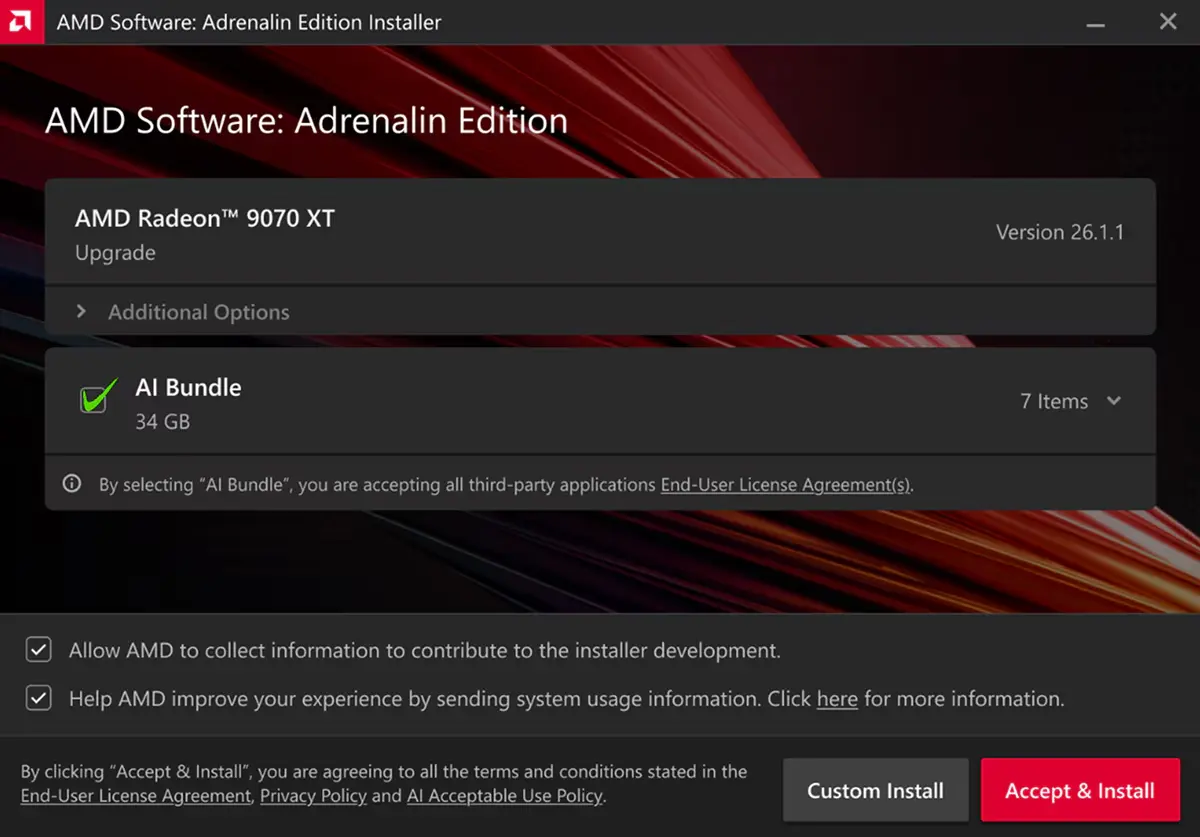
AMD today has released the first Windows graphics driver for 2026 and the update brings a very cool new feature that many users will likely appreciate. The company has added a check box to the installation options that will allow users to opt out of AI features with just one click.
AMD has explained in a new blog post about its new "AI Bundle" option that, as the name suggests, bundles all of the available AI driver features under that option. AMD explains that it contains PyTorch, ComfyUI, Ollama, LM Studio, and Amuse. Thus users who do not require AI optimization on their Radeon systems can save huge disk space, up to 34 GB, by simply unticking that AI Bundle checkbox.
Aside from that, the new driver also brings support for the recently released Ryzen AI 400 series APUs, as well as game support for Starsand Island, and Avatar: Frontiers of Pandora™ - From the Ashes Edition.
The driver also fixes several bugs like visual corruption and other graphical glitches and more, including in games and other apps. The full changelog is given below:
- New Features
- Optional install of AI Bundle
- New Product Support
- New Game Support
- Starsand Island
- Avatar: Frontiers of Pandora™ - From the Ashes Edition
- Fixed Issues
- Some shadows may not render correctly while playing Call of Duty®: Black Ops 7 on some AMD Graphics Products on Radeon™ RX 5000 series and Radeon™ RX 6000 series graphics products.
- Texture corruption may be observed when playing Enshrouded while at the first “Elixir Well” location on Radeon™ RX 7000 series and Radeon™ RX 9000 series graphics products.
- Application may fail to launch while playing Diablo 4 with usernames containing non-english characters on Radeon™ RX 7000 series and Radeon™ RX 9000 series graphics products.
- Some lights may not render correctly while playing Microsoft Flight Simulator 2024 during nighttime scenes on Radeon™ RX 7000 series and Radeon™ RX 9000 series graphics products.
- Application crashes when using Unreal Engine 5.6 Editor with Lumen HWRT enabled on Radeon™ RX 5000, Radeon™ RX 6000, Radeon™ RX 7000 and Radeon™ RX 9000 series products.
- Intermittent visual corruption may be observed while navigating Chromium and Electron apps on Radeon™ RX 5000 series and Radeon™ RX 6000 series graphics products.
- Slow window resizing may be observed (related to vkAcquireNextImage extension) while developing games that use the Vulkan API on Radeon™ RX 7000 series and Radeon™ RX 9000 graphics products.
- Player sprites may not render correctly while playing Cassette Beasts on Radeon™ RX 7000 series and Radeon™ RX 9000 series graphics products.
- Artifact may appear when playing Baldur’s Gate 3 with TAA enabled on Radeon™ RX 5000 series and Radeon™ RX 6000 series graphics products. .
Finally, we have the issues that remain unresolved still:
-
Intermittent application crash or driver timeout may be observed while loading a saved game in Cyberpunk 2077 with Path Tracing enabled. AMD is actively working on a resolution with the developer to be released as soon as possible.
- Intermittent application crash or driver timeout may be observed while playing Battlefield™ 6 on AMD Ryzen AI 9 HX 370. AMD is actively working on a resolution with the developer to be released as soon as possible.
- Intermittent application crash or driver timeout may be observed while playing Roblox Player (Car Zone Racing & Drifting) when task switching between media on Radeon™ RX 7000 series products.
- Texture flickering or corruption may appear while playing Battlefield™ 6 with AMD Record and Stream on some AMD Graphics Products. .
You can download the new WHQL-certified Adrenalin 26.1.1 driver from AMD"s driver page here on the company"s official website.