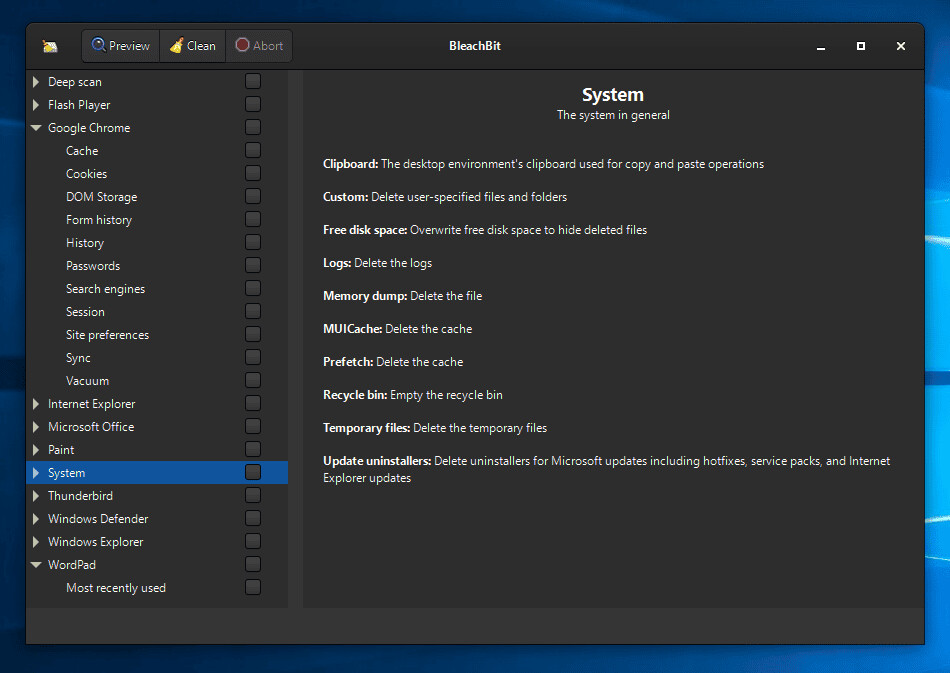
When your computer is getting full, BleachBit quickly frees disk space. When your information is only your business, BleachBit guards your privacy. With BleachBit you can free cache, delete cookies, clear Internet history, shred temporary files, delete logs, and discard junk you didn"t know was there.
Designed for Linux and Windows systems, it wipes clean thousands of applications including Firefox, Microsoft Edge, Google Chrome, Opera, Safari, and more. Beyond simply deleting files, BleachBit includes advanced features such as shredding files to prevent recovery, wiping free disk space to hide traces of files deleted by other applications, and vacuuming Firefox to make it faster. Better than free, BleachBit is open source.
BleachBit has many useful features:
- Delete your private files so completely that "even God can"t read them" according to South Carolina Representative Trey Gowdy.
- Simple operation: read the descriptions, check the boxes you want, click preview, and click delete.
- Multi-platform: Linux and Windows
- Free of charge and no money trail
- Free to share, learn, and modify (open source)
- No adware, spyware, malware, browser toolbars, or "value-added software"
- Translated to 64 languages besides American English
- Shred files to hide their contents and prevent data recovery
- Shred any file (such as a spreadsheet on your desktop)
- Overwrite free disk space to hide previously deleted files
- Portable app for Windows: run without installation
- Command line interface for scripting and automation
- CleanerML allows anyone to write a new cleaner using XML
- Automatically import and update winapp2.ini cleaner files (a separate download) giving Windows users access to 2500+ additional cleaners
- Frequent software updates with new features
Going beyond standard deletion of files, BleachBit has several advanced cleaners:
- Clear the memory and swap on Linux
- Delete broken shortcuts on Linux
- Delete the Firefox URL history without deleting the whole file—with optional shredding
- Delete Linux localizations: delete languages you don"t use. More powerful than localepurge and available on more Linux distributions.
- Clean APT for Debian, Ubuntu, Kubuntu, Xubuntu, and Linux Mint
- Find widely-scattered junk such as Thumbs.db and .DS_Store files.
- Execute yum clean for CentOS, Fedora, and Red Hat to remove cached package data
- Delete Windows registry keys—often where MRU (most recently used) lists are stored
- Delete the OpenOffice.org recent documents list without deleting the whole Common.xcu file
- Overwrite free disk space to hide previously files
- Vacuum Firefox, Google Chrome, Liferea, Thunderbird, and Yum databases: shrink files without removing data to save space and improve speed
- Surgically remove private information from .ini and JSON configuration files and SQLite3 databases without deleting the whole file
- Overwrite data in SQLite3 before deleting it to prevent recovery (optional)
BleachBit 5.1.2 Beta – Key Highlights:
Browser Cleaning Improvements
Chromium-based browsers:
- Expanded cleaning to include component cache, extension cache, Graphite Dawn cache, shader cache, DIPS, crash reports, code cache, media device salts, sessions, IndexedDB, reporting data, network state, search suggestions, saved files, plus improved handling for snap and Flatpak installs.
Chrome-based browsers:
- General cleaning enhancements.
- New cleaner: Vivaldi
- Added full support for cleaning the Vivaldi browser.
Firefox-family browsers:
- Improved cleaning for Mozilla Firefox, LibreWolf, and Waterfox, including storage, permissions, bounce tracking protection, site security state, alternate services, favicons, and session backups, plus better cache handling for snap and Flatpak.
Reorganized Site Data Options
- Unified and reorganized Site data sections for both Firefox-based and Chromium-based browsers.
- Improved clarity and descriptions for browser session and site data options.
User Interface & Usability
- Enhanced expert mode: clearer tree view and correct behavior when enabling the parent “deep scan” warning without auto-enabling children.
- Tooltip added for locked preferences.
- Better explanation of the cookie manager’s keep list.
Bug Fixes
- Fixed UnicodeEncodeError when displaying filenames with invalid surrogate characters.
- Resolved GUI deadlock triggered by malformed XML cleaners.
- Ensured shredding works for file paths pasted from the Windows clipboard.
- Improved application launch reliability for Chinese, Japanese, and Korean language users.
- Fixed font check dialog on Windows.
Windows-Specific Enhancements
- Added support in Winapp2.ini for excluding registry keys using ExcludeKey#=REG.
- Vacuuming added for WebStorage/QuotaManager databases in Brave, Microsoft Edge, and Opera.
Download: BleachBit 5.1.2 Beta | Portable | ~20.0 MB (Open Source)
View: BleachBit Home page | Screenshot