When your computer is getting full, BleachBit quickly frees disk space. When your information is only your business, BleachBit guards your privacy. With BleachBit you can free cache, delete cookies, clear Internet history, shred temporary files, delete logs, and discard junk you didn't know was there.
Designed for Linux and Windows systems, it wipes clean thousands of applications including Firefox, Microsoft Edge, Google Chrome, Opera, Safari, and more. Beyond simply deleting files, BleachBit includes advanced features such as shredding files to prevent recovery, wiping free disk space to hide traces of files deleted by other applications, and vacuuming Firefox to make it faster. Better than free, BleachBit is open source.
BleachBit has many useful features:
- Delete your private files so completely that "even God can't read them" according to South Carolina Representative Trey Gowdy.
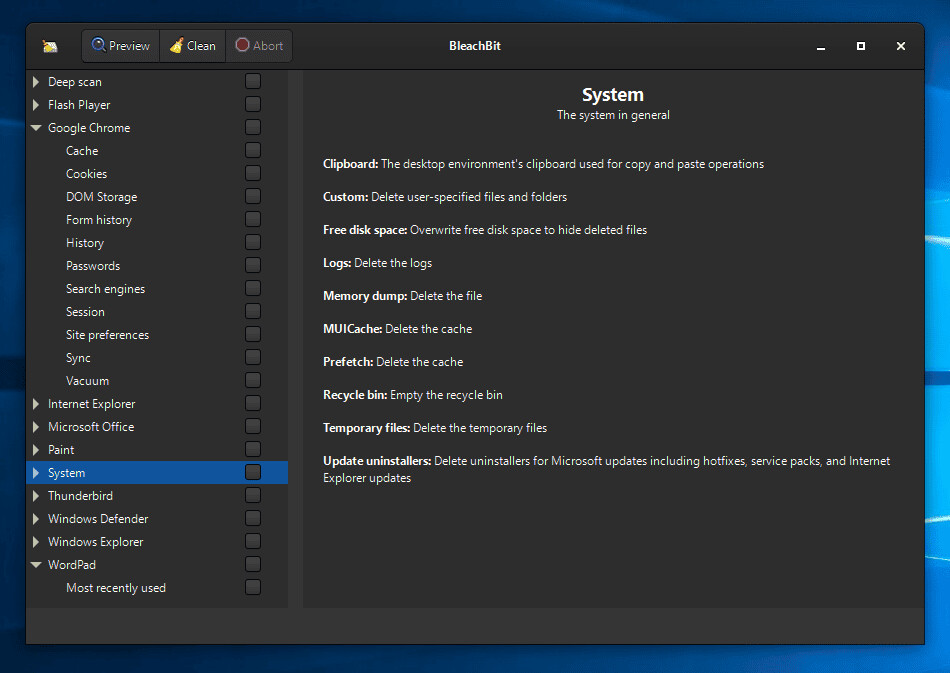
- Simple operation: read the descriptions, check the boxes you want, click preview, and click delete.
- Multi-platform: Linux and Windows
- Free of charge and no money trail
- Free to share, learn, and modify (open source)
- No adware, spyware, malware, browser toolbars, or "value-added software"
- Translated to 64 languages besides American English
- Shred files to hide their contents and prevent data recovery
- Shred any file (such as a spreadsheet on your desktop)
- Overwrite free disk space to hide previously deleted files
- Portable app for Windows: run without installation
- Command line interface for scripting and automation
- CleanerML allows anyone to write a new cleaner using XML
- Automatically import and update winapp2.ini cleaner files (a separate download) giving Windows users access to 2500+ additional cleaners
- Frequent software updates with new features
Going beyond standard deletion of files, BleachBit has several advanced cleaners:
- Clear the memory and swap on Linux
- Delete broken shortcuts on Linux
- Delete the Firefox URL history without deleting the whole file—with optional shredding
- Delete Linux localizations: delete languages you don't use. More powerful than localepurge and available on more Linux distributions.
- Clean APT for Debian, Ubuntu, Kubuntu, Xubuntu, and Linux Mint
- Find widely-scattered junk such as Thumbs.db and .DS_Store files.
- Execute yum clean for CentOS, Fedora, and Red Hat to remove cached package data
- Delete Windows registry keys—often where MRU (most recently used) lists are stored
- Delete the OpenOffice.org recent documents list without deleting the whole Common.xcu file
- Overwrite free disk space to hide previously files
- Vacuum Firefox, Google Chrome, Liferea, Thunderbird, and Yum databases: shrink files without removing data to save space and improve speed
- Surgically remove private information from .ini and JSON configuration files and SQLite3 databases without deleting the whole file
- Overwrite data in SQLite3 before deleting it to prevent recovery (optional)
BleachBit 6.0.0 release notes:
- BleachBit 6.0.0 marks the project’s most substantial release in years, introducing major new features, expanded browser cleaning capabilities, and a range of usability improvements. Notable additions include a new cookie manager, enhanced cleaning support for Chromium- and Firefox-based browsers, as well as new cleaners for Vivaldi and Zen. The update also delivers numerous interface refinements. Overall, the release reflects months of development, with more than 100 improvements and fixes implemented.
New Features / All Platforms
- Cookie manager: A new cookie manager lets you choose which cookies to keep when cleaning Chromium- and Firefox-based browsers.
- New browser support: Added cleaners for the Vivaldi and Zen web browsers.
- Deeper browser cleaning (Chromium-based, including Google Chrome): Now cleans component cache, extension cache, Graphite Dawn cache, shader cache, DIPS, crash reports, code cache, media device salts, reporting data, IndexedDB, network state, and search suggestions. Additional databases are vacuumed and cache handling is improved for snap and Flatpak installations.
- Deeper browser cleaning (Firefox, LibreWolf, Waterfox): Now cleans storage, permissions, bounce tracking protection, site security state, alternate services, favicons, and session backups. Cache handling is also improved for snap and Flatpak installations.
- Major improvements to Opera cleaning.
- Reorganized browser options: Firefox and Chromium-based browser options have been reorganized under a clearer "Site data" category.
- Improved session option descriptions for web browsers.
- Expert mode: A new expert mode option adds guardrails for less experienced users by restricting advanced operations. Users upgrading from versions older than 5.1.0 may need to enable expert mode to access all features that previously did not have guardrails.
- CLI negation support: The command-line interface now supports negation. See the CLI documentation for details.
- Paste paths from clipboard: Press Ctrl+V in the main window to paste files for shredding. Previously, only files copied from a file manager were accepted; now plain text paths (e.g., copied from Notepad) are also supported.
- Chaff improvements: Faster chaff generation, flexible stop conditions (file count, total size, free space percentage), a stop button, and a completion message. The UI no longer freezes while downloading chaff data.
New Features / Windows
- Deeper browser cookie cleaning: More cookie locations are now cleaned for Chromium and Brave on Windows, and a new cookie location is supported for Microsoft Edge.
- LibreOffice version 4 cleaning is now supported.
- Windows installer is now localized: The installer can be displayed in your language. If your language is not available, consider contributing a translation.
- Updated code signing timestamp protocol for the Windows installer and application: now using the RFC 3161 timestamp protocol with SHA-256, replacing the Authenticode protocol which used SHA-1.
- winreg search type for CleanerML: Allows cleaning apps installed in a path defined by a Windows registry key.
- Winapp2.ini: Added support for exclusion of registry keys (ExcludeKey#=REG), completing full support for the Winapp2.ini format.
- Friendly message when switching user profiles: When the application is started from a standard account and the user elevates privileges using a different account, a notification explains that cleaning user-specific paths (such as browser data) will only affect the elevated account. Tip: Declining the UAC dialog when prompted will run the application with standard permissions, which is a good choice when cleaning only your user profile, unless file overwriting is required.
- Add a warning for the "Update Uninstaller" option in the System cleaner.
- Context menu in Windows Explorer now loads BleachBit faster.
Bug Fixes
- Important fix: Do not follow directory junctions/symlinks in the Recycle Bin. This prevents unintended data loss.
- Fix: Read-only files were not properly deleted.
- Fix: "Access denied" error when getting the size of certain files.
- Fix: Treat "access denied" errors differently than "file locked by another process."
- Fix: Avoid crash when the SSLKEYLOGFILE environment variable is set.
- Fix: Avoid crash when run from a folder named bin or lib.
- Fix: Application icon appearance.
- Fix: Splash screen appearance is now a simpler design with just the logo and a transparent background.
- Fix: Error on first start with disconnected network drives.
- Fix: Poor contrast with Windows 10 theme.
- Workaround: A new dialog on first launch asks user whether they are experiencing blurry or unreadable fonts, and offers a workaround by switching the font rendering backend. The preference dialog has a new option for toggling the font rendering backend.
- Performance & Updates
- Improved speed of overwriting files when running with administrator privileges.
- Improved Windows update cleaning: services are stopped in fewer cases, and unneeded error messages are suppressed.
- Updated bundled libraries: Python 3.12 and GTK 3.24.51. [full release notes]
Download: BleachBit 6.0 | Portable | ~20.0 MB (Open Source)
View: BleachBit Home page | Screenshot
 Get alerted to all of our Software updates on Twitter at @NeowinSoftware













0 Comments
Load the comments and join the conversation!
Read the comments, ask the editors questions, show respect and join the conversation.