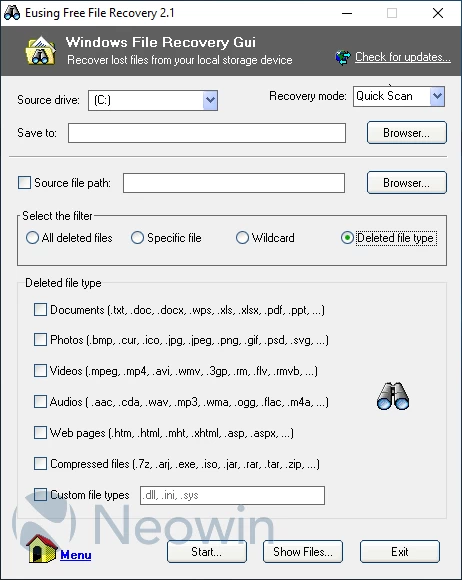
Eusing Free File Recovery makes it easy to find files you couldn’t recover from a backup. If something important went missing, this tool gives you another chance to get it back.
Microsoft has quietly released its own recovery tool in the Microsoft Store—Windows File Recovery—which can restore deleted files on Windows 10 and 11. It’s powerful, but it runs entirely from the command line, so many users may not even know it exists or may not feel comfortable using CMD. That’s where Eusing Free File Recovery comes in. It provides a friendly graphical interface for the same recovery engine, making it much easier for anyone who prefers clicking over typing command-line instructions.
Once launched, the software detects your drives automatically. Just choose the drive you want to scan and select a different drive where recovered files should be saved—you can’t save them back onto the same drive being scanned. The program will create a folder called Recovery_ on your destination drive and store everything there.
You can choose between Quick Scan and Deep Scan. Quick Scan is fast and often enough to find recently deleted files. If you still can’t locate what you need, switch to Deep Scan—it takes longer but digs much deeper. You can also search for a specific file by name, path, type, or even using wildcards.
Whether it"s a hard drive, SSD (with TRIM limitations), USB stick, or memory card, this tool gives you a simple, user-friendly way to recover the files you thought were gone for good.
Key Features:
- Easy-to-use GUI for Windows File Recovery: Enjoy a clear, friendly interface built on top of Microsoft’s command-line Windows File Recovery tool—no CMD needed.
- Beginner-friendly file recovery: Restore lost files on Windows 10 and 11 with a clean, simple layout that guides you through the process.
- Supports many file types: Recover photos, videos, documents, and more—helping ensure your important data isn’t lost forever.
- Works across multiple devices: Retrieve deleted files from SSDs, HDDs, USB drives, and memory cards on Windows 10 and 11, supporting NTFS, FAT, and exFAT.
- Safe and clean: 100% spyware-free, with no adware, viruses, or unwanted software included.
Download: Eusing Free File Recovery 2.1.0.0 | 1.3 MB (Freeware)
Download: Portable Eusing Free File Recovery | 774 KB
View: Eusing Free File Recovery Home Page | Screenshot