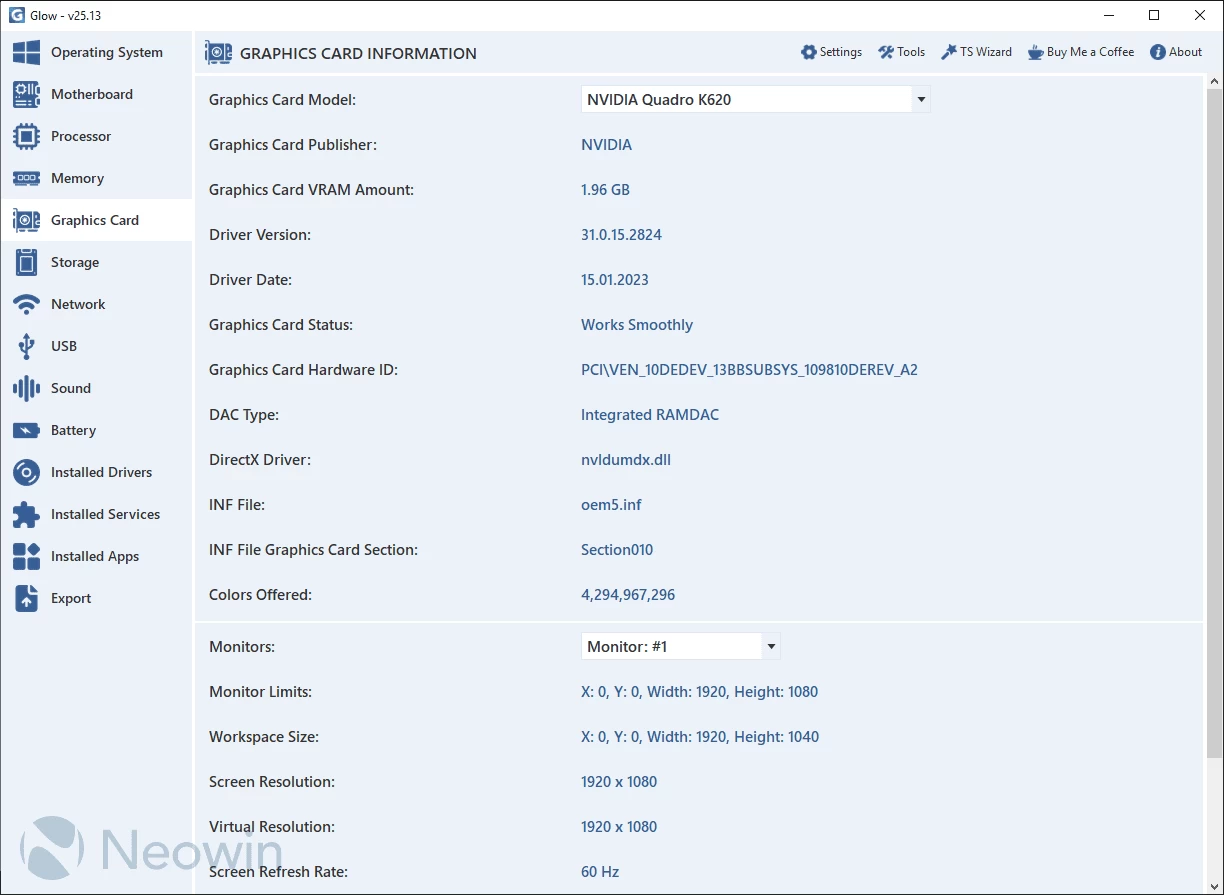
Glow provides detailed reporting on every hardware component in your computer, saving you valuable time typically spent searching for CPU, motherboard, RAM, graphics card, and other stats. With Glow, all the information is conveniently presented in one clean interface, allowing you to easily access and review the comprehensive hardware details of your system.
Glow provides detailed information on various system aspects, including OS, motherboard, processor, memory, graphics card, storage, network, battery, drivers, and services. The well-organized format ensures easy access to the required information. You can export all the gathered data to a plain text file, facilitating sharing with others for troubleshooting purposes.
No installation needed. Just decompress the archive, launch the executable, and access computer-related information. Glow runs on Windows 11 and Windows 10 64-bit versions.
Glow 26.11 changelog:
New Features
- Next-Generation Stability with a 100% Thread-Safe Architecture: Glow"s core infrastructure has been completely redesigned with a fully thread-safe architecture. By preserving data integrity during concurrent operations and eliminating race conditions, it delivers stable, reliable, and highly scalable performance even under heavy workloads.
- Windows 11 26H2 and Windows Server Support: Glow now provides preliminary support for Windows 11 26H2. In addition, Windows Server 2022 and all later versions are officially supported.
- Enterprise-Ready Reliability: With the improvements introduced in Glow v26.11, the software now meets the level of accuracy and reliability required for enterprise-grade system analysis.
- Hardware Security Audit Tool (CTRL + 7): Analyze critical Windows security components—including TPM 2.0, Secure Boot, VBS, HVCI, and IOMMU—from a single interface. Instantly verify compliance with enterprise security standards and next-generation anti-cheat requirements (e.g., Riot Vanguard), and simply double-click any disabled feature to learn how to enable it. This tool has been engineered to provide industry-standard accuracy.
- Smarter Search Filtering: The search system in the Drivers, Services, and Applications tabs has been redesigned. Searches now display only matching results, eliminating unnecessary clutter and making navigation significantly faster.
- More Accurate Application Detection: The algorithms responsible for scanning installed applications have been enhanced. Application size, installation path, and publisher information are now detected with significantly greater accuracy.
- Redesigned Stealth Mode: The underlying implementation has been modernized and optimized for better performance. Complex asterisk (*) masking has been replaced with the cleaner and more consistent standard bullet (●) masking. Additionally, all masked values are now displayed using a fixed length of eight characters.
- Faster Troubleshooting with TS Logger: A comprehensive logging system has been integrated into every menu and tool to capture potential errors. Background issues can now be identified and resolved much more quickly.
- Optimized Theme Engine: The color management infrastructure has been simplified by removing unnecessary overhead. This reduces memory usage while delivering a smoother and more responsive user interface.
- TS Custom Graphics UI Library v26.8 Update: Our proprietary graphics library has been upgraded to version 26.8, improving overall stability while providing more accurate scaling and consistent rendering across a much wider range of display resolutions and monitor configurations.
Bug Fixes
- Language-Independent DISM & SFC Automation: Instability caused by Windows language dependencies, which could allow certain errors to go undetected, has been eliminated. The tool now operates on a redesigned infrastructure that directly processes the system"s raw error codes for consistent and reliable execution.
- Graphics Driver Crash Fix: A critical issue that caused the application to crash (System.ArgumentOutOfRangeException) while reading DirectX information due to raw file names has been resolved. This also prevents crashes during GPU switching on multi-GPU systems.
- Enhanced Report Export: The export module has been fully optimized. Error handling for missing or incomplete data has been significantly improved, and full compatibility with Markdown, HTML, and TXT formats has been ensured. Additionally, errors within a single section no longer interrupt the entire report generation process.
- Strengthened TS Logger: The TS Logger module has also been migrated to the thread-safe architecture. Race conditions during concurrent access have been eliminated, file writing performance has been improved, and resource cleanup is now more stable and reliable.
- More Accurate Disk Testing: Background issues identified within the Disk Test Tool have been resolved, improving measurement accuracy, overall stability, and performance.
- Application Location Folder Fix: Fixed an issue in the Installed Applications section where double-clicking an entry could incorrectly open the Documents folder instead of the application"s installation directory due to a Windows path normalization error.
- Blue Screen (Minidump) Button Revision: Resolved parsing and navigation issues affecting the button that opens the Blue Screen folder or dump files. Incorrect behavior when the dump folder was empty, along with misleading status messages, has also been corrected.
Changes
- New Minimum OS Requirement: With the transition to a modern architecture, the minimum supported operating system for Glow is now Windows 10 22H2 (64-bit).
- Expanded Disk Test Buffer Options: The Disk Test Tool now supports additional buffer sizes ranging from 4 KB to 4096 KB, allowing for significantly more flexible test configurations.
- Safer Blue Screen Archive Creation: The feature that packages Blue Screen dump files into a ZIP archive now requires user confirmation before execution, preventing accidental or unintended operation.
- Stealth Mode & New Icon: In all non-Turkish languages, "Hiding Mode" has been renamed to "Stealth Mode". A redesigned modern icon has also been introduced to improve interface consistency and the overall visual experience.
- Architecture Code Optimization: To improve long-term maintainability, the project"s source code has been comprehensively refactored. Variable names, comments, and related code structures have been cleaned up and standardized in accordance with modern software architecture practices.
- About Section Image Refresh: The artwork used in the About section has been updated to match the design language shared across other Türkaysoft applications. While each application retains its own color identity, this unified design will be used throughout the Türkaysoft software lineup during 2026.
- Removal of an Unused Tool: The Screen Overlay Tool has been removed due to its limited functionality and lack of practical usage.
Note: Always unzip the program before using it. Otherwise you may get an error.
Download: Glow 26.11 | 1.8 MB (Open Source)
Links: Glow Homepage | Screenshot | Github