
Glow provides detailed reporting on every hardware component in your computer, saving you valuable time typically spent searching for CPU, motherboard, RAM, graphics card, and other stats. With Glow, all the information is conveniently presented in one clean interface, allowing you to easily access and review the comprehensive hardware details of your system.
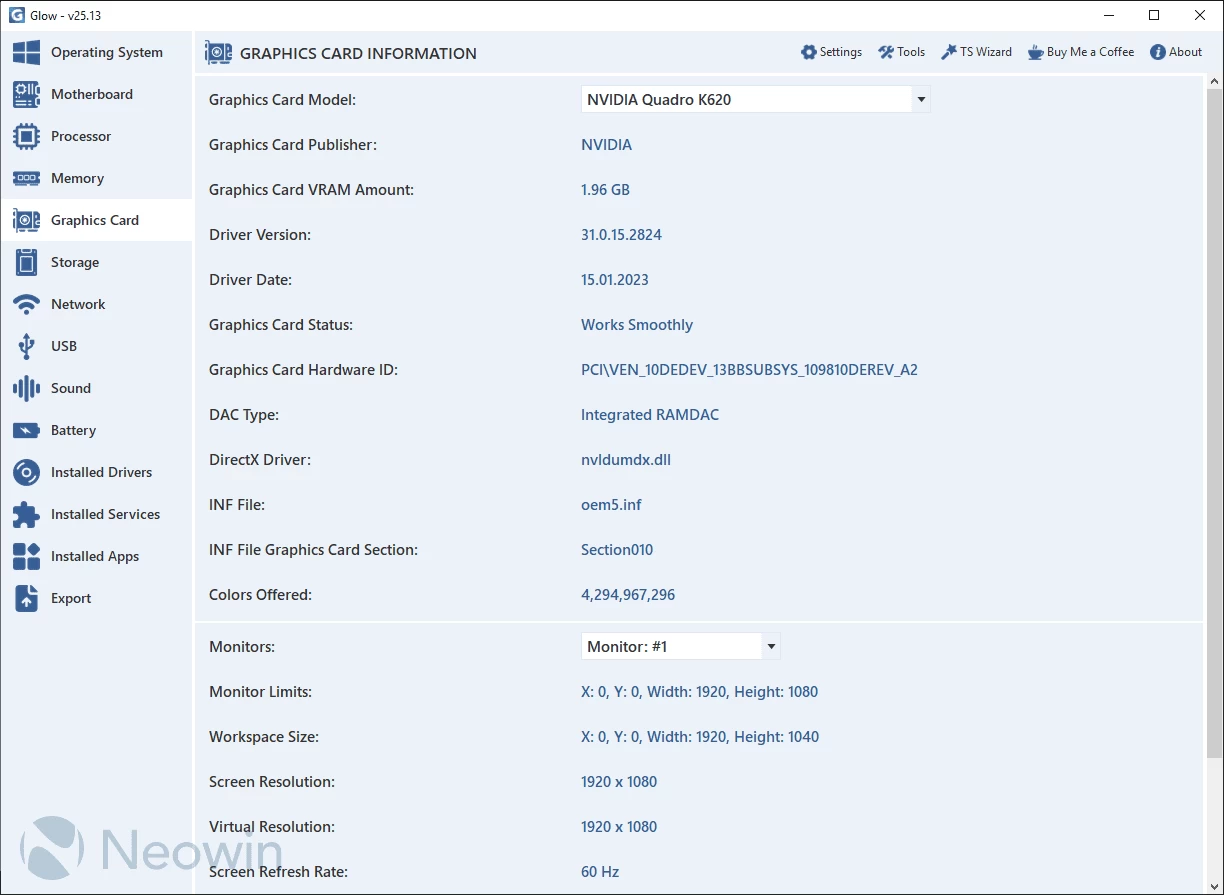
Glow provides detailed information on various system aspects, including OS, motherboard, processor, memory, graphics card, storage, network, battery, drivers, and services. The well-organized format ensures easy access to the required information. You can export all the gathered data to a plain text file, facilitating sharing with others for troubleshooting purposes.
No installation needed. Just decompress the archive, launch the executable, and access computer-related information. Glow runs on Windows 11 and Windows 10 64-bit versions.
Glow 26.7 changelog:
New Features
- Hardware detection accuracy has been improved for Intel and AMD desktop processors. Support for Intel, AMD, Apple, and Snapdragon mobile processors has been expanded and made more reliable.
- The TPM Specification Sub-Version feature has been added to the TPM section at the bottom of the motherboard page. With this addition, the TPM section is now complete.
- In the memory section, the available memory is now clearly displayed alongside the total capacity (e.g., 32 GB – available: 31.7 GB).
- Memory technology detection has been made more comprehensive and stable across desktop, laptop, and server systems.
- Detection accuracy and coverage have been improved for Intel, AMD, NVIDIA, and Apple M-series graphics units (including integrated GPUs).
- In the graphics card section, the available memory is now clearly displayed along with the total VRAM (e.g., 8 GB – available: 7.7 GB).
- Detection accuracy for NVIDIA G-SYNC Pulsar and AMD FreeSync-supported monitors, as well as their hardware capabilities, has been improved.
- Detection support has been enhanced for dual-screen laptops such as the ASUS ZenBook Duo and Lenovo Yoga Book 9i, ensuring more accurate and consistent identification of display configurations.
- Compatibility for Elgato and AVerMedia capture cards has been improved, and detection processes have been optimized.
- In the network section, primary and secondary DNS handling has been enhanced. IPv4 and IPv6 addresses are now displayed separately, and a smart prioritization algorithm has been added. This algorithm automatically detects tunneling solutions such as Cloudflare WARP when they are active.
- Detection of VPN/tunneling solutions such as Cloudflare WARP, WireGuard, OpenVPN, and ZeroTier has been improved with enhanced analysis techniques.
- Hardware detection accuracy and compatibility have been improved in virtual machine environments such as VMware, VirtualBox, and Hyper-V.
- A "scroll to top" feature has been added to the Operating System, Motherboard, Processor, Memory, Graphics Card, Storage, and Network sections, allowing users to quickly return to the top of the page with a smooth animation.
- The TSImageRenderer and ResizeImageToDeviceDpi algorithms have been updated. Image processing and resizing workflows have been optimized to deliver sharper results and more efficient memory usage.
Bug Fixes
- A bug in the Double-Click to Copy module that could occasionally cause the application to crash and throw errors has been fixed.
- Visual flickering and rendering artifacts that occurred during UI transitions and page scrolling on high refresh rate monitors have been resolved.
- A visual issue causing the Screen Overlay Tool to flash on every launch has been fixed.
- UI flickering that occurred during theme switching has been resolved.
- Translation errors in the TPM section at the bottom of the motherboard page, which caused feature descriptions to appear inconsistent with Windows terminology, have been corrected.
- An issue in the disk section that caused the Disk Volume Serial Number to be displayed as XXXXXXXX has been fixed; it is now correctly shown in the Windows-standard XXXX-XXXX format.
Changes
- Brand & Distribution Update. The company has updated its brand and distribution identity. It now operates under the name Türkaysoft, and its official website has transitioned to turkaysoft.com.
- All size calculation algorithms have been updated to align with Windows’ current calculation methodology, resulting in more consistent and standardized outputs.
- The IsNetworkCheck algorithm in the update checking system has been improved to ensure more accurate protocol usage.
- The TPM Status feature at the bottom of the motherboard page now provides a cleaner output.
- The TPM Manufacturer information on the motherboard page has been improved. For Intel TPM chips, the previously displayed value "INTC" has been updated to "Intel (INTC)" for better clarity.
- Shortcut keys for tools in the top menu have been reorganized.
- The System ID Generator Tool has been renamed to System ID Analysis Tool to better reflect its scope.
Planned Innovations
- Glow – Upcoming Update Mechanism. The next Glow release is planned to include a built-in update system. This enhancement replaces the previous TS Wizard–based process, enabling the application to manage updates internally without relying on external software.
Removed Features
- Following the Windows 10 22H2 and Windows 11 25H2 updates, the Windows CA 2023 certificate validation features in the Operating System and Motherboard sections have been removed, as they are no longer necessary.
- In line with current standards and due to being obsolete, the Quick Access Tool designed for Windows 8.1 and earlier has been removed.
- The TS Wizard integration has been removed due to limited functionality and low usage. In the next release, a built-in update system will be integrated directly into Glow.
Note: Always unzip the program before using it. Otherwise you may get an error.
Download: Glow 26.7 | 1.7 MB (Open Source)
Links: Glow Homepage | Screenshot | Github
 Get alerted to all of our Software updates on Twitter at @NeowinSoftware
















0 Comments
Load the comments and join the conversation!
Read the comments, ask the editors questions, show respect and join the conversation.