
Last year in April 2024, Microsoft revealed the Windows Server 2025 roadmap wherein it outlined NVMe support for the OS and detailed the big performance boost users will be getting against Windows Server 2022. The company promised an enormous 70% gain in IOPS (input output per second) performance with the new optimized feature.
Following that, in June, Microsoft detailed DiskSpd improvements and optimizations that were made to help measure the impact of the change.
Fast forward to today, in December 2025, Microsoft confirmed that the feature was recently rolled out to Windows Server 2025 as it hit general availability status. The company has confirmed that the recent October 2025 Patch Tuesday update for Server 2025 (KB5066835) is bringing native NVMe support, though currently it is available as an opt-in feature only, which means administrators will need to enable it manually as it will not be ON by default.
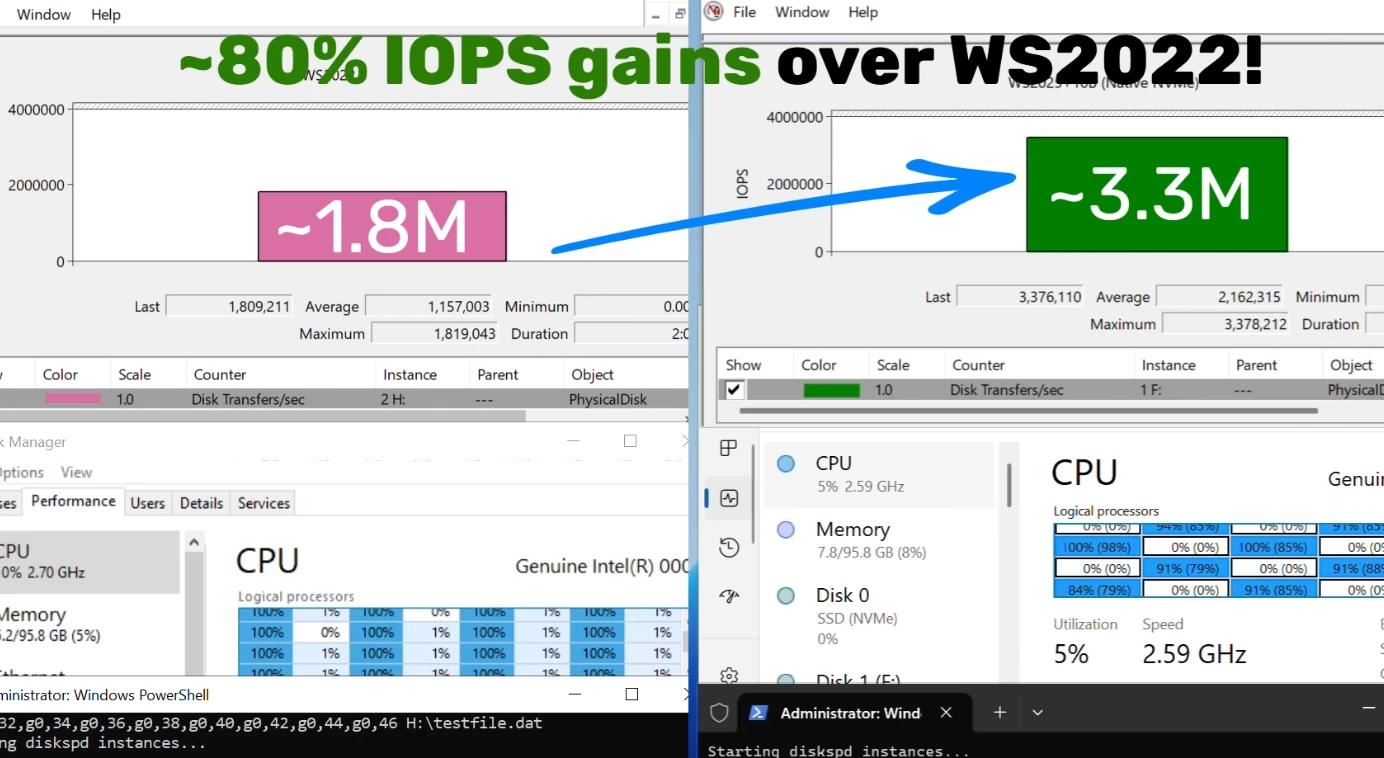
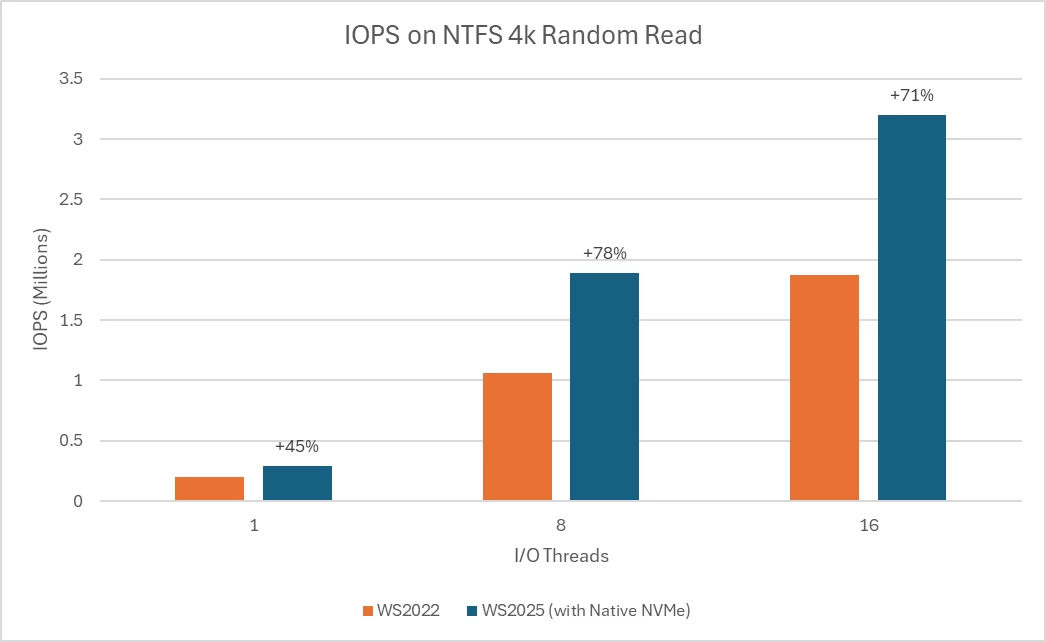
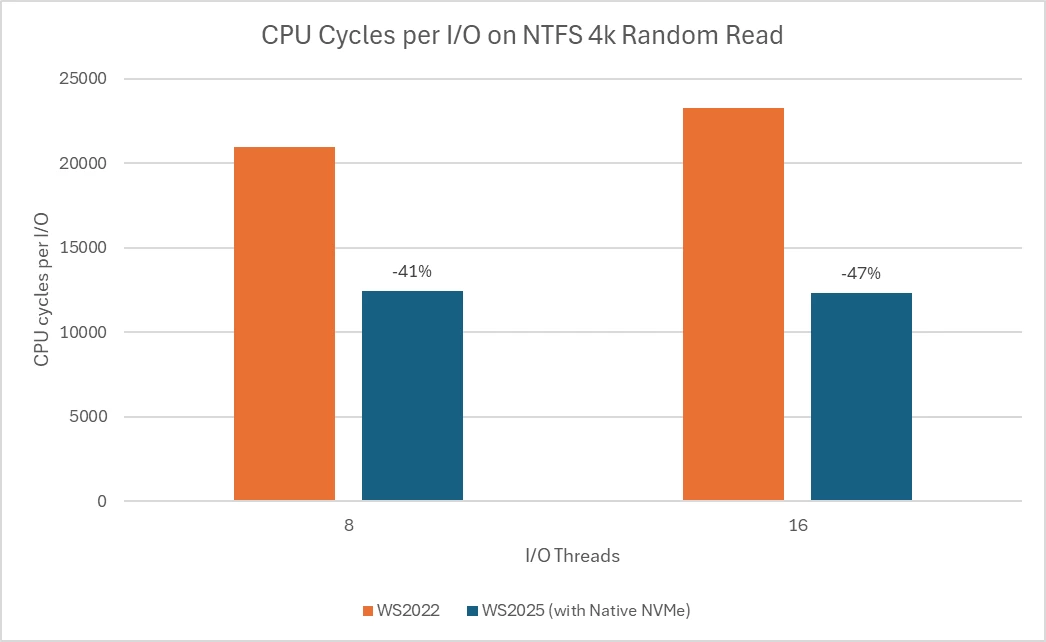
Interestingly, Microsoft has now claimed an ~80% performance boost in IOPS terms which is a 10 percentage points bump over the earlier promises. This suggests that further optimizations have helped enhance the performance even more. Additionally, a ~45% savings in CPU cycles per I/O on 4K random read workloads on NTFS volumes is also promised.
If you are wondering how this is possible, the company has explained that Windows Server 2025 no longer defaults to seeing all storage devices as SCSI (Small Computer System Interface) which was a standard originally designed for rotational disks like hard disks. Curiously, as a trivia, NVMe now supports HDDs too, thanks to the NVMe 2.0 spec.
Microsoft has highlighted all the improvements the new native NVMe support for SSDs delivers:
-
Massive IOPS Gains: Direct, multi-queue access to NVMe devices means you can finally reach the true limits of your hardware.
-
Lower Latency: Traditional SCSI-based stacks rely on shared locks and synchronization mechanisms in the kernel I/O path to manage resources. Native NVMe enables streamlined, lock-free I/O paths that slash round-trip times for every operation.
-
CPU Efficiency: A leaner, optimized stack frees up compute for your workloads instead of storage overhead.
-
Future-Ready Features: Native support for advanced NVMe capabilities like multi-queue and direct submission ensures you’re ready for next-gen storage innovation.
In order to opt in, Microsoft says that admins will need to Opt In to enable Native NVMe by either using a Registry tweak or with a Group Policy object (GPO) edit. It writes:
"After applying the 2510-B Latest Cumulative Update (or most recent), add the registry key with the following PowerShell command:
reg add HKEY_LOCAL_MACHINE\SYSTEM\CurrentControlSet\Policies\Microsoft\FeatureManagement\Overrides /v 1176759950 /t REG_DWORD /d 1 /f
Alternatively, use this Group Policy MSI to add the policy that controls the feature then run the local Group Policy Editor to enable the policy (found under Local Computer Policy > Computer Configuration > Administrative Templates > KB5066835 251014_21251 Feature Preview > Windows 11, version 24H2, 25H2)."
You can find the announcement post here on Microsoft"s official Tech Community website.
Windows Server 2025 and Windows 11 24H2 have a lot in common, and consecutively, Windows 11 25H2 also shares the same codebase and servicing branch as 24H2. Hence, we wonder what the underlying changes can mean for personal Windows 11 24H2/25H2 systems. Gaming of course can greatly benefit as Microsoft recently explained with its new recommendation and requirements guide