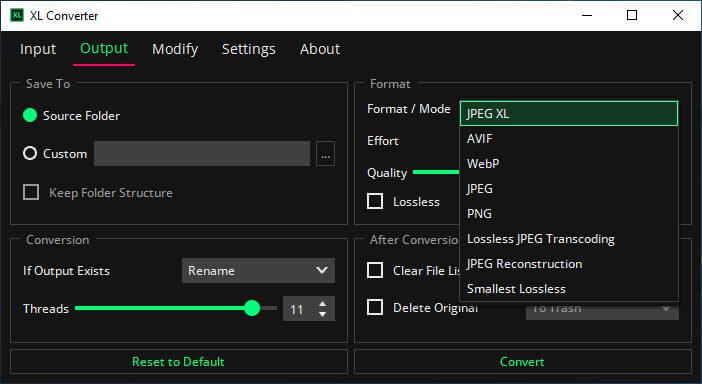
XL-Converter is a fast and easy-to-use image converter focused on modern formats. It supports JPEG XL, AVIF, JPEGLI, and lossless JPEG transcoding, ensuring high-quality conversions. The tool leverages parallel encoding for speed and efficiency. It also integrates ExifTool, allowing metadata preservation and manipulation during conversion. With a simple interface, XL-Converter makes it easy to batch process images without hassle.
XL Converter key features:
- Batch conversion for multiple images
- Supports JPEG XL, AVIF, WebP, JPEG, PNG
- Lossless JPEG compression & reconstruction
- Fast parallel encoding using multiple CPU cores
- Better JPEG compression with JPEGLI (up to 35% smaller)
- High-quality AVIF encoding (AOM AV1)
- Metadata handling with ExifTool
- Easy-to-use interface with drag-and-drop & dark mode
- Keeps folder structure during conversion
- Resize images by resolution or dimensions
- Lossless JPEG fixes (verify & normalize)
- Finds smallest file size across formats
- Privacy-friendly (no ads, telemetry, or internet required)
- Optimized default settings for best results
XL Converter 1.2.3 changelog:
Added
- Add --debug CLI option.
- Add processing order option (#114).
Fixed
- Fix preserving metadata with ExifTool for some TIFF sources.
- Fix GIF to JPEG XL conversion stalling on Windows (#115).
- Fix Flatpak permission check false positive (#110).
- Restore native file dialog on GTK-based desktop environments (Linux).
- Prioritize "Delete Original" when replacing files in source folder (#111).
- Improve temp file cleanup on cancel.
- Fix icon scaling issues on Windows.
Changed
- Clear "Read-only" file attributes on Windows (#108).
Download: XL Converter 1.2.3 | 59.7 MB (Open Source)
Download: Portable XL Converter 1.2.3 | 57.8 MB
Links: XL Converter Home Page | GitHub | Screenshot