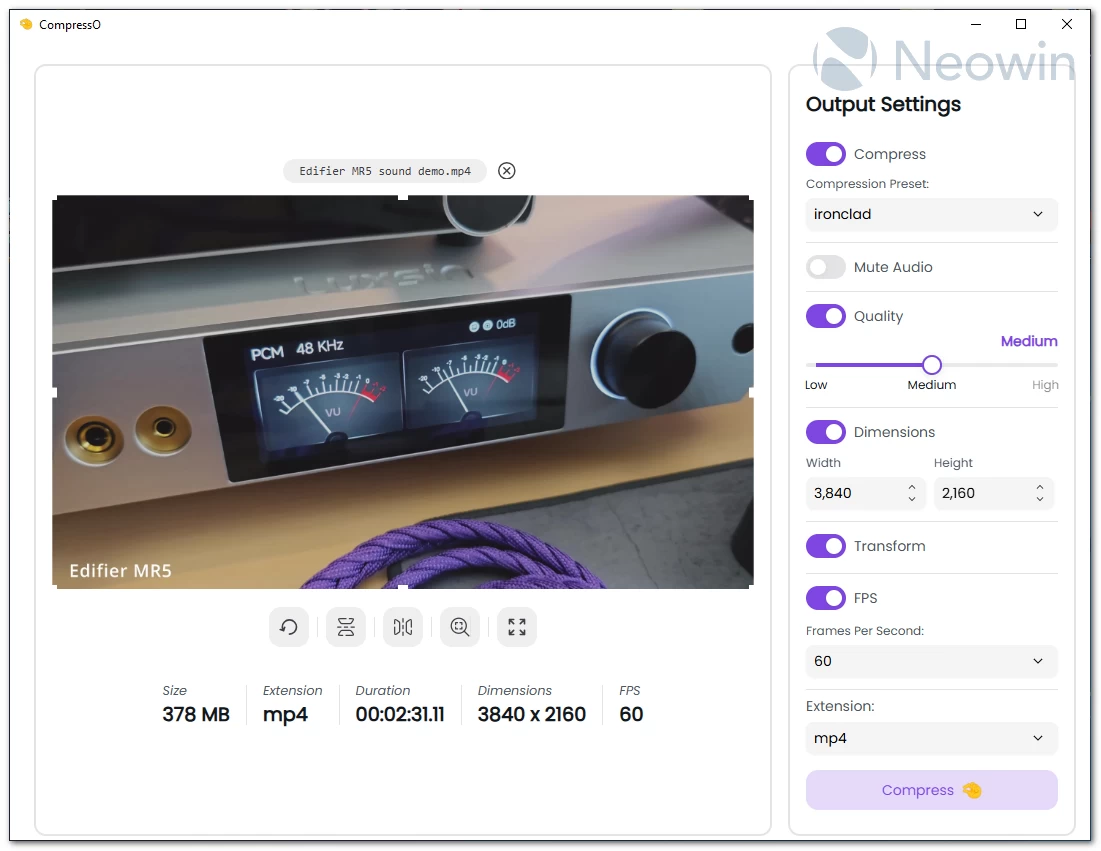
CompressO: Shrink your videos without losing quality
If you’ve ever struggled with huge video files that take forever to upload or eat up your storage, CompressO is the kind of tool you’ll instantly fall in love with. It’s a clean, lightweight, open-source video compressor that helps you shrink videos to a tiny size—without noticeable quality loss and without dealing with complicated settings. Built with a modern TypeScript + Vite interface and powered by Rust and Tauri, CompressO uses the rock-solid FFmpeg engine behind the scenes. Everything runs locally on your computer, so your videos stay private and you don’t need an internet connection to get the job done.
CompressO is available on Windows, macOS, and Linux, with prebuilt installers for each platform, making setup quick and hassle-free. Licensed under AGPL-3.0, it’s free to use and customize, giving developers the freedom to tweak it for their own projects. Whether you’re a content creator, educator, or just someone who deals with large video files, CompressO provides a reliable, lightweight solution to save storage and speed up video sharing. For anyone passionate about open-source tech and productivity tools, it’s definitely worth a look.
Key Features
- Batch compression for reducing multiple videos or entire directories at once.
- Drag & drop folders or videos—or even paste files and directories directly from your clipboard.
- Trim and split videos with simple built-in editing tools.
- Integrated video player (macOS & Windows) for quick previews.
- Open With CompressO support from your file manager for instant processing.
- Full video information, including container details, audio tracks, subtitles, chapters, and more.
- Copy compressed videos to clipboard for quick sharing.
- Video codec selection and customizable metadata (title, artist, album, year, genre, description, etc.).
- Custom thumbnails that appear in file managers, plus thumbnail regeneration.
- Audio controls including codec selection, track selection, bit rate adjustment, channel manipulation, volume control, and amplification up to 200%.
- Upload and embed subtitles (single or multiple), directly into the final output.
- Extract and download embedded subtitles in SRT or VTT format.
- Capture the current video frame and copy it instantly.
- Theme color customization to tailor the interface to your style.
CompressO 3.0.0 changelog:
Features
- New Brand Identity: Updated logo and app icon across all platforms.
- Image Compression Support: Comprehensive image compression for JPEG, PNG, WebP, and GIF formats with quality controls and optimization options.
- Image Transformations: Full transformation support for images including crop, rotate, flip, and dimension adjustments.
- SVG Conversion: Convert SVG files to PNG, JPEG, or WebP formats with advanced settings for raster to SVG conversion.
- Convert to SVG: Convert any raster images like png, jpeg, webp, etc. to a svg image. A real vector image.
- Video to GIF Conversion: Convert videos to animated GIFs with customizable quality and FPS settings.
- GIF Compression: Compress animated GIFs while maintaining quality and reducing file size.
- Cross-Container Image Conversion: Convert between different image formats (JPEG, PNG, WebP, SVG) seamlessly.
- Output Comparison Slider: Compare original and compressed images/videos with an interactive before/after slider.
- In-App Updater: Built-in updater to notify and download new releases automatically within the application.
- Video Speed Control: Adjust video playback speed for faster preview and review.
- Image Metadata Preservation: Preserve EXIF and other metadata when compressing images.
- Full Image Information View: View detailed information about image files including dimensions, format, EXIF metadata, etc.
Enhancements
- Linux Video Playback: Implemented local axum server to serve video assets on Linux, enabling video playback that was previously unsupported on WebGTK.
- Improved Compression Settings: Enhanced compression settings UI with better controls and options for both video and image compression.
- Better Output Stats Display: Improved the display of compression statistics showing before/after file sizes and savings percentage.
- Advanced SVG Support: Added support for converting large SVG files to PNG for thumbnail rendering and better compatibility.
- Piped Process Support: Refactored media processing to support piped commands, enabling more complex transformation workflows.
- Central Process Executor: Implemented central process executor using builder pattern for better process management and error handling.
- Subtitle Handling: Improved subtitle embedding with better preservation of language and title metadata.
- Metadata Stripping: Enhanced metadata stripping functionality with more granular controls.
- Batch Compression: Extended batch compression settings to fully support image compression alongside video compression.
Bug Fixes
- Fixed dimension calculation issue during image crop operations.
- Fixed output path display after media is saved.
- Fixed FPS not being properly applied during GIF conversion.
- Fixed subtitle embedding issues for multiple container formats.
Download: CompressO 64-bit | 64.3 MB (Open Source)
Links: CompressO Home Page | Screenshot | Other OSes