Windows 11 is now pushing five, but the general perception of the operating system is still far from what Microsoft wished for. It gets plenty of hate, often well-deserved, and with Microsoft being most of the time tone-deaf to user feedback, many PC users are worried about what is in store for Windows going forward.
While I share the pessimistic sentiment about Windows ens*ittification, in 2025, Windows 11 received quite a lot of new and useful stuff. In this article, I want to highlight my top 10 changes and improvements. Some of these are quite big, some are minor, but they surely made the operating system better than before.
Note: Features from this list may still be rolling out gradually.
1. Start menu
This is undoubtedly the biggest and most important change for Windows 11, as the Start menu has been among the biggest complaints since day one. Microsoft finally brought more layouts with more efficient screen use, the long-requested ability to disable recommendations properly, and more.

The new Start menu is not perfect, though. You still cannot resize it, and there are some odd bugs, but for what it is worth, it is a massive upgrade over the original, poorly implemented menu from 2021. I personally do not use the Start menu at all (Command Palette single-handedly killed Start for me), but I understand how integral it is for millions of users, so I appreciate Microsoft doing the right thing.
2. Redesigned battery indicators
They are awesome! The battery indicator has been annoying me since day one. It was too small, too hard to read, and lacked the ability to display battery percentage. After years of complaints from users, Microsoft finally redesigned the battery indicator on the taskbar and the lock screen. The new one is bigger, has colorful indicators for charging and low-power mode, and lets you display battery charge in percentages.
3. Taskbar upgrades
The new battery indicator is not the only taskbar upgrade in Windows 11 this year. Microsoft finally fixed the stupid inability to open the notification center on secondary displays. Small icons are also here, and you can have a dedicated button for the emoji panel, which is a handy alternative to the standard shortcut (Win + ;).
Again, not everything is perfect. You cannot have a smaller taskbar when using small taskbar icons like in Windows 10, and Microsoft still won"t let us move the taskbar to the top or sides of the screen. Come on, Microsoft!
4. Better dark mode
At long last, Microsoft equipped common file dialogs with dark mode support so that the system no longer blinds you whenever you delete a file, copy/move something, etc. Microsoft is finally taking dark mode in Windows 11 more seriously, and I am very happy about it. If only Windows 11 knew how to switch modes on schedule, but this omission is well taken care of by the new Light Switch module in PowerToys.
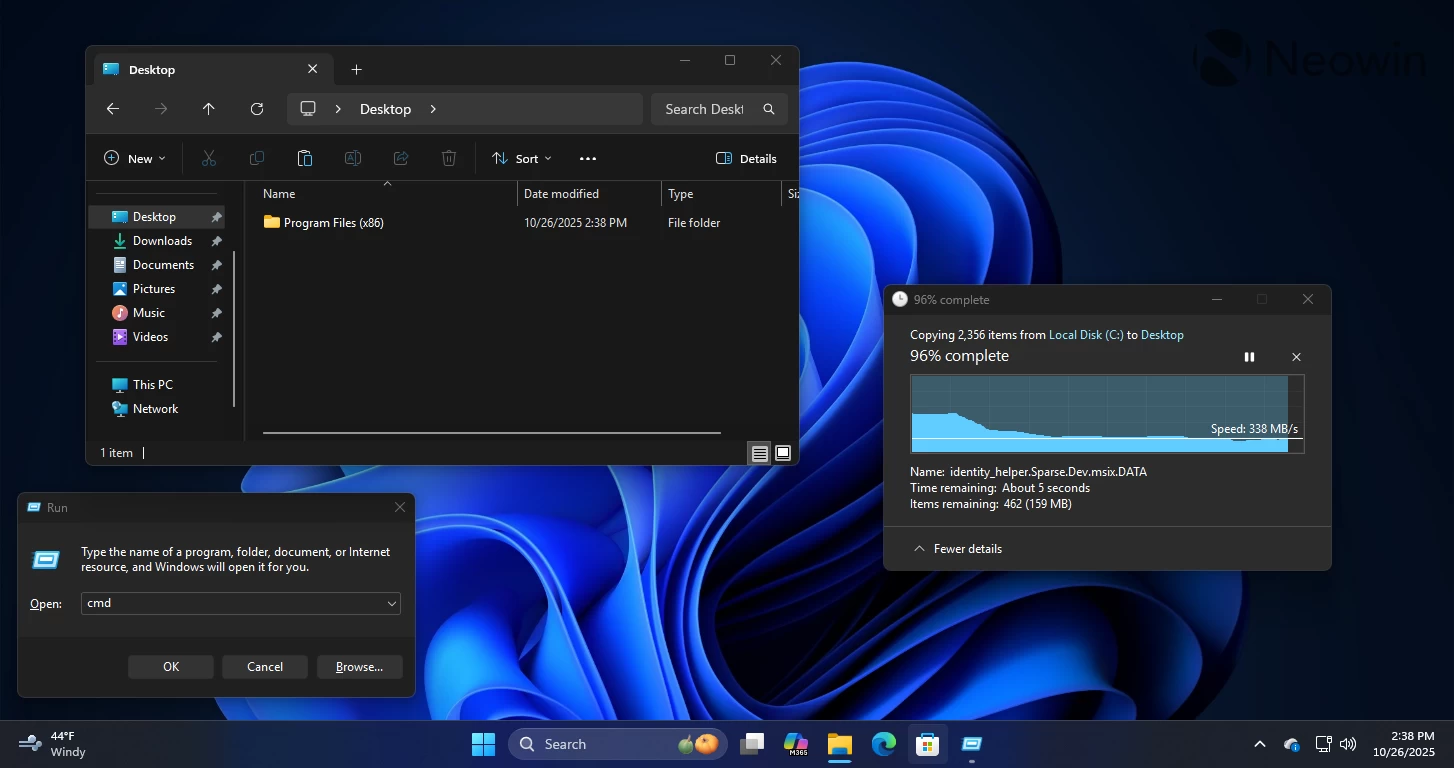
5. Em dash shortcut
This one is small but very handy. Now I can press Win and minus to enter an em dash. As a person who uses the em dash often, this tiny change improved my typing experience a lot.
6. Windows Backup App
In 2025, Microsoft made the Windows Backup app a lot more useful; now, it can transfer your files and settings from your old PC to a new one, making the transition a lot more seamless for those who have a bunch of local files and no means to transfer them to a new computer.
7. Gamepad keyboard
Windows 11 now has a great on-screen keyboard for your gamepad, which makes it much easier to type something when gaming without reaching for your physical keyboard. It is a great implementation, with keys properly mapped to controller buttons so that you can quickly type whatever you need from your coach. It is a great addition to the gaming experience alongside stuff like the built-in browser in Game Bar.
8. Accessibility
Microsoft pays quite a lot of attention to accessibility in its operating system, ensuring everyone can use Windows 11 regardless of their physical abilities. In 2025, Windows 11 received upgrades to Voice Access and typing, Narrator, and Magnifier.
Windows 11 now uses AI to clean up your speech and correct mistakes on the go, it supports conversational commands, and works with custom vocabularies. You can also adjust wait time, disable profanity filter, and more.
Narrator can now generate richer image descriptions, read more smoothly in Word, protect your privacy with Screen Curtain, and utilize HD voices that sound more natural and expressive. Finally, Magnifier now features faster, clearer navigation with one-click zoom controls and HD voices for a more natural and engaging experience.
9. Quick Machine Recovery
Quick Machine Recovery is a new tool that allows Microsoft to deploy fixes for outages quickly and efficiently. If another botched update takes down a chunk of Windows systems and they can no longer boot, Microsoft can send an emergency update and bring those PCs back to life from the Windows Recovery Environment.
10. Passkey improvements
Windows 11 now has a redesigned Windows Hello and the ability to integrate third-party password managers into it. The operating system can tap into things like 1Password to use your stored passkeys to sign you into apps, websites, etc. It can also save a new passkey there, for a more seamless password-free experience. As a long-time 1Password user who tries hard to adopt passkeys, it is a very nice and welcome improvement.
These are only 10 features and improvements that stood out among the rest for me. What are your favorite updates to Windows 11 in 2025? Share your thoughts in the comments.