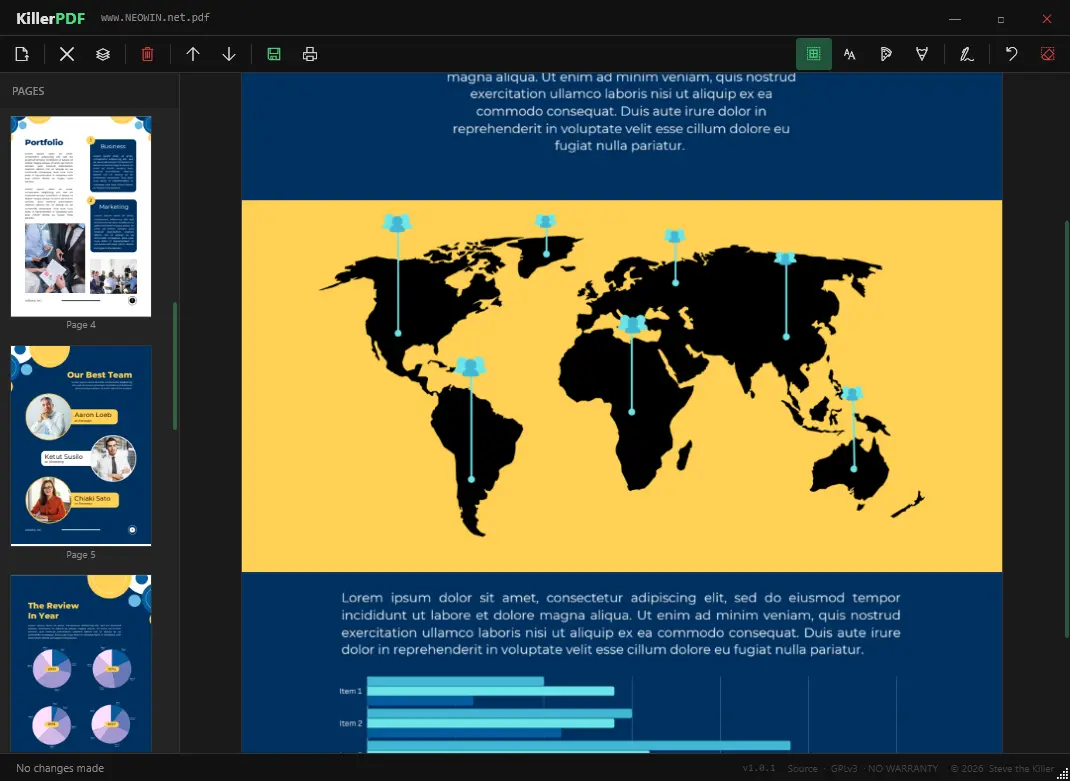
KillerPDF is a lightweight, portable PDF editor for Windows built for users who want full control without subscriptions, installers, or telemetry. It runs as a single executable, making it ideal for USB use and field work. You can view PDFs with smooth PDFium rendering, navigate quickly with thumbnails, zoom, and shortcuts, and reorganize pages using drag-and-drop. It supports merging multiple PDFs, splitting documents, and extracting selected pages.
KillerPDF also allows inline text editing with font matching to preserve the original layout, plus annotations like text boxes, freehand drawing, highlights, and reusable signatures. You can search full text, copy content easily, and print documents with flattened annotations.
Designed as a free and open alternative to bloated PDF tools, it works fully offline on Windows 10/11 x64. No runtimes install. Everything needed is inside the EXE (targets .NET Framework 4.8, which ships with every supported Windows release).
KillerPDF key features:
- High-quality PDF rendering via PDFium
- Edit PDF text inline (double-click to modify text)
- Page thumbnails and fast navigation with zoom and shortcuts
- Merge multiple PDFs into one
- Split PDFs and extract selected pages
- Drag-and-drop page reordering
- Font matching to preserve original document appearance
- Text boxes for notes
- Freehand drawing tools
- Highlight overlays with adjustable color, size, opacity
- Undo actions and clear per-page annotations
- Create, draw, and save reusable signatures
- Click-to-place signatures anywhere
- Full-text search with highlighted results
- Drag-select or Ctrl+A to copy text
- Print with annotations flattened
- Portable single-file app (~10 MB)
- No installer, no admin rights required
- No account, no telemetry
KillerPDF 1.4.1 changelog:
Added
- Page number jump box in toolbar. Type a page number and press Enter to navigate directly to that page.
- Signature auto-selects after placing so you can immediately reposition or resize without switching tools.
- Zoom to Width / Fit Page now re-applies when the window is resized.
- Middle mouse button panning. Hold middle mouse and drag to pan the view in any direction.
- Multi-page grid view toggle (toolbar button left of the zoom dropdown). Switch between seeing all pages in a scrollable grid and a focused single-page view. Defaults to grid view on open.
- Ctrl+S saves directly to the current file without a dialog. Ctrl+Shift+S opens Save As.
- Arrow key navigation: Left/Up goes to the previous page, Right/Down goes to the next page.
- Keyboard shortcut overlay. Press Ctrl+? to show a full shortcut reference. Dismiss with Escape or by clicking outside the panel.
- Crop tool improvements: corner drag handles to resize the selection after drawing without having to redraw; Enter applies the crop to the current page; Escape cancels; Remove Crop / Remove All buttons in the confirm bar clear an existing CropBox from one page or all pages.
Fixed
- Fit to Width and Fit Page zoomed incorrectly on HiDPI (4K) displays.
- Pages appeared blurry at higher zoom levels on HiDPI displays.
- Signature position drifted after saving.
- Memory spike (6+ GB) when opening large PDFs on HiDPI displays.
- Navigating pages caused multi-second UI lag on documents with many pages.
- Scroll wheel now navigates to the previous page when scrolled to the top of a page, and to the next page when scrolled to the bottom.
Download: KillerPDF 1.4.1 | 6.1 MB (Open Source)
Link: KillerPDF Home Page | Github | Screenshot