
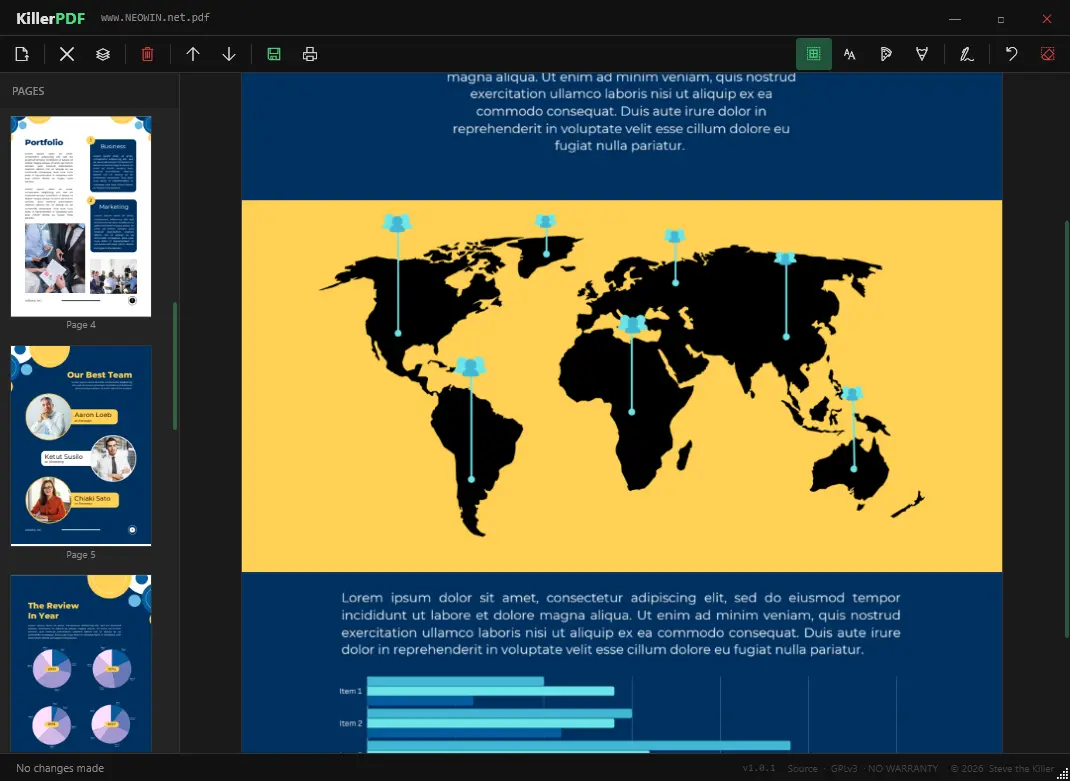
KillerPDF is a lightweight, portable PDF editor for Windows built for users who want full control without subscriptions, installers, or telemetry. It runs as a single executable, making it ideal for USB use and field work. You can view PDFs with smooth PDFium rendering, navigate quickly with thumbnails, zoom, and shortcuts, and reorganize pages using drag-and-drop. It supports merging multiple PDFs, splitting documents, and extracting selected pages.
KillerPDF also allows inline text editing with font matching to preserve the original layout, plus annotations like text boxes, freehand drawing, highlights, and reusable signatures. You can search full text, copy content easily, and print documents with flattened annotations.
Designed as a free and open alternative to bloated PDF tools, it works fully offline on Windows 10/11 x64. No runtimes install. Everything needed is inside the EXE (targets .NET Framework 4.8, which ships with every supported Windows release).
KillerPDF key features:
- High-quality PDF rendering via PDFium
- Edit PDF text inline (double-click to modify text)
- Page thumbnails and fast navigation with zoom and shortcuts
- Merge multiple PDFs into one
- Split PDFs and extract selected pages
- Drag-and-drop page reordering
- Font matching to preserve original document appearance
- Text boxes for notes
- Freehand drawing tools
- Highlight overlays with adjustable color, size, opacity
- Undo actions and clear per-page annotations
- Create, draw, and save reusable signatures
- Click-to-place signatures anywhere
- Full-text search with highlighted results
- Drag-select or Ctrl+A to copy text
- Print with annotations flattened
- Portable single-file app (~10 MB)
- No installer, no admin rights required
- No account, no telemetry
KillerPDF 1.4.0 changelog:
Added
- Rotate page (Issue #52). Right-click any page in the sidebar to rotate it 90° clockwise or counter-clockwise. Works on multi-page selections.
- Insert Image tool (Issue #50). Click the toolbar button, then click anywhere on the page to place a PNG, JPG, BMP, GIF, or TIFF as a resizable annotation. Drag the green corner handle to resize; burned into the PDF on save.
- PDF link annotation support (Issue #47). Clicking hyperlinks and internal cross-references in a PDF now navigates to the target page or opens the URL in the default browser. Works on both the primary page and all secondary pages in multi-page grid view.
- New Blank Document (Ctrl+N, toolbar button). Creates a single blank A4 page as a new working document. Prompts to discard unsaved changes if a dirty file is open.
- Typewriter tool font size picker. When the Text tool is active, a settings bar appears showing size presets (8–72pt) and a color palette. Size and color are stored per-annotation and applied when flattening to PDF.
- Insert Blank Page. Right-clicking any page in the sidebar now shows a context menu with page-level operations: insert a blank A4 page, move up/down, extract, or delete.
- Signature resize. Placed signatures now show a green drag handle in the bottom-right corner. Dragging it scales the signature proportionally; releasing commits the new size.
- Multi-page grid view. When viewing a page, subsequent pages render as a tiled grid to the right and below, allowing context across multiple pages at once.
- Fit to Width on open. Files now auto-zoom to fill the viewer width on open instead of opening at 100% and clipping wide pages.
Fixed
- Scroll wheel in the main viewer no longer triggers page navigation. Previously, at low zoom levels where the page fit entirely in the viewport, every scroll tick caused a full page re-render.
- Page selection no longer flashes centered before jerking left. The layout width is now managed exclusively in the Dispatcher callback, eliminating the double layout pass that caused the visual artifact.
- "Back to TOC" and other internal links on secondary pages now navigate to the correct target instead of advancing to the next sequential page.
- Clicking an internal link now scrolls the viewer back to the top of the target page so links pointing to page tops (e.g. TOC back-links) land correctly.
- Internal PDF links now survive a merge. When merging PDFs, named destinations from the source document's catalog are resolved and rewritten as explicit page-object references in the merged document, so TOC and cross-reference links continue to work after merging.
- Multi-page grid content is now centered in the viewport instead of left-aligned. Panel width is snapped to a whole number of page-width slots so HorizontalAlignment=Center has room to work.
- Sidebar page list no longer shows empty space after the last page. The list now ends at the final page entry with no trailing dead zone.
Changed
- Theme updated to match killertools.net. Film grain overlay added to the main content area. Footer text lightened for readability.
- Sidebar scroll is now handled by an outer ScrollViewer wrapping the page list, allowing the list to size to its content rather than stretching to fill the panel height.
Download: KillerPDF 1.4.0 | 6.1 MB (Open Source)
Link: KillerPDF Home Page | Github | Screenshot
 Get alerted to all of our Software updates on Twitter at @NeowinSoftware

















0 Comments
Load the comments and join the conversation!
Read the comments, ask the editors questions, show respect and join the conversation.