Recently we reviewed Intel"s new desktop chips, the Core Ultra 200S Plus. We thought it was the company"s best chip in recent times and as such it received a 10 out of 10 rating from us for the value it is offering. You can check out our full review in this dedicated article here.
The performance of the processors, we thought, was particularly impressive given that they are based on the Arrow Lake Refresh design, which clearly is a decent improvement over the original Arrow Lake, despite being a refresh, as we saw some pretty decent gains on occasions. You can go check out the review we linked above to see what we are talking about.
The previous flagship, the Core Ultra 9 285K, and the new Core Ultra 270K Plus, are very similar in spec in terms of core configuration, both of them having 24 cores (8 P-cores +16 E-cores), and 24 threads (if you recall, Intel dropped hyperthreading on its P-cores with Lunar Lake back in 2024.
Clock speeds are also fairly close, though Intel has made multiple key changes under the hood related to clock frequencies, which have netted in the improvement. Intel informed us in the reviewers" guide that the Die-to-Die (D2D) frequency was up 900 MHz to 3.0 GHz from 2.1 GHz; and the NGU (next gen uncore) System Agent SoC fabric frequency was up 400 MHz also to 3.0 GHz, up from 2.6 GHz.
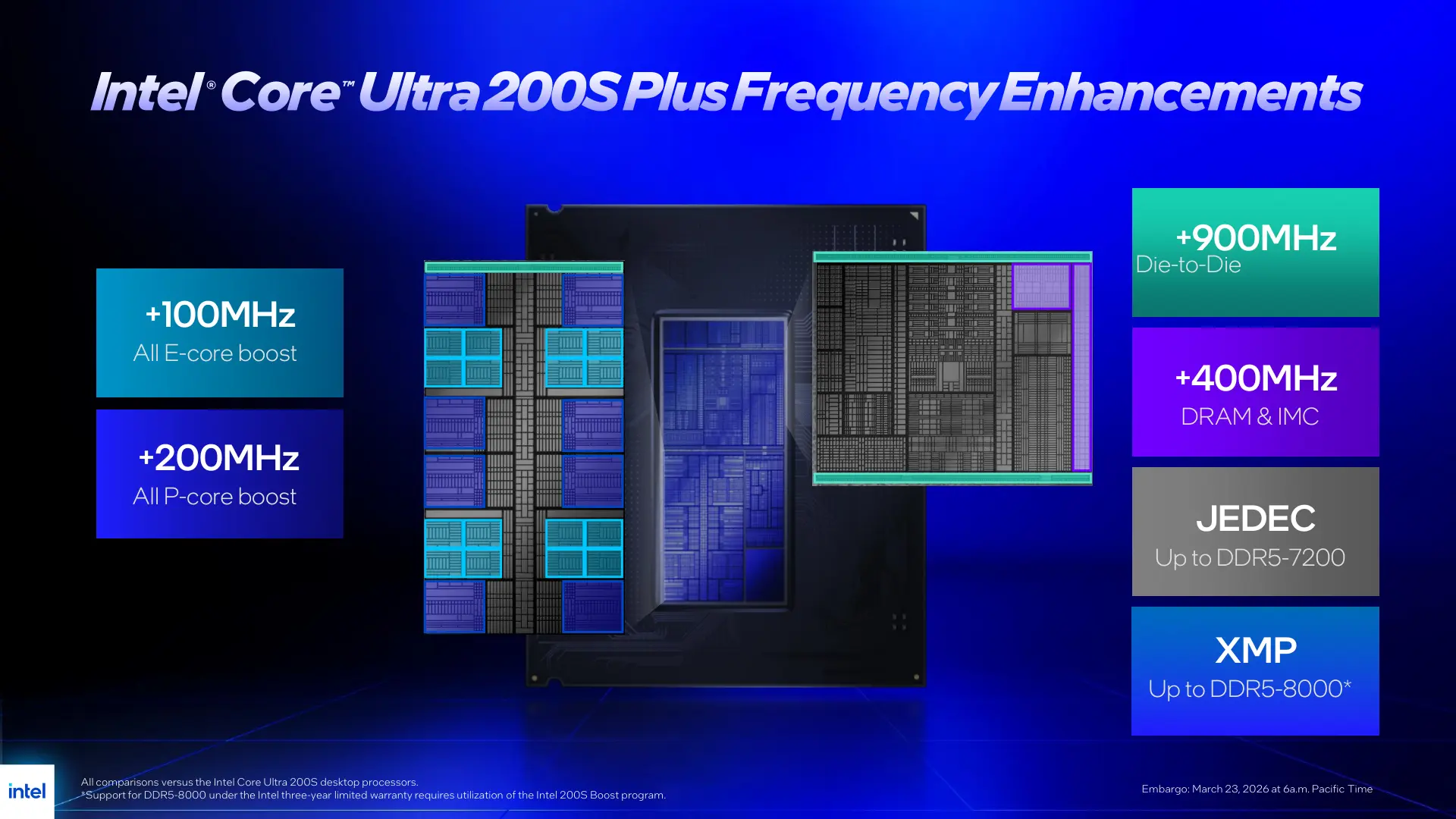
We also had Intel"s recommended 200S Boost ON in the BIOS which took the NGU clock speed on our sample to 3.2 GHz. This was expected behaviour, though the D2D frequency, which was also supposed to see a 200 MHz increase, did not see any bump. Also the memory speed did not go up to 8000 MT/s from 7200 MT/s.
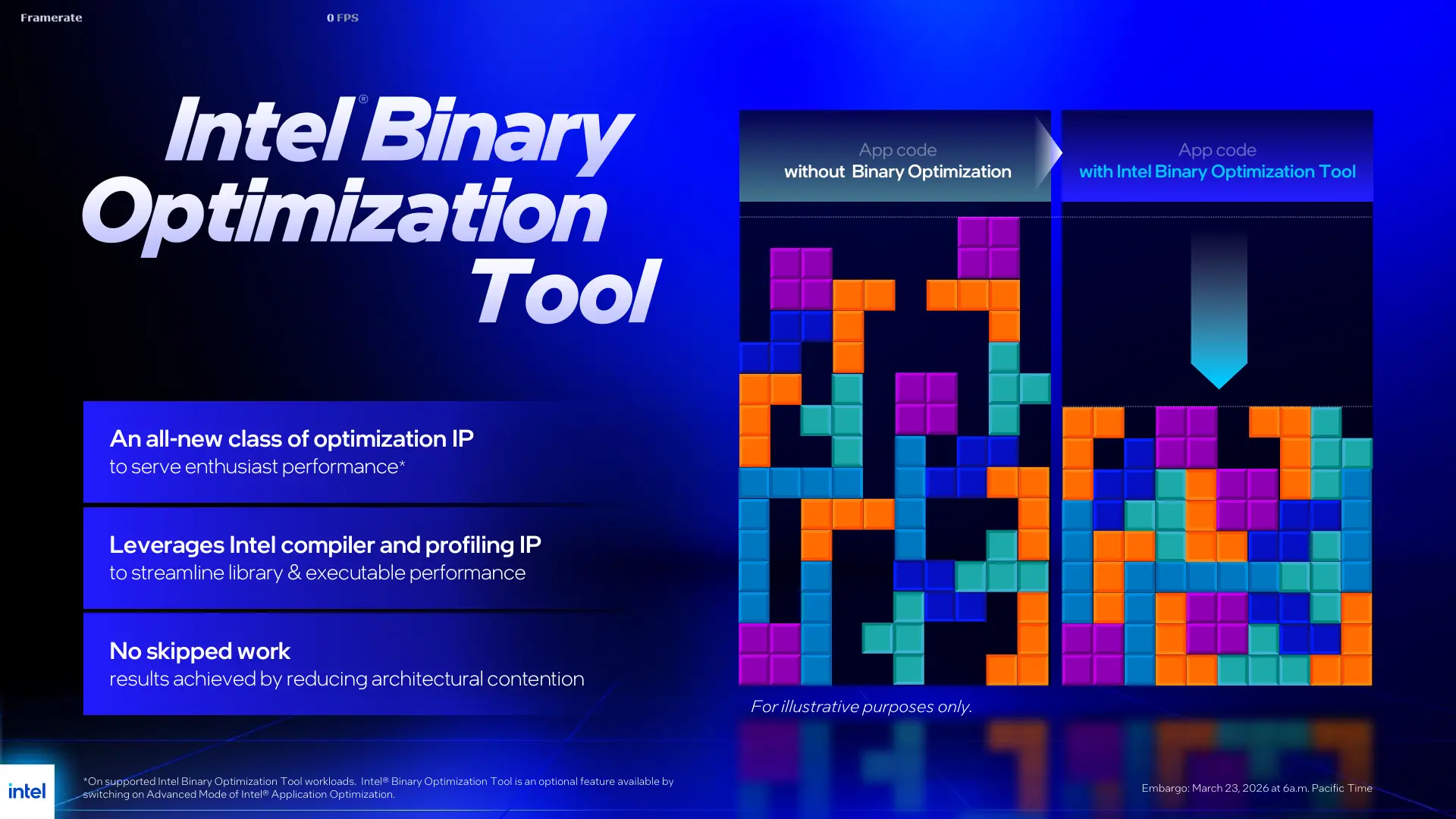
Aside from these, Intel also devised a new tool to improve the performance of the new CPUs, especially under Windows. The company says its new Intel Binary Optimzation tool is its "first-of-its-kind binary optimization IP that can streamline any x86-based workload to behave more like an “Intel x86” optimized workload." The company has touted it as the only tool in current market that can perform real-time IPC enhancement.
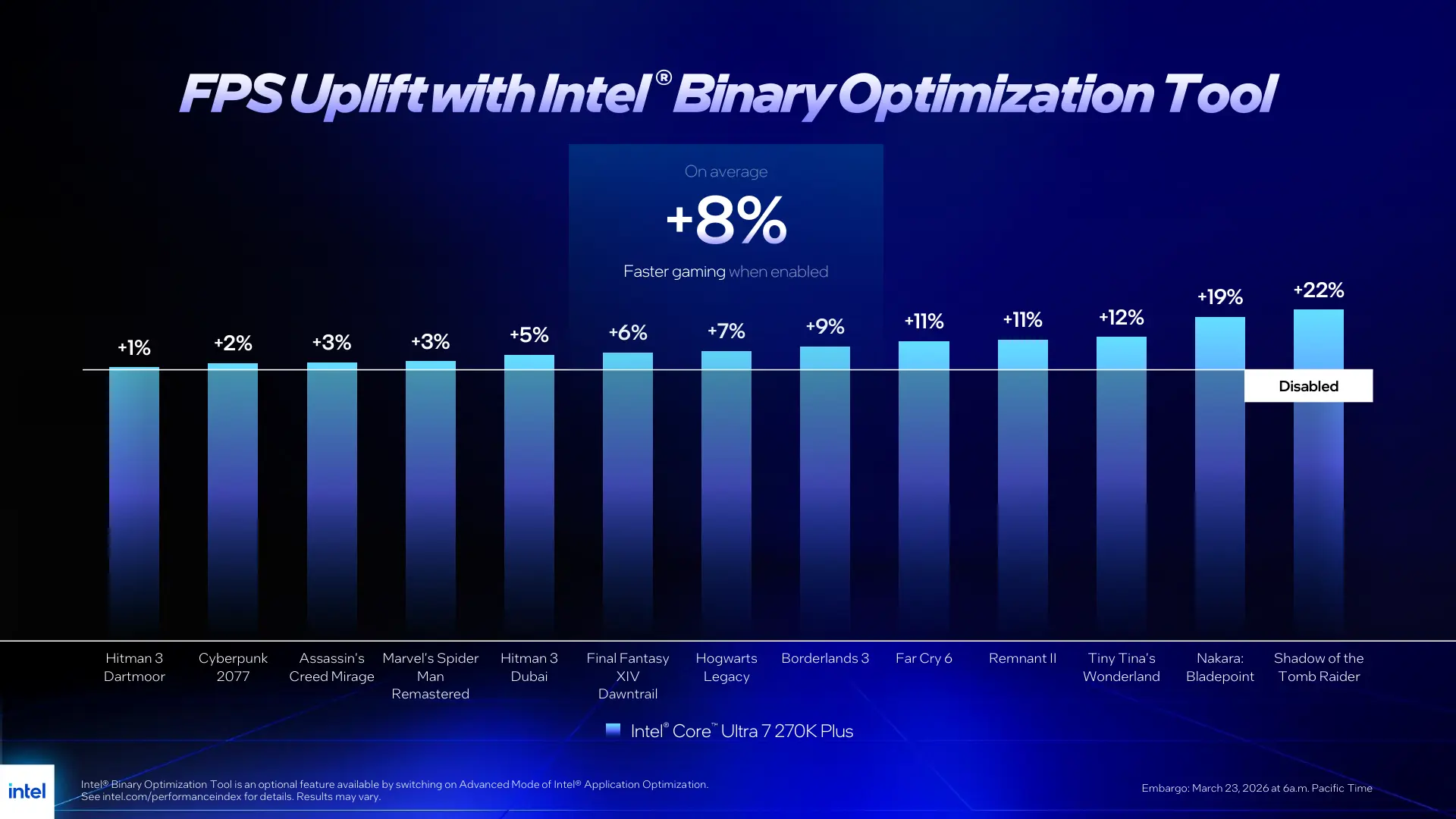
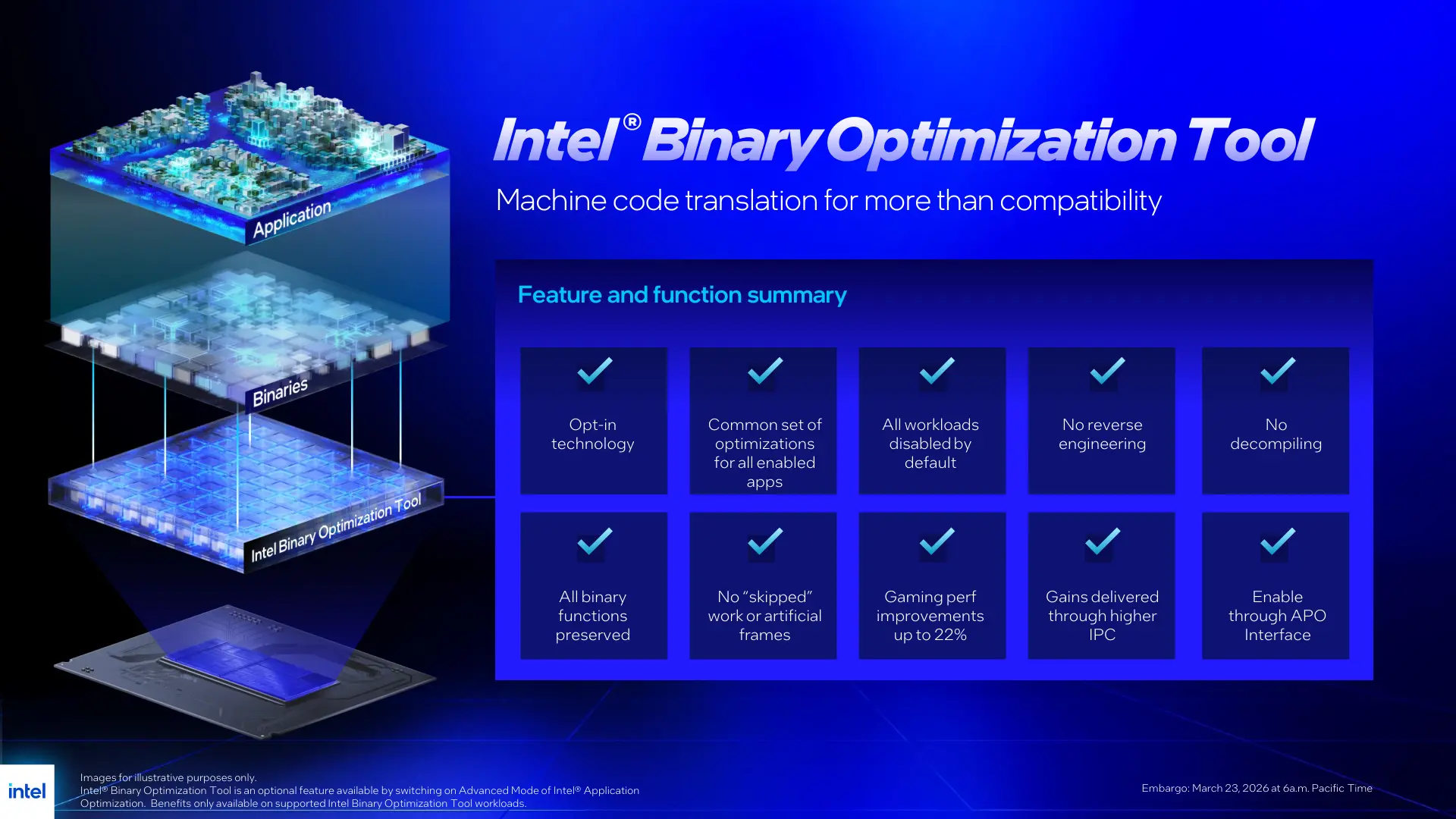
IPC stands for Instructions per Cycle, if you are not familiar. In simple terms it is the amount of work or processing a compute device like a CPU can do, and with Intel Binary Optimization Tool (let"s call it IBOT for short), the company claims up to 20% performance improvement.
In Intel"s own words, IBOT works similarly to GPU shader replacement, such that a "known function call with sub-optimal performance is substituted on-the-fly with a more performant option that better fits the underlying architectural capabilities." The tool helps minimize or at least reduce performance penalties like cache misses, branch mispredictions, frontend stalls, and such.
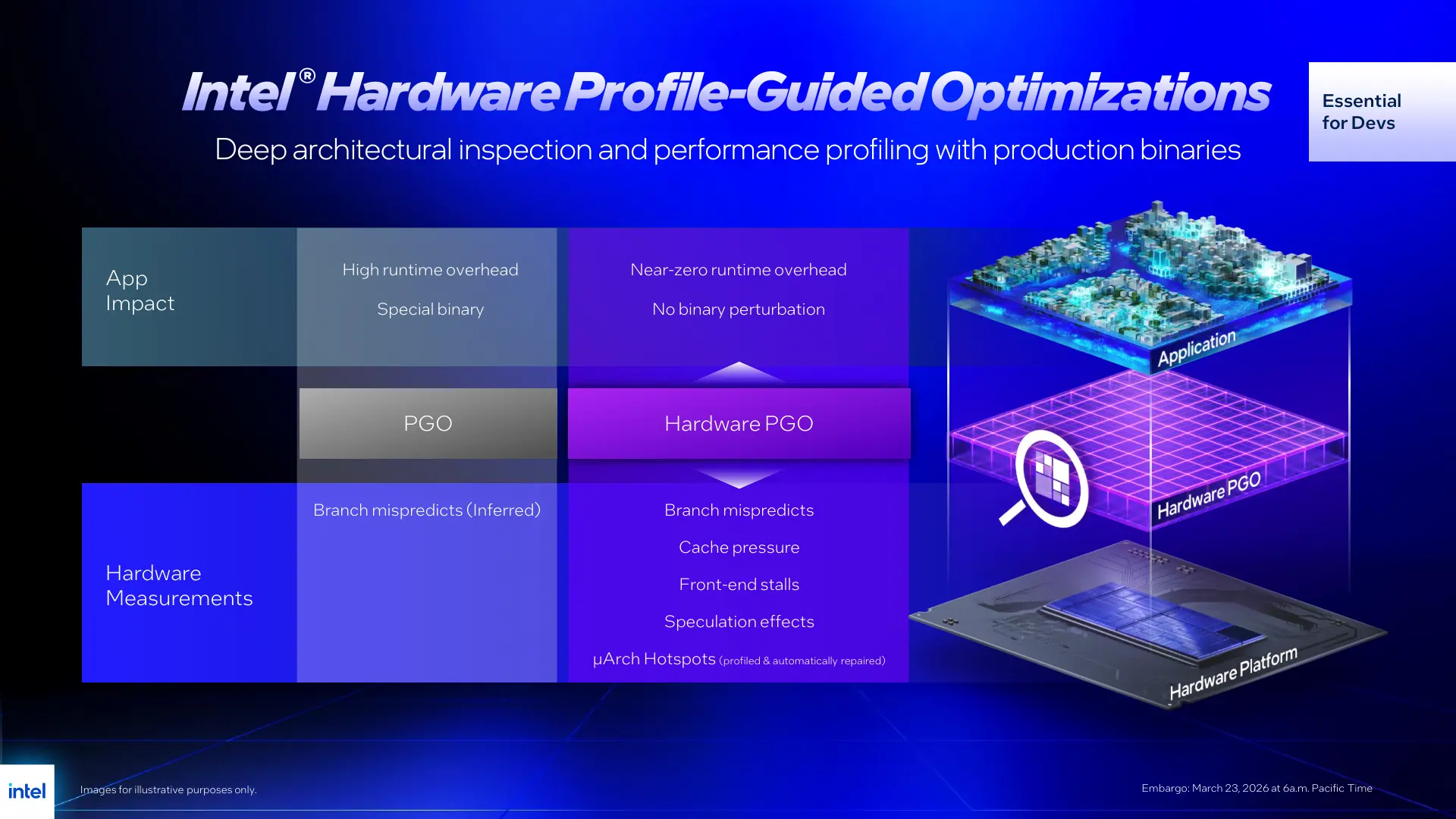
If you are wondering how Intel determines these optimal binaries and libraries, it does so using HWPGO or hardware profile guided optimization. HWPGO leverages hardware performance monitoring counters (PMCs) available on modern Intel CPUs. PMCs are part of the processor"s Performance Monitoring Unit (PMU) and are essentially specialized hardware registers embedded within CPUs.
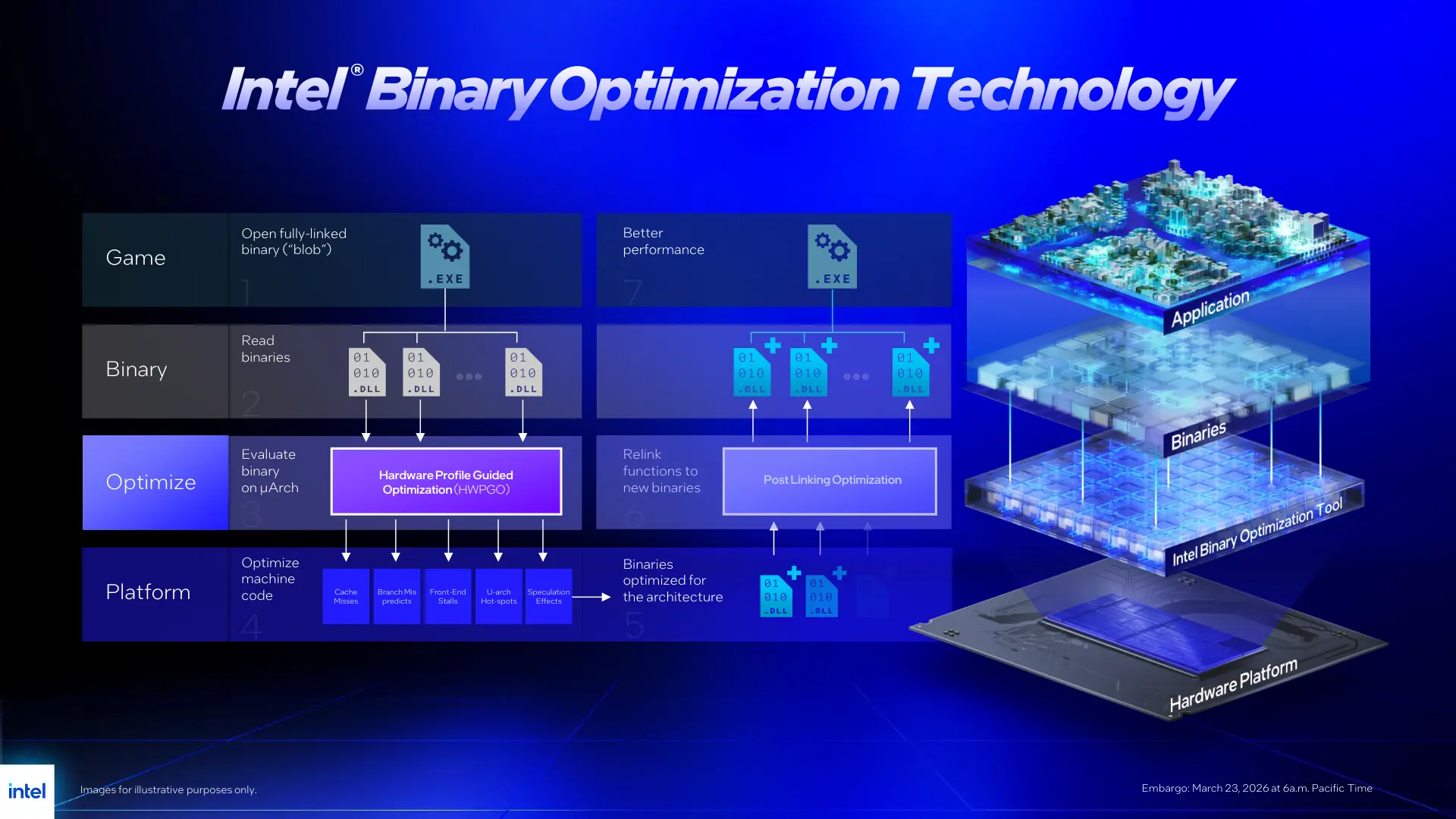
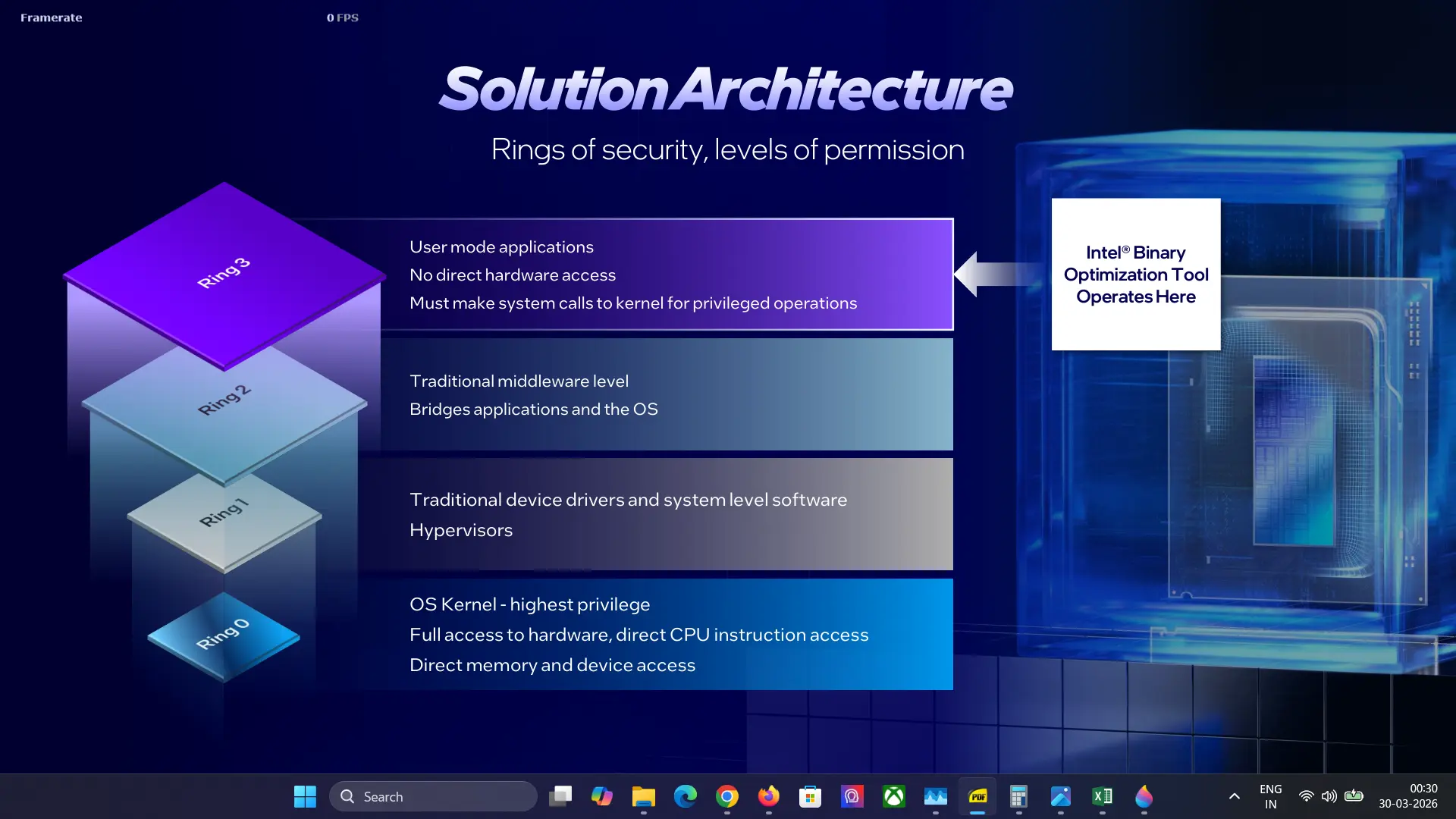
Compared to software PGO, Intel says that its HWPGO greatly reduces runtime overhead without any binary perturbation and the source code remains unaltered. Intel says that IBOT is secure too as it operates at the user mode level (Ring 3) only, with no direct access to hardware.
To see the effects of Intel IBOT, we ran tests on compatible games with the feature enabled and then disabled.
Test system
- Intel Core Ultra 7 270K Plus (Amazon | Newegg)
- GIGABYTE Z890 AORUS ELITE WIFI7 ICE (BIOS F19) (Amazon|Newegg)
- Corsair RM1000x SHIFT (Amazon|Newegg)
- ARCTIC Liquid Freezer III Pro 360 A-RGB (White) AIO (Amazon|Newegg)
- Thermal Grizzly KryoSheet - 44x37 (Amazon|Newegg)
- 2x 16GB G.Skill Trident Z5 RGB (7200 MT/s in XMP) (Amazon|Newegg)
- TEAMGROUP MP44Q 4TB NVMe (PCIe 4.0) (Amazon|Newegg)
- NVIDIA RTX 5090 Founders Edition
- Windows 11 25H2 Professional Build 26200.7623 (Neowin Deals)
We tested CPU-bound settings to minimize the effect of the GPU and maximize the load on the processor as much as possible. Certain graphics settings which are known to impact the CPU were kept enabled.
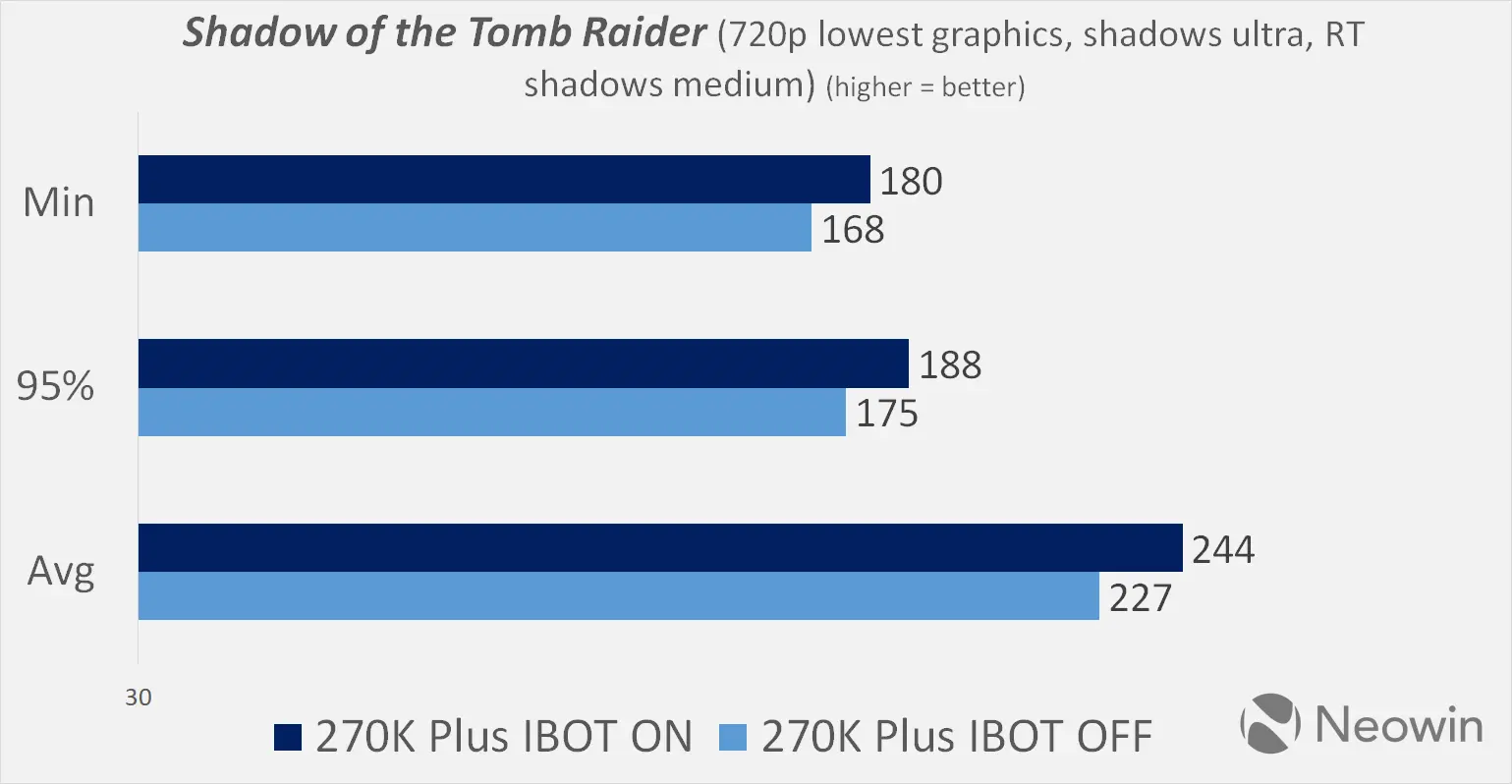
First we have 2018"s Shadow of the Tomb Raider based on the Foundation Engine. The good news is that we saw immediate improvement as we saw a 7.5% gain in the averages. The bad news is that this was the only instance we saw a clear advantage with IBOT enabled.
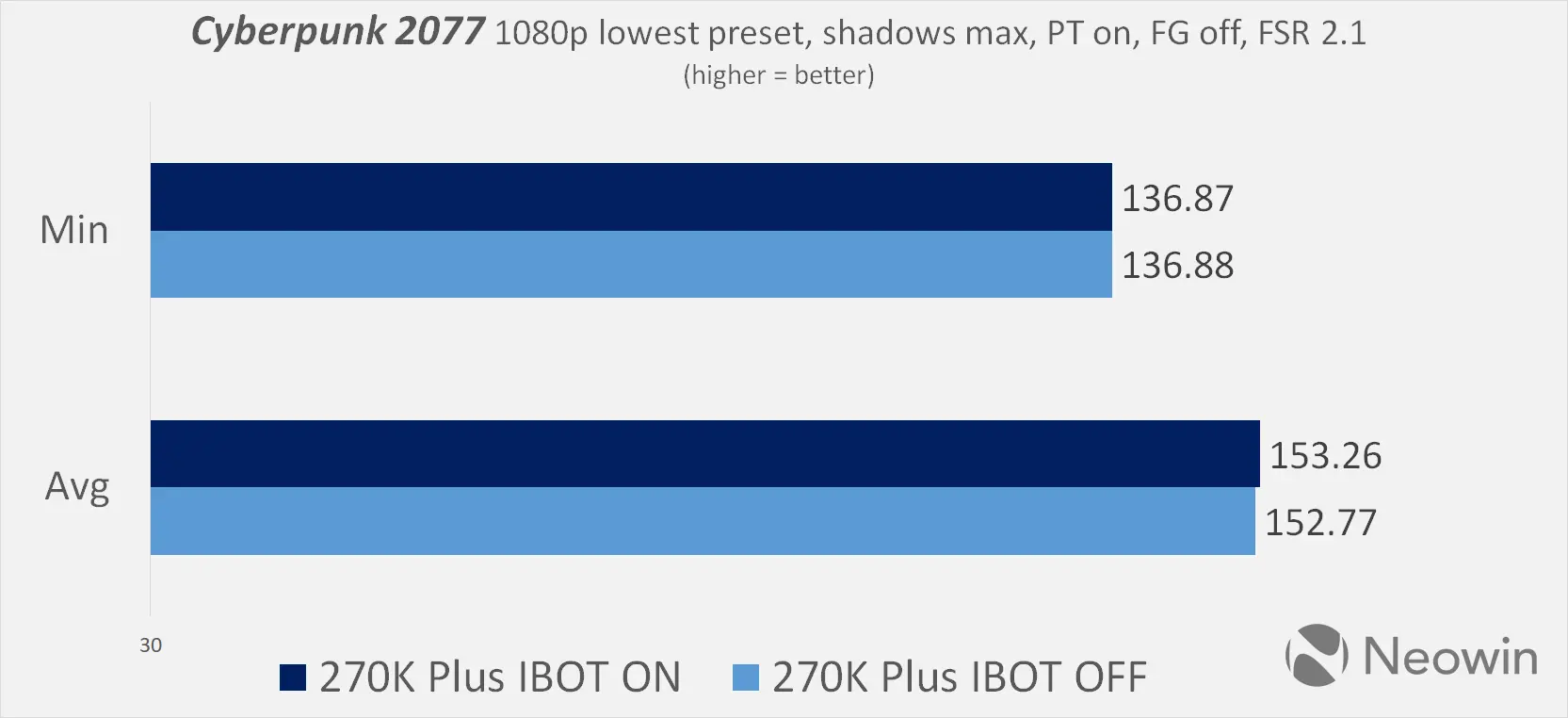
In Cyberpunk 2077 next, based on CDPR" in-house RED engine, there is a tie. Although technically we did see higher averages with IBOT flipped on, the margin is too narrow to call a win, or loss, for either.
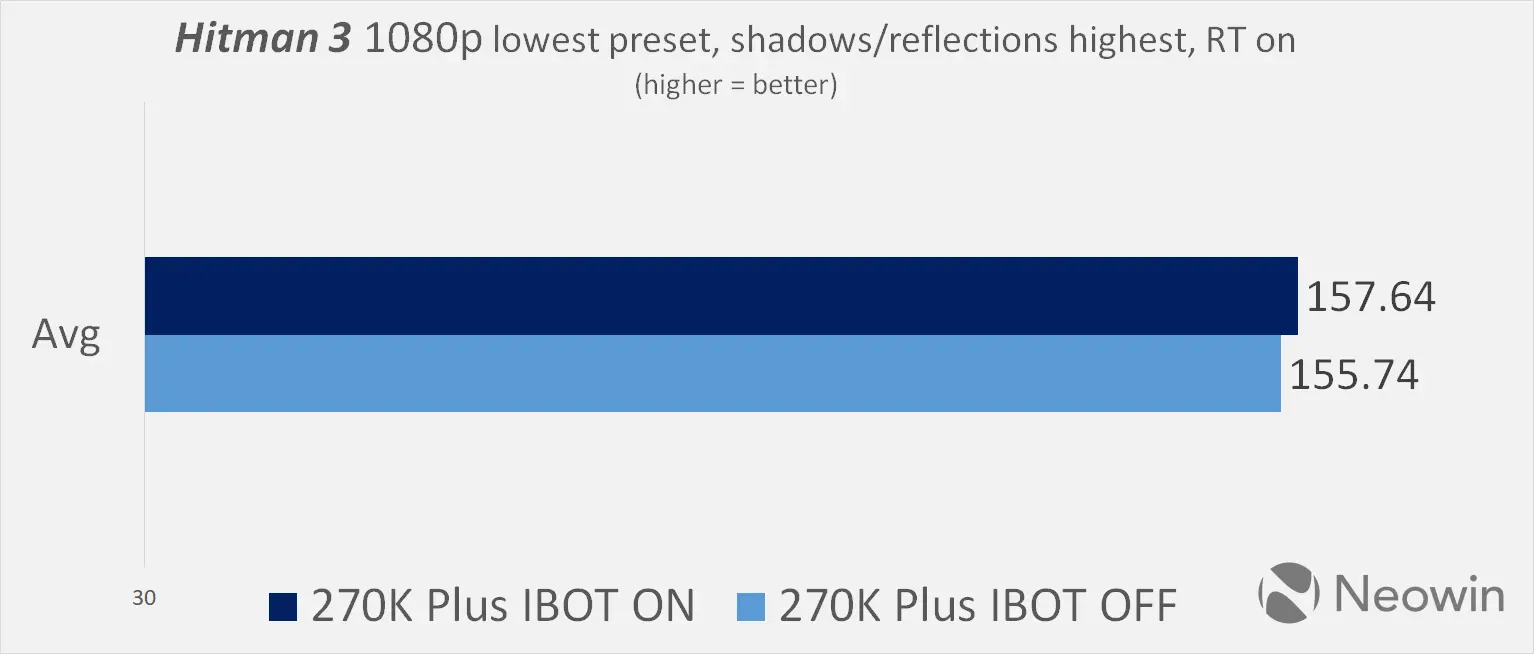
Hitman 3 is made on Glacier engine and here, IBOT shows a very slight advantage. Still it is in the margin of error category as the split saw just a 1.2% advantage with binary optimization working.
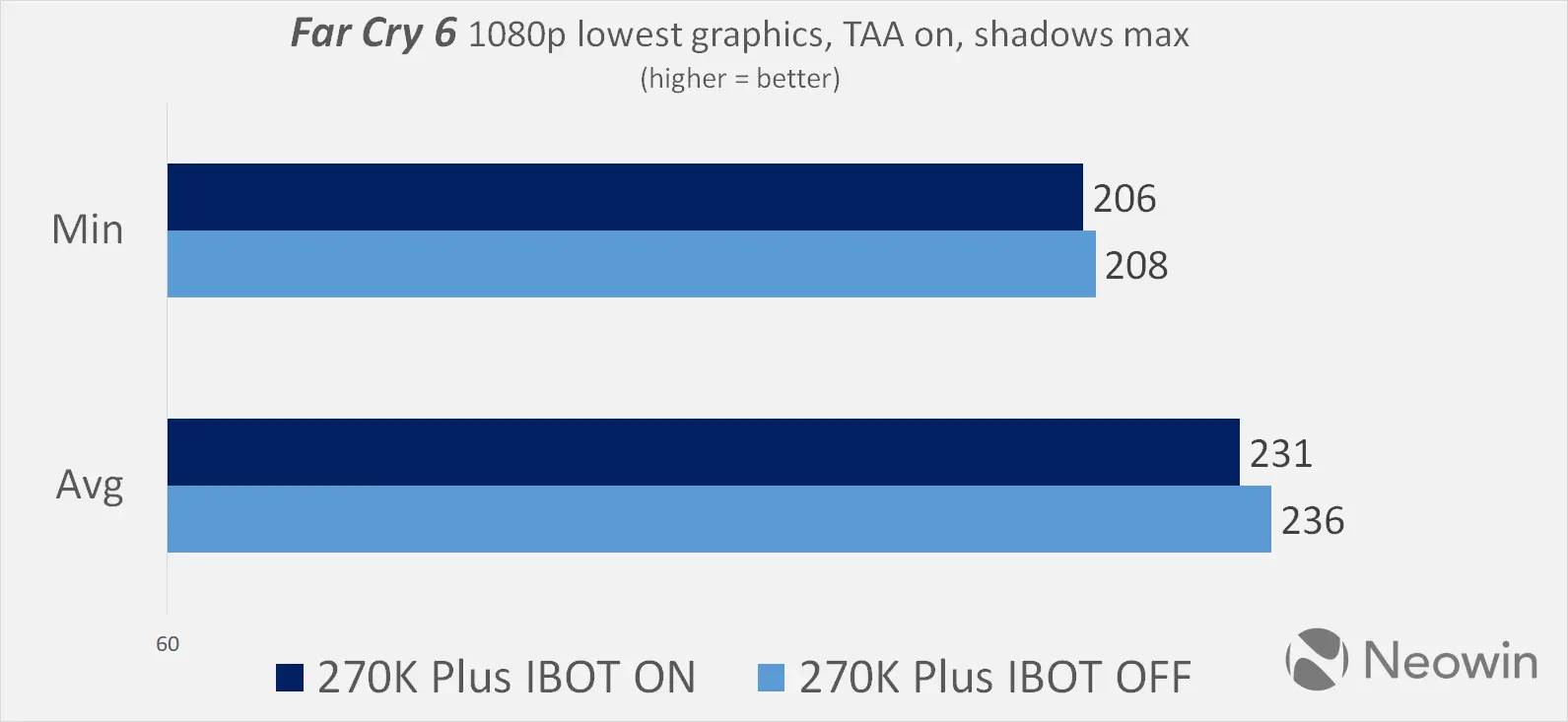
Finally in Far Cry 6, we saw the most unfavourable result in our test as we lost some performance, though the framerates are so high that users are unlikely to notice the difference. There was a 2% regression in our test with Binary Optimzation Tool ON.
What"s good about this though is that users are not really leaving too much performance on the table without IBOT, at least according to our testing. Keep in mind that this is a first-generation product and it will likely improve from here, so next time we test it, there may be bigger improvements.
Intel has summarized several of the benefits of the new IBOT feature in the graphic below.
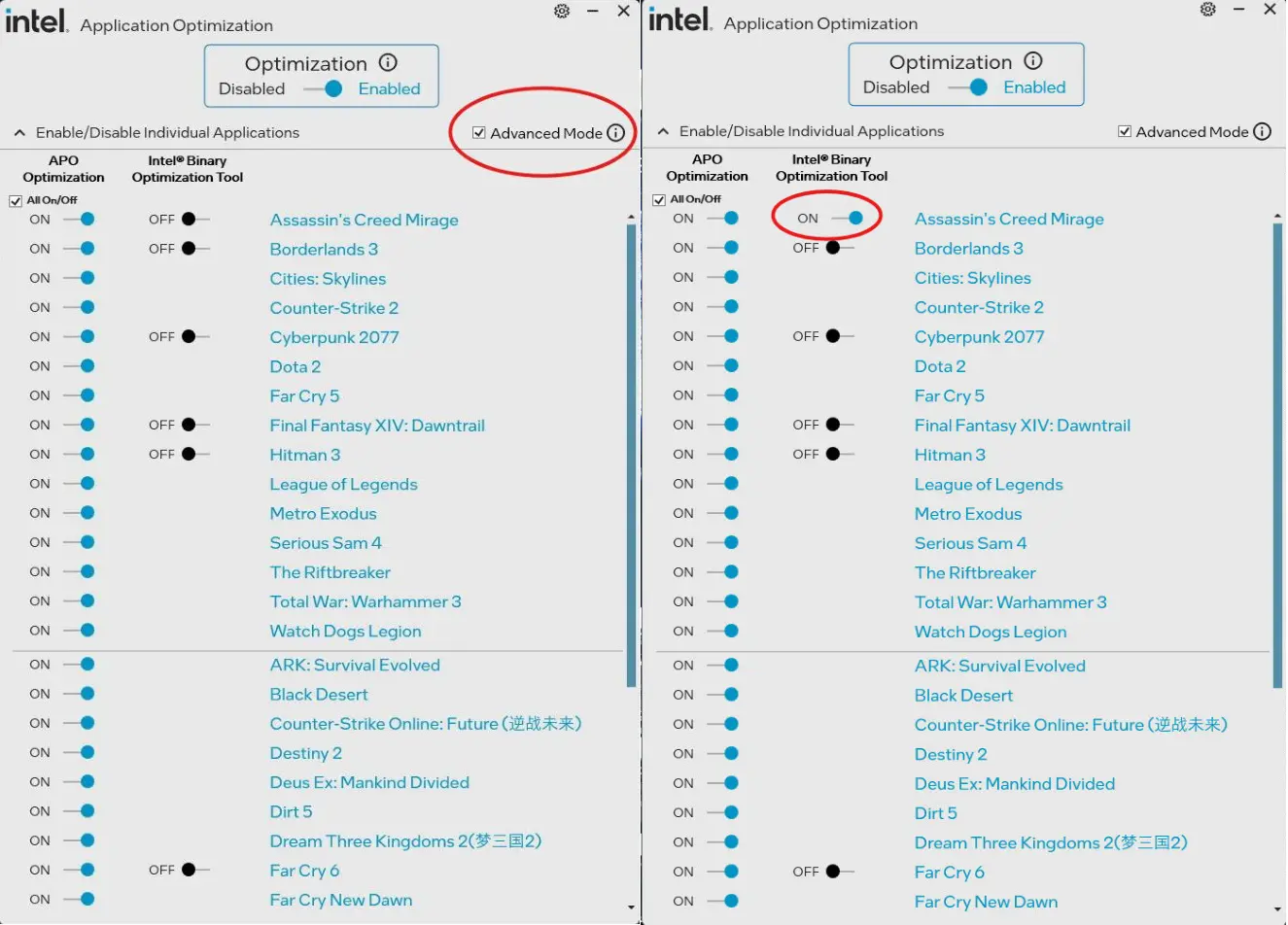
This is currently an opt-in technology since it is very new, which means a user will have to explicitly enable the Binary Optimization Tool. It is currently part of the Intel Platform Performance Package (IPPP) and works via the APO or Application Optimization interface that has an "Advanced" mode. When this Advanced mode is selected, it lets users toggle IBOT on. As you can see in the image above, there are individual toggles for the supported games.
Whether or not you want to keep it enabled will depend on the title you are playing as we saw varying outcomes. The big positive is that there were no hiccups that we noticed like crashes or freezes, which is a plus point considering it"s a brand new tech.
As an Amazon Associate we earn from qualifying purchases.