Back in Google I/O 2023, Google announced an accessibility feature, "headphone loud sound alert," with Android 14, that calculates a "sound dose" by measuring momentary exposure levels over a continuous seven-day period. If the system detects you have been listening to audio at high volumes for too long, it first sends a warning. If you ignore that warning, the phone automatically lowers the volume to a safer level.
Google implemented this system to be compliant with international standards like IEC 62368-1 and EN50332-3. The feature became available on Android devices with the release of Android 15 last year.
But it seems this forced intervention has not been received well, with some users complaining that the automatic volume reduction interrupts their sessions while they"re at the gym. Others get pissed off when the phone"s volume suddenly drops while they are listening to music in the car, as many prefer to set the phone to maximum and control the actual sound level with the car"s stereo knob.
Now, the folks over at Android Authority have uncovered a new, hidden settings page that might give people some control back. The discovery points to a so-called "Hearing Wellness" menu that gives users more control over these audio safety alerts. The menu contains two toggles: one for "Sound Exposure Notifications" and another for "Hearing Health".
As Android Authority notes, with both features enabled, your phone will behave much as it does now. When you cross the safe listening threshold on your Pixel, you get two options: "Keep listening" or "Lower the volume". If you dismiss the notification instead of making a choice, the system defaults to safety and lowers the volume for you anyway. Turn off both toggles, and both the alert and auto-lowering features are disabled.
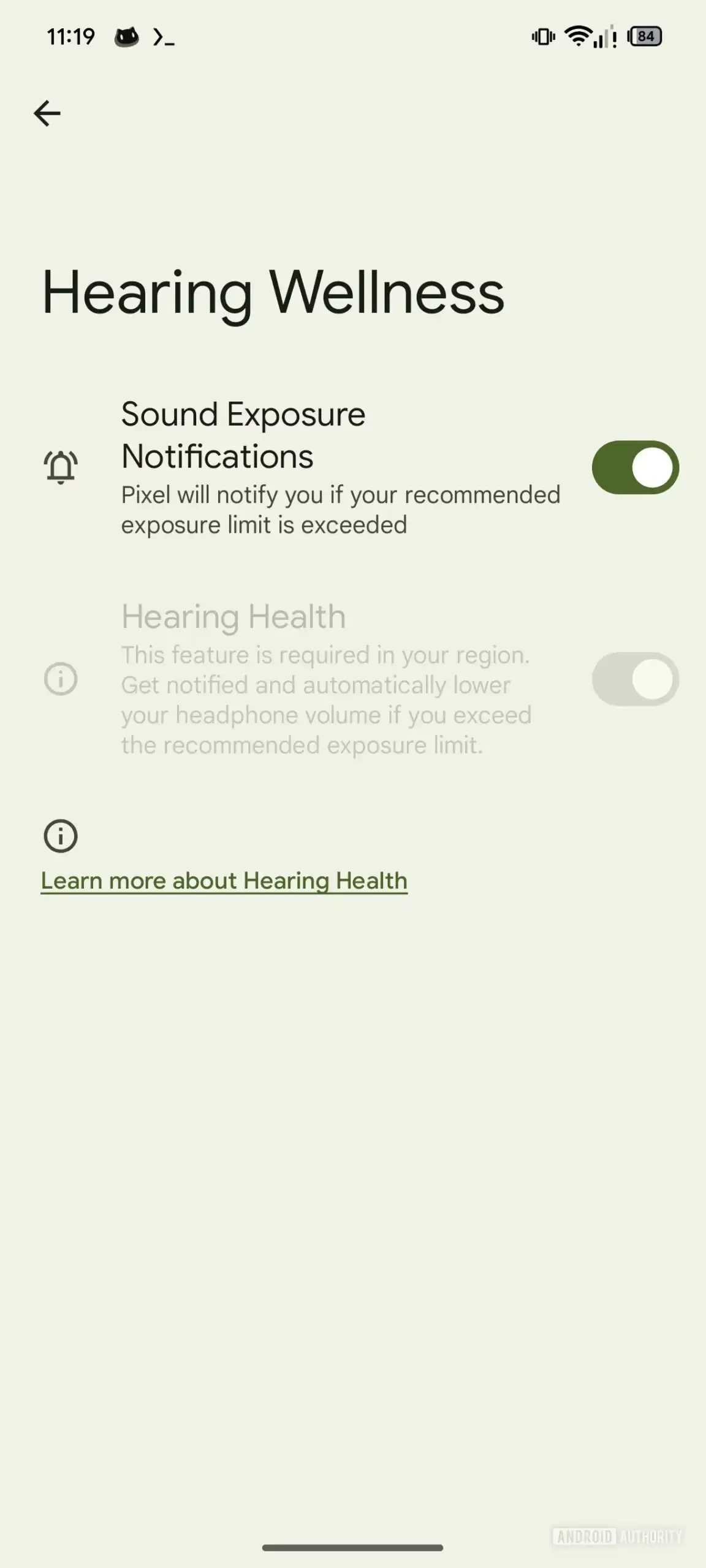
There is a catch, however. Some European Union countries, like France, Germany, Italy, and Spain, require these safety measures by law, so users there do not get a say because the "Hearing Health" setting, which controls automatic volume reduction, cannot be turned off. Here"s the full breakdown:
| Region / Country | What happens | Can you turn it off? | Notes |
|---|---|---|---|
| EU (all 27 countries) | Warning, then auto-lower if ignored | No | Legally mandated safe-listening behavior. |
| EEA / Switzerland | Warning, then auto-lower if ignored | No | Same rules as EU. |
| US & Canada | Usually only warning | Yes (depends on device) | No legal mandate; some devices may lock features voluntarily. |
Android Authority says on Pixels, both options in the Hearing Wellness menu are enabled by default, regardless of region, and there is no way to turn them off right now.