Back in early 2024, Microsoft announced that it was updating Secure Boot keys as they were going to become 15 years old in 2026, which is also when they are set to expire. As such, in June last year, the company shared a timeline of the change.
At the time, Microsoft had informed that new keys and certificates would be installed on user PCs via Windows Update, and in fact, the company has already rolled those out with the February 2026 Patch Tuesday updates.
So if you have got the latest Windows Updates installed you should be fine. Microsoft says that the new certs must be installed before June 2026, so make sure to get the February update or a later update as they are cumulative and will pack the necessary Secure Boot upgrade as well. Updated boot manager and Secure Boot certificates are crucial for protection against malware like bootkits.
Recently though, we had complained about Microsoft regarding a temporary lapse of judgment from the company wherein crucial information regarding this Secure Boot update was mistakenly removed from the company. Thankfully though it was restored again at a later date.
Microsoft has done a 180 now, as today the company published a couple of new support articles which are, in fact, helpful. The company has announced a new change to the Windows Security app such that it can alert users about whether they have installed the necessary update.
Essentially, Microsoft has added colored marks to the Secure Boot icon inside the Windows Security app. A green checkmark is supposed to indicate that a device is "fully updated" and it "has received all required Secure Boot certificate updates, and the updated Boot Manager has been installed", and so "no action is needed."
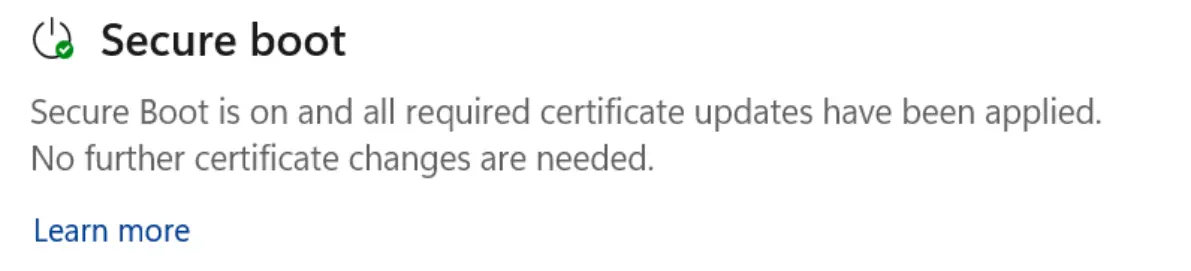
On the other hand, a yellow exclamation mark indicates that the device is running an older Secure Boot certificate that requires updating. Hence the recommendation in this case is to connect to the internet and update the device via Windows Update.
Finally, a red cross or stop icon indicates that a device still possesses expired Secure Boot certificates, and so it requires a firmware update to fix.
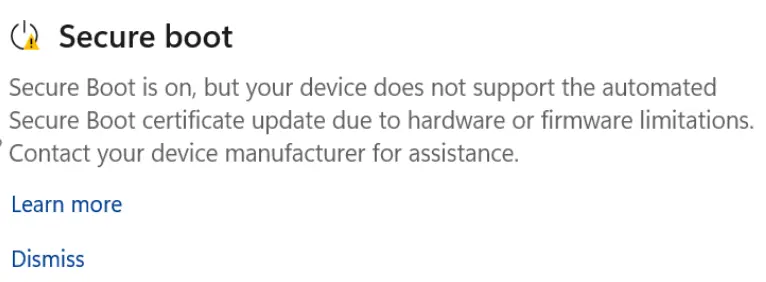
A helpful table has also been shared by the company for additional guidance:
| If you see this message in the Secure Boot section | What you should do |
|---|---|
| Secure Boot is on and all required certificate updates have been applied. No further certificate changes are needed. | No action is needed. |
| Secure Boot is on, but your device is using an older boot trust configuration that should be updated. | Make sure your device has the latest Windows updates installed. Restart if prompted. |
| Secure Boot is on, but your device is affected by a known issue. To reduce risk, Secure Boot certificate updates are temporarily paused while Microsoft and partners work toward a supported resolution. The update will resume automatically once resolved. | No action is needed. The certificates update will resume automatically once the issue is resolved. |
| Secure Boot is on, but your device is using an older boot trust configuration that should be updated. There is not yet enough data to classify your device for automatic update. Visit the link below for more information. | Your device might need additional validation before the update can proceed automatically. Visit aka.ms/getsecureboot for more information. |
| Secure Boot is on, but your device does not support the automated Secure Boot certificate update due to hardware or firmware limitations. Contact your device manufacturer for assistance. | Contact your device manufacturer for assistance. |
| Secure Boot is on, but this device can no longer receive required updates for the Windows boot experience. | Your device is still using an old certificate after the expiration dates. Visit aka.ms/getsecureboot for guidance. |
Aside from the new caution feature on the Windows Security app, Microsoft has added that more such Secure Boot warnings, like system alerts, will be rolling out starting May 2026.