
Microsoft is further improving Bluetooth audio capabilities in Windows 11 by finally introducing shared audio support. Starting with the latest build 26220.7051, Windows 11 users can share a single audio stream to two separate headphones, speakers, hearing aids, and other wireless audio devices. Microsoft says this feature is useful for scenarios like watching a movie on a plane with someone else, studying together, and more.
Sadly, there is one big catch. In addition to being available only in the Insider program (Dev and Beta Channels), shared Bluetooth audio in Windows 11 currently works with Copilot+ PCs with Qualcomm Snapdragon processors. Microsoft is working on adding more devices to the compatibility list, so look forward to getting it if you have a Samsung Galaxy device with an Intel Core Ultra Series 200 processor.
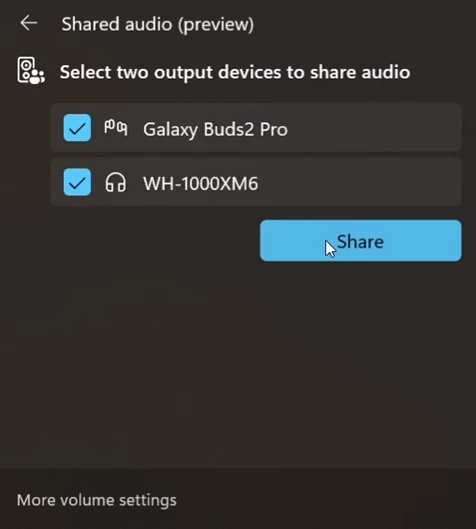
For now, shared audio only works on consumer and business versions of Snapdragon-based Surface Laptop 7 and Surface Pro 11. Soon, Microsoft will bring shared audio to Samsung Galaxy Book5 Pro, 360, 360 Pro, and Book4 Edge with Intel Core Ultra 200 and Snapdragon X chips, alongside lower-end Surface Laptop 13-inch and Surface Pro 12-inch with Snapdragon processors. According to the announcement post, a driver update will appear first, after which, you will see the Shared Audio tile in Quick Settings. By the way, Windows Update now uses simplified names, so spotting the necessary driver should be easier.
Microsoft says more devices "may be supported once available to general audiences."
As for compatible headphones, Microsoft says shared audio in Windows 11 works with a wide range of accessories that support Bluetooth LE Audio. Those include (not limited to) Samsung Galaxy Buds2 Pro, Buds3 and Buds3 Pro, Sony WH-1000XM6, and various hearing aids from ReSound and Beltone that support Bluetooth LE Audio.
If you have a compatible device and the latest Windows 11 preview build, you can try shared audio by pairing two headphones and then clicking the Shared Audio tile in Quick Settings. Select the headphones you want to use and press Share.


















8 Comments
Load the comments and join the conversation!
Read the comments, ask the editors questions, show respect and join the conversation.