• 0

Digsby has gone to the dark side.


Question

After recently downloading a copy of Digsby at a customers house. I was shocked what I found. I was so shocked I rechecked that I hadn't been phished about 4 times.

While all of the stuff in new install is opt out. Its still a step back. Whats funny is that after you see all of that spyware being thrown in your face a box pops up at the end of the install wanting your email address. If that doesn't make you worried on some level even if just for a moment, you need to listen to some "security now".

Here is what I posted on the digsby forum regarding the new installer

First of let me start by saying I downloaded the first beta that was made available to the public. When I say I was quite impressed I'm not kidding. Never before had I fallen in love with an IM client that I continued to use for months and still use to this day. I tried other IM clients like Pidgin or Miranda. But they got deleted after about a day of use. They just never felt right. The previous IM messenger I used was trillian. With the new Astra release taking forever and the god ugly default UI, well let's just say Digsby came along just in time.

About 2 weeks ago I was at a customer's house. I do computer repair and I was there on a repair job. I just finished reinstalling Windows XP from a malware infection. I was going to have them try Digsby, in hopes this would prevent them having to run 4 different messengers at once. I went to the site and downloaded the installer. Once I opened the installer to start installing Digsby, to say I was surprised is an understatement. I was so surprised that I thought somehow I had been phished by miss typing the URL. So I checked it, double checked it and triple checked it. Surely this installer couldn't be related to Digsby? So I checked it again. At this point I closed the installer hopping I just didn't catch some kind of infection on this nice clean xp machine. I don't know what frightened me more about that installer. The fact it looked so doggy or all of the different things I could potentially infect (yes I said infect, most of that stuff is spyware) this machine with.

I don't know if it's because I'm computer savvy, or the fact I listen to the podcast "Security Now" every week and just had a gibsonian response(a response Steve Gibson would have if he ran your installer).

I realize that you make all of the items on the installer opt out. Being in the computer repair business you see just how stupid people can be. People will infect themselves will all sorts of stuff without trying very hard. Unfortunately I feel your new Digsby installer gives people an even easier way to accomplish that.

I know you guys want to make money. After all, you are making something for free. I just have to imaging there is a better way to accomplish this than by using your new frightenly infectious installer. Remember how bad the buzz surrounding Kazza was from installing tons spyware on peoples machines? At this point in time I feel you are really no different, other than the fact you ask people before you do it. The truth of the matter is people are too stupid to opt out.

I would try a donation button first. See how that goes. If you offered free life time upgrades I'd buy a copy of your product for $20. Just please do away with your new installer. While I guess you guys mean well on some really hard to figure out level, in the end your shooting yourself in the foot. Keep it up and you will be known as the Kazza of instant messengers.

Adam

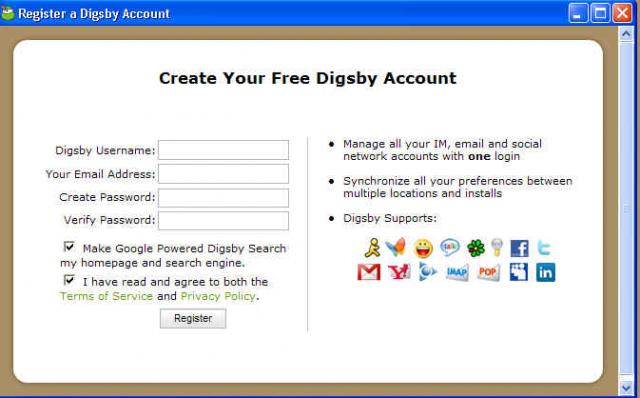
And now for the photos

post-4927-1230616278_thumb.jpg

post-4927-1230616284_thumb.jpg

post-4927-1230616289_thumb.jpg

post-4927-1230616294_thumb.jpg

post-4927-1230616298_thumb.jpg

post-4927-1230616304_thumb.jpg

post-4927-1230616310_thumb.jpg

post-4927-1230616316_thumb.jpg

post-4927-1230616321_thumb.jpg

Edited by warwagon
Link to comment
https://www.neowin.net/forum/topic/715258-digsby-has-gone-to-the-dark-side/
Share on other sites

Recommended Posts

  • 0
I realize that you make all of the items on the installer opt out

opt-out? It looks to me like all those items are actually opt-in by default in the installer, ie. if you just click accept accept accept, you'll get all those malwares installed by default.

this is really sad for Digsby, which was a nice program with a nice design before.

  • 0

Yeah I got that installer last time I did a full install. It's pretty bad for those unsuspecting who will just click accept. I'm not like that way though and immediately went to the decline part figuring if it stops the installation, I just won't use Digsby. I'm still using Digsby though because, barring the ridiculous installer, it is a really good IM client.

-Spenser

  • 0

After reading this blog post :

http://blog.digsby.com/archives/68

it seems they also opt-in by default to use your computer for some "research to make the world a better place".

Curiously they don't tell you want those "research to make the world a better place" really are... and considering those spywares pushed by their installer, I won't trust their choice of "research to make the world a better place" :shiftyninja:

  • 0

Bummer, and someone just recommended me Digsby.

Thanks for the heads up!

Edit: Also, like the guy above me mentioned:

If you think this is bad, you should check out their new 'help digsby do research' option that's buried in their menu structure and ENABLED BY DEFAULT. This allows your computer to join a computational botnet that does commercial work that the Digsby team gets paid for (think folding@home for money). Notice your laptop fan whirring away unexpectedly? You're probably doing protein analysis for some drug company. Totally shady. I'm dropping Digsby like a hot potato, I've lost all trust in the developers if they somehow think this is 'okay'.

http://www.downloadsquad.com/2008/11/24/ne...oat-and-adverts

Edited by psygn
  • 0

:/

They should offer a "slim" installer on their website as well at least if they're going to pull this with their main installer.

Plus opting people in by default for some research application is wrong, that should be at user discretion only.

  • 0

Never used digsby, but that installer looks shocking... What extra features does this have over aMSN or Pidgin? I only use my client for chatting with friends and sharing photos/screenshots, which is why I use adium on my mac. As far as I'm aware, pidgin, aMSN and adium do not require you to install any supporting software, and yet are still turning out semi-regular updates... Perhaps these guys have real jobs as well and are doing their projects as an aside, or perhaps they get enough donations to make it worthwhile. Whatever the case, perhaps someone should make a digsby-clone and make it open source, if it has enough features to make it worthwhile putting the effort in...

  • 0

Just decided to install this in a sandbox virtual machine after a friend recommended it to me and I have to say, I'm not impressed. The installer itself looks like spyware, and the fact that they are using your extra CPU cycles and therefore slowing down your computer (if for instance the client starts utilizing cycles while another program is in the middle of something important) is a complete turn off.

  • 0

Great post because this REALLY P I SS ED me off....

When Digsby came out, I was excited, and immediately switched from Pidgin over to Digsby.. I loved the theme options, ease of installation/changing of themes, and recommended Digsby to every friend, co-worker I had. (We use AIM at work to communicate).... But I recently had to do a reformat on one of my employee's machines, and after downloading the latest digsby and started the install, noticed these boxes come up and was completely shocked... Honestly I thought I had gotten a fake version of Digsby or something.. I cancelled the install, and redownloaded from the site, again to my horror it was there.... I went back and installed an OLD version of AIM on their machine and told them this would work great for now.....

I am honestly going back to Pidgin now, just because of the spam they are adding into Digsby.. Now I know they its a freeware program and such, and they have to do something to help generate revenue, but it being the way it is, really bugs me, and I don't plan on continueing to use the program.

This topic is now closed to further replies.
  • Recently Browsing   0 members

    • No registered users viewing this page.
  • Posts

    • Studio MDHR reveals Cuphead sequel and an 8-bit platformer spin-off by Pulasthi Ariyasinghe Studio MDHR has been rather silent about its next major gaming project since the release of Cuphead back in 2017. However, that ended today during the Summer Game Fest presentation, with the studio revealing not one but two project announcements. First, the studio confirmed that it is currently in the middle of developing a brand-new Cuphead game, bringing back the iconic characters for another adventure. Just like the last game, this is slated to be a fully hand-animated endeavor. This also means there isn't a release date attached to it yet. “Craftsmanship is at the heart of everything we do here at Studio MDHR,” says co-founder Chad Moldenhauer. “When it came time to peel back the curtain and share a little bit about what we’ve been up to, we couldn’t imagine a more fun way to do so than with today’s Special Bulletin. The studio is working on this new Cuphead with help from Toronto’s Stop Motion Department and Continue Agency. At the same time, Studio MDHR also revealed that another part of the team has been working on a different Cuphead installment. Dubbed the Mighty Cuphead Adventure, this is taking a different art direction to the original. "In true Studio MDHR fashion, this game goes beyond just taking inspiration from the classics of the 1980s… it is actually built with technology of the era," the studio explained. "That's right: Mighty Cuphead Adventure is programmed in assembly language and designed with the exacting specifications of the Sega Master System home gaming console in mind." Aside from releasing on PC and modern consoles, Mighty Cuphead Adventure will even be playable on the 1985-released Sega Master System. A release date has not been announced just yet.
    • Any decent ITSM will A) have a web form that allows a user to raise a ticket, if you're writing an email you can write a ticket. B) Monitor a mailbox and auto-generate tickets based on inbound mails for those users that really can't get their heads around the concept that if you have an issue you go to support.mycompany.com and fill in the box. From your description you're having users email the desk, and then having a human read each one and manually raise a ticket on behalf of the user.
    • Microsoft PC Manager 3.21.6.0 (Offline Installer) by Razvan Serea With Microsoft PC Manager, users can easily perform basic computer maintenance and enhance the speed of their devices with just one click. This app offers a range of features, including disk cleanup, startup app management, virus scanning, Windows Update checks, process monitoring, and storage management. Microsoft PC Manager key features: Storage Manager- easily uninstall infrequently used apps, manage large files, perform a cleanup, and set up Storage Sense to automatically clear temporary files. Health Checkup feature -scans for potential problems, viruses, and startup programs to turn off. It helps you identify unnecessary items to remove, optimizing your system's performance. Pop-up Management - block pop-up windows from appearing in apps. Windows Update - scans your system for any pending updates. Startup Apps - enable or disable startup apps on your PC, allowing you to optimize your system's startup performance. Browser Protection - rest assured that harmful programs cannot alter your default browser. Also enables you to change your default browser. Process Management - allows you to conveniently terminate any active process, ensuring optimal system performance and resource utilization. Anti-virus protection - Fully integrated with Windows Security. Safeguard your PC anytime. Quick Steps: Download Microsoft PC Manager Offline Installer (APPX/MSIX) with Adguard Adguard serves as a third-party online service, offering a user-friendly method for directly downloading appx, appxbundle, and msixbundle files from the Microsoft Store. Official download links will be generated for both the app's various versions and its dependency packages. How to download Microsoft PC Manager Offline Installer (APPX/MSIX) 1. Initially, you must find the app URL within the Microsoft Store. Access the Microsoft Store via your browser and search for "Microsoft PC Manager". Once located, copy the app URL, which includes the product ID, either from the address bar or from the provided link below. https://apps.microsoft.com/detail/9PM860492SZD 2. Now paste the app URL into the designated area, then click the check mark button to produce a direct download link. 3. To download, right-click the relevant link and select “Save link as…” from your browser's menu. Occasionally, Microsoft Edge may flag the download as insecure. In such cases, consider utilizing alternative browsers such as Google Chrome or Firefox to successfully complete the download. Microsoft PC Manager is a completely free tool optimized exclusively for use on Windows 10 (19042.0 and above) and Windows 11. Download: Microsoft PC Manager 3.21.6.0 | from Microsoft Store View: Microsoft PC Manager Home Page | Screenshot Get alerted to all of our Software updates on Twitter at @NeowinSoftware
    • I've never even heard of this browser before seeing this article. How does it differ from other browsers?
    • Fixing things? Have you ever tried linux? Everything works out of the box nowadays in most common hardware. This includes Wifi and Bluetooth. If anything, if they return back to windows is because they haven't found an equivalent program which often used on windows.
  • Recent Achievements

    • Mentor
      grik went up a rank
      Mentor
    • Dedicated
      JKR earned a badge
      Dedicated
    • One Year In
      CHUNWEI earned a badge
      One Year In
    • Conversation Starter
      FBSPL earned a badge
      Conversation Starter
    • Week One Done
      I2D earned a badge
      Week One Done
  • Popular Contributors

    1. 1
      +primortal
      489
    2. 2
      PsYcHoKiLLa
      273
    3. 3
      Skyfrog
      78
    4. 4
      Steven P.
      66
    5. 5
      +Edouard
      61
  • Tell a friend

    Love Neowin? Tell a friend!