• 0

Digsby has gone to the dark side.


Question

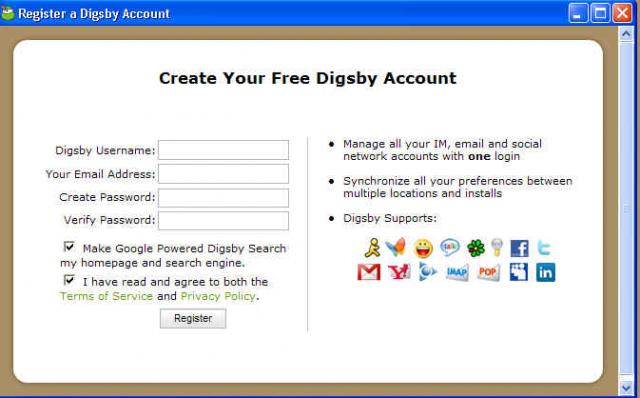
After recently downloading a copy of Digsby at a customers house. I was shocked what I found. I was so shocked I rechecked that I hadn't been phished about 4 times.

While all of the stuff in new install is opt out. Its still a step back. Whats funny is that after you see all of that spyware being thrown in your face a box pops up at the end of the install wanting your email address. If that doesn't make you worried on some level even if just for a moment, you need to listen to some "security now".

Here is what I posted on the digsby forum regarding the new installer

First of let me start by saying I downloaded the first beta that was made available to the public. When I say I was quite impressed I'm not kidding. Never before had I fallen in love with an IM client that I continued to use for months and still use to this day. I tried other IM clients like Pidgin or Miranda. But they got deleted after about a day of use. They just never felt right. The previous IM messenger I used was trillian. With the new Astra release taking forever and the god ugly default UI, well let's just say Digsby came along just in time.

About 2 weeks ago I was at a customer's house. I do computer repair and I was there on a repair job. I just finished reinstalling Windows XP from a malware infection. I was going to have them try Digsby, in hopes this would prevent them having to run 4 different messengers at once. I went to the site and downloaded the installer. Once I opened the installer to start installing Digsby, to say I was surprised is an understatement. I was so surprised that I thought somehow I had been phished by miss typing the URL. So I checked it, double checked it and triple checked it. Surely this installer couldn't be related to Digsby? So I checked it again. At this point I closed the installer hopping I just didn't catch some kind of infection on this nice clean xp machine. I don't know what frightened me more about that installer. The fact it looked so doggy or all of the different things I could potentially infect (yes I said infect, most of that stuff is spyware) this machine with.

I don't know if it's because I'm computer savvy, or the fact I listen to the podcast "Security Now" every week and just had a gibsonian response(a response Steve Gibson would have if he ran your installer).

I realize that you make all of the items on the installer opt out. Being in the computer repair business you see just how stupid people can be. People will infect themselves will all sorts of stuff without trying very hard. Unfortunately I feel your new Digsby installer gives people an even easier way to accomplish that.

I know you guys want to make money. After all, you are making something for free. I just have to imaging there is a better way to accomplish this than by using your new frightenly infectious installer. Remember how bad the buzz surrounding Kazza was from installing tons spyware on peoples machines? At this point in time I feel you are really no different, other than the fact you ask people before you do it. The truth of the matter is people are too stupid to opt out.

I would try a donation button first. See how that goes. If you offered free life time upgrades I'd buy a copy of your product for $20. Just please do away with your new installer. While I guess you guys mean well on some really hard to figure out level, in the end your shooting yourself in the foot. Keep it up and you will be known as the Kazza of instant messengers.

Adam

And now for the photos

post-4927-1230616278_thumb.jpg

post-4927-1230616284_thumb.jpg

post-4927-1230616289_thumb.jpg

post-4927-1230616294_thumb.jpg

post-4927-1230616298_thumb.jpg

post-4927-1230616304_thumb.jpg

post-4927-1230616310_thumb.jpg

post-4927-1230616316_thumb.jpg

post-4927-1230616321_thumb.jpg

Edited by warwagon
Link to comment
https://www.neowin.net/forum/topic/715258-digsby-has-gone-to-the-dark-side/
Share on other sites

Recommended Posts

  • 0

I am never ever using their software until they remove spyware from their installer.

I would not mind if it was opt out or something, hell i could live with a simple after install there be a popup or advert to view or even a few adverts but to have software installed that is spyware on my pc no thanks

This is low real low, they should of done the msn plus approach to this.

Boycott digsby

  • 0
i don't understand why people would use Digsby when there's a GREAT open source alternative called Pidgin available.

It even looks like Digsby.

Biggest reason is, Digsby adds, social networking, AND for me a really quick way to see your other emails, with a GMail notification on your taskbar.. I can click it and check my email without even going to the site.

Also it's MUCH easier to skin Digsby than it is Pidgin, and finding skins is a breeze. Try to explain to a 40+ yr old person about GTK and how to find a skin on the linux websites can be a pain in the butt.

My installer hasn't looked like that. I wonder if it's the new version.

If it does.. I won't be using it again.

It does Andrew.. Its the newest versions that has it, like I said my original installer did not, but when I got the most recent version from the site about a week or more ago, it had it in it.

  • 0

i had an older version of Digsby installed and each time they would push an update i would get it. however, a few days ago i got a message telling me that my version of Digsby was Very outdated and i figured it might need additional newer modules or something so i went to the site and downloaded the "New" installer. once i installed it i noticed my computer running slowly during renders. thats when i found out about the "Optional research function" even thought it says it uses low priority when rendering 3D graphics there was a Very noticeable different by HOURS of render time. I wish i had known before hand, i would have never upgraded it.

  • 0
i had an older version of Digsby installed and each time they would push an update i would get it. however, a few days ago i got a message telling me that my version of Digsby was Very outdated and i figured it might need additional newer modules or something so i went to the site and downloaded the "New" installer. once i installed it i noticed my computer running slowly during renders. thats when i found out about the "Optional research function" even thought it says it uses low priority when rendering 3D graphics there was a Very noticeable different by HOURS of render time. I wish i had known before hand, i would have never upgraded it.

That's odd. Mine's still pushing updates.

  • 0
I stopped using Messenger Plus! a long time ago because of the addition of adware in the installer. It looks like this is yet another one that will never touch my PC.

I really don't think it's fair to compare Digsby to Messenger Plus!. Cyril and the rest of us have worked extremely hard to make it clear that the sponsor program is not only 100% noticeable when installing, but also have worked to keep the sponsor program non-intrusive by filtering out nudity and profanity out of the advertisements. To say that you quit using Messenger Plus! because of the "addition of adware in the installer" is very misleading because it's totally noticeable.

50 million people use Messenger Plus! and it's resources on a daily basis, so it takes a lot for Cyril to keep the software going smoothly. The only way that we're able to see new version of Messenger Plus! offering new features (Such as the custom sounds feature), is by having the sponsor program.

Edited by RebelSean
  • 0

I liked digsby from the beginning, but I knew they would goto the dark side, but I never knew it would be this bad. It's sad to see such a good product turn to such garbage because of this.

  • 0
Who's the guy that submitted this to Digg?

Why ruin a perfectly good title ("Digsby has gone to the dark side")?

That'd be me, and I changed it because "spyware" seems to get more hits. It's not like the article was ripped and put elsewhere so I don't see what the big deal is.

  • 0

Yesterday I was flipping out trying to figure out why my system was acting so sluggishly. Now, I'm curious if it has anything to do with the hidden research option. Where in the settings does the option appear? I have to try to disable it tonight to see if it's the cause of my problems.

  • 0
Yesterday I was flipping out trying to figure out why my system was acting so sluggishly. Now, I'm curious if it has anything to do with the hidden research option. Where in the settings does the option appear? I have to try to disable it tonight to see if it's the cause of my problems.

It's buried under Help > Support Digsby, and in the dialog that appears there is an option for "Help Digsby conduct research" with a Disable button next to it.

  • 0

I guess i'll eat my words and wait for Trillian Astra to come out (currently in beta, which i'm testing...good so far). Hopefully there's a plugin similar to the e-mail function Digsby has where you can reply to e-mails from within the popup notification.

  • 0
For something completely different... There are still people out there taking Steve Gibson seriously?

That would be me. I agree Gibson has his moments where he says stupid stuff. Like vista includes an antivirus. I still believe he a very smart individual when it comes to security. He's very cautious online. After listing to security now for as long as I have I feel more paranoid online, which I think is a good thing.

  • 0
It's buried under Help > Support Digsby, and in the dialog that appears there is an option for "Help Digsby conduct research" with a Disable button next to it.

Thanks for the info.

I think that if you are an advanced enough user to want to use a multi service IM client, then it's pretty obvious that you don't want all the extra crap. So I don't really have an issue with Digsby there, but I had no idea about that, and I'm seriously ****ed off about it actually :angry:

Should I be able to see a process running in task manager apart from "digsby-app.exe" (I take it "aspell.exe" is installed by Digsby too)

  • 0

Considering the average user likely clicks 'Accept' repeatedly until the program is finished installing (sad...i know, but i'm sure it happens often), this is beyond ridiculous. I could understand 1 or 2 items in the install, but 4-5? Fail.

This topic is now closed to further replies.
  • Recently Browsing   0 members

    • No registered users viewing this page.
  • Posts

    • I don't hate the new menus, I am not a fan of the lack of features and how they went live when they clearly are not complete. The menu itself presents much better than the previous - but what's lacking (IMO) is: 1) Any kind of automated manipulation such as: "this goes on the new menu because you use this feature more often on this filetype" "this is rarely used and will fall back to the old menu" 2) Any kind of user manipulation such as: "a UI to add/remove/order items to the new menu"
    • The biggest issue in this version of Win 11 context menu, from usability standpoint, is the movable row with basic commands. Think of a car analogy...if You turn the week left the infotainment screen will move right and vice versa. With how it works now Microsoft made something forbidden in designing in any UI, software or hardware. I can't grasp who were the morons within Microsoft suggesting it was a good idea and gave it a green light.
    • LibreOffice 26.2.4 by Razvan Serea LibreOffice is the free power-packed Open Source personal productivity suite for Windows, Macintosh and Linux, that gives you six feature-rich applications for all your document production and data processing needs: Writer, Calc, Impress, Draw, Math and Base. Support and documentation is free from our large, dedicated community of users, contributors and developers. You, too, can also get involved! Choosing Between LibreOffice Still and LibreOffice Fresh: LibreOffice Still is a good choice if you value stability, a longer support cycle, and a more conservative approach to software updates. It's suitable for businesses and organizations where reliability and compatibility are crucial. LibreOffice Fresh is ideal if you're an enthusiast or an early adopter who wants to stay on the cutting edge of LibreOffice development and is willing to accept more frequent updates and occasional minor issues. Features: Writer is the word processor inside LibreOffice. Use it for everything, from dashing off a quick letter to producing an entire book with tables of contents, embedded illustrations, bibliographies and diagrams. The while-you-type auto-completion, auto-formatting and automatic spelling checking make difficult tasks easy (but are easy to disable if you prefer). Writer is powerful enough to tackle desktop publishing tasks such as creating multi-column newsletters and brochures. The only limit is your imagination. Calc tames your numbers and helps with difficult decisions when you're weighing the alternatives. Analyze your data with Calc and then use it to present your final output. Charts and analysis tools help bring transparency to your conclusions. A fully-integrated help system makes easier work of entering complex formulas. Add data from external databases such as SQL or Oracle, then sort and filter them to produce statistical analyses. Use the graphing functions to display large number of 2D and 3D graphics from 13 categories, including line, area, bar, pie, X-Y, and net - with the dozens of variations available, you're sure to find one that suits your project. Impress is the fastest and easiest way to create effective multimedia presentations. Stunning animation and sensational special effects help you convince your audience. Create presentations that look even more professional than the standard presentations you commonly see at work. Get your collegues' and bosses' attention by creating something a little bit different. Draw lets you build diagrams and sketches from scratch. A picture is worth a thousand words, so why not try something simple with box and line diagrams? Or else go further and easily build dynamic 3D illustrations and special effects. It's as simple or as powerful as you want it to be. Base is the database front-end of the LibreOffice suite. With Base, you can seamlessly integrate into your existing database structures. Based on imported and linked tables and queries from MySQL, PostgreSQL or Microsoft Access and many other data sources, you can build powerful databases containing forms, reports, views and queries. Full integration is possible with the in-built HSQL database. Math is a simple equation editor that lets you lay-out and display your mathematical, chemical, electrical or scientific equations quickly in standard written notation. Even the most-complex calculations can be understandable when displayed correctly. E=mc2. LibreOffice also comes configured with a PDF file creator, meaning you can distribute documents that you're sure can be opened and read by users of almost any computing device or operating system. LibreOffice also comes configured with a PDF file creator, meaning you can distribute documents that you're sure can be opened and read by users of almost any computing device or operating system. Download: LibreOffice 64-bit | LibreOffice 32-bit ~300.0 MB (Open Source) View: LibreOffice Website | Screenshot | Release Notes Get alerted to all of our Software updates on Twitter at @NeowinSoftware
    • Amazon eero Pro 6E mesh Wi-Fi system 2-pack is 27% off by Ivan Jenic The Amazon eero Pro 6E mesh Wi-Fi system is currently $239.99 on Amazon for the 2-pack, down from $329.99. That's 27% off and $90 saved for a solid Wi-Fi solution that covers your entire home (purchase link down below). The 2-pack covers up to 4,000 square feet (372 square meters) and supports 100+ connected devices, which handles the vast majority of home setups without breaking a sweat. Wi-Fi 6E brings access to the 6 GHz band for lower latency across the network, and the 2.5 Gb Ethernet port supports gigabit+ internet plans if your ISP offers them. eero's TrueMesh technology handles traffic routing automatically, so you're not manually managing which devices connect to which node. You set up the entire thing through the eero app, and the entire process takes a few minutes. The system also receives automatic security updates in the background, so once you set it up, you don't have to worry about compatibility issues. If you're covering a larger home or want more nodes, the 3-pack is $329.99 and the 4-pack is $479.98, both at similar discount levels. It's worth mentioning that a newer model exists, which is likely the reason for the discount, but the Pro 6E is still perfectly capable hardware for most homes. Amazon eero Pro 6E mesh Wi-Fi system 2-pack - $239.99 | 27% off on Amazon This Amazon deal is US-specific and not available in other regions unless specified. This is a first-party seller link (at the time of article publishing); ensure that you also purchase from a first-party seller link only. If you don't like it or want to look at more options, check out the previous deals that we have covered, OR you can also visit Amazon US deals page. Get Prime (SNAP), Prime Video, Audible Plus or Kindle / Music Unlimited. Free for 30 days. As an Amazon Associate, we earn from qualifying purchases.
  • Recent Achievements

    • Week One Done
      I2D earned a badge
      Week One Done
    • Week One Done
      Dr Jared Dental Studio earned a badge
      Week One Done
    • Week One Done
      RG INVESTMENT GROUP earned a badge
      Week One Done
    • Very Popular
      The Norwegian Drone Pilot earned a badge
      Very Popular
    • Very Popular
      s0nic69 earned a badge
      Very Popular
  • Popular Contributors

    1. 1
      +primortal
      484
    2. 2
      PsYcHoKiLLa
      258
    3. 3
      Skyfrog
      84
    4. 4
      FloatingFatMan
      64
    5. 5
      Michael Scrip
      63
  • Tell a friend

    Love Neowin? Tell a friend!