

-
Posts
-

By Chay Meredith · Posted
They should show the onedrive recycle bin in a searchable manner and on app not just on the website -

By PeterTHX · Posted
You looking at a phone or something? On my 4K HDR monitor it is frikking spectacular. -
.thumb.png.d61bbc678107f4e0e9d82b277997a816.png)
By MrElectrifyer · Posted
The Surface Pro 7+ already has a USB C port which can be used for everything you mentioned, except for eGPUs. Meanwhile, microsoft have gotten rid of ALL of the following that are present in the Surface Pro 7+: -
By PeterTHX · Posted
I expect more H.266 VVC which was finalized in 2020. -

By Steven P. · Posted
It also says "Google has about nine months to implement these controls under the compliance timeline. " so where Google is testing the new toggle might not be available to you yet.
-
-
Recent Achievements
-

 nothanks earned a badge
One Month Later
-
 B2Proxy earned a badge
One Month Later
-

 MadMung0 earned a badge
One Year In
-

 jefred earned a badge
Week One Done
-

 JoeyNeo went up a rank
Apprentice
-
-
Popular Contributors
-
Tell a friend


.thumb.png.d61bbc678107f4e0e9d82b277997a816.png)



.thumb.png.b7089ebbdf00d96b3b92dddbd04bac02.png)


Question
Rob Veteran
Hi all, hope you're well.
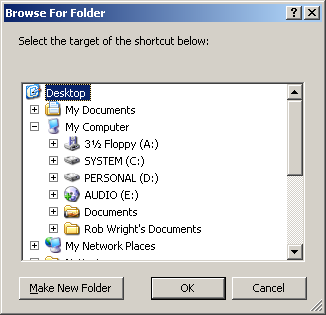
Could someone please provide information on how to build a tree menu like the one pictured below (though not for selecting directories, just for general use). Ideally it should support XP-style alpha-channel icons as well as normal 16-bit icons.
Thanks in advance.
Update: I've got the TreeView control working fine but it doesn't support alpha-blended icons - any ideas?
Edited by XenonicRobLink to comment
https://www.neowin.net/forum/topic/133013-vb6-tree-menu-with-icons-help-please/Share on other sites
3 answers to this question
Recommended Posts