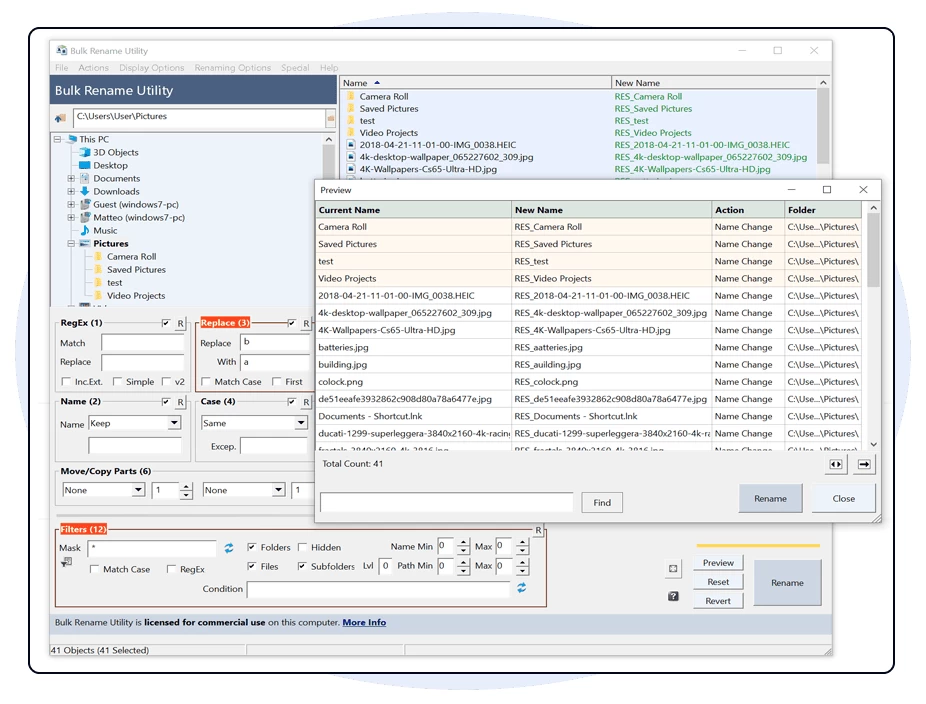
Bulk Rename Utility is an easy to use file rename program (a.k.a. file renamer). Renaming multiple files and/or multiple folders has never been easier. It has a small memory footprint so it can be left running all the time without consuming all your memory. Add date/time stamps, replace numbers, insert text, convert case, add auto-numbers, process folders and sub-folders... plus a whole lot more!
Bulk Rename Utility allows you to easily rename files and entire folders based upon extremely flexible criteria.
Bulk Rename Utility is free of charge for personal, private use, at home. To use Bulk Rename Utility within a business entity, company or for commercial purposes, a commercial license is required.
Bulk Rename Utility key features:
- Rename multiple files quickly, according to many flexible criteria.
- Rename files in many ways: add, replace, insert text into file names. Convert case, add numbers. Remove or change file extensions.
- Check the detailed preview before renaming.
- Add "Bulk Rename Here" to the Windows Explorer for quick access (optional).
- Directory recursion - process files/folders in all sub-directories too.
- Use Regular Expressions to rename files / folders.
- Use Javascript to rename files / folders.
- Rename files from an input text-file list (CSV).
- Create an Undo batch file.
- Log all renaming activity to a log file.
- Change file and folder date/timestamps (created, modified, accessed).
- Change file/folder attributes (hidden, read-only, archived).
- Rename photos using EXIF metadata (i.e. "Date Picture Taken", "Resolution" and other information embedded in all JPG photo files).
- Rename MP3 files using ID3 tags (a.k.a. MP3 ID3 tag renaming).
- Rename files using Windows File Properties (e.g. length, width, height, rate, publisher, title, etc). More than a hundred attributes for different file types.
- Change EXIF date taken information.
Bulk Rename Utility 4.0.0.8 changelog:
- New Renaming Option (Advanced): 'Bypass Name and Path Validation
- Performed by Windows'. This option is useful when renaming files with invalid characters, such as removing an invalid dot or space at the end of a filename.
- Changed behavior of the 'Word Space' option in Add (7): it now inserts spaces only before uppercase letters that follow lowercase letters or numbers, and ignores all other characters. The old behavior can still be achieved using a RegEx.
- Upgraded the RegEx (1) v2 algorithm from UTF-8 to UTF-16 to avoid issues with characters such as à, á, è, é, í, ó, ú, and other problems related to replacing certain Unicode characters. This also applies to regular expressions used in Replace (3).
- Added support for using relative paths in Copy/Move to Location (13). For example, use “.\” for current folder, “..\” for parent folder, or simply “SubfolderName” to copy or move files to a subfolder of the current folder. This allows creating copies of files/folders “in place” or relative to the current file path.
- Extended the functionality of the Lvl field in Filters (12). You can now limit subfolder level inclusion using comparison operators: <=, < (e.g., <=3, <3), >, >= (e.g., >0, >=5), and = (e.g., =3). For example, to include all subfolders with files but exclude files in the root folder, use >0. To include only files and subfolders at level 2, use =2.
- Fixed an issue with copying/moving folders using Copy/Move to Location (13) while also renaming them.
- Fixed issue with Delta timestamp changes not working in version 4.0.0.7.
- Fixed issue with the program freezing when browsing files and folders on a hidden drive. The hidden drive is still not shown in the Bulk Rename Utility folder tree, but entering a path in the address bar now allows browsing the drive and renaming files and folders without the program locking.
Download: Bulk Rename Utility 4.0.0.8 | 11.4 MB (Free for personal use)
Download: Bulk Rename Utility Portable | 20.6 MB
View: Bulk Rename Utility Home Page | Screenshot
 Get alerted to all of our Software updates on Twitter at @NeowinSoftware