SceneShift is a terminal-first process optimizer built for people who push their hardware hard—gamers, 3D artists, streamers, and anyone preparing for heavy rendering workloads. Instead of manually hunting down background apps eating CPU and RAM, SceneShift lets you kill or suspend them in one move, creating what feels like an instant “performance scene” for your machine.
Its zero-bloat design makes it remarkably quick: you toggle a preset, free gigabytes of memory, and launch your game or render pipeline without the usual slowdowns. Features like Snapshot RAM provide real-time feedback on how much memory you’ve reclaimed, while Smart Process Control lets you suspend apps like Chrome or Spotify without closing them completely. It’s clean, efficient, and designed for peak performance.
Installation is simple: place SceneShift.exe in a dedicated folder, run it with admin privileges, and it automatically generates all required config files. SceneShift delivers a clean, zero-bloat performance boost for modern Windows users.
SceneShift v2.0 release notes:
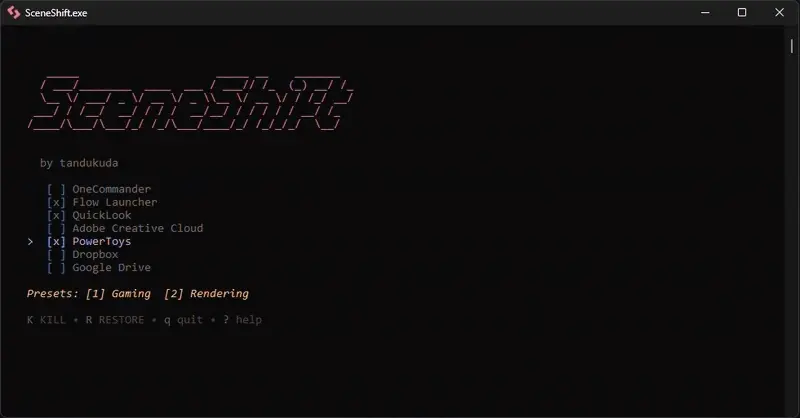
Version 2.0 transforms SceneShift into a fully interactive tool—no more editing config files manually. You can now add, edit, or remove apps inside the interface using a visual checklist, real-time process search, and instant-save configuration. The new theme engine offers guided first-run setup, live color editing, and built-in presets like Nord, Dracula, and Rose Pine.
Changelog:
Key Features
- In-App Editor: Add, edit, remove apps without editing config files. Instant saves.
- Real-Time Process Search: Smart scanning and live filtering of running apps.
- Visual Preset Manager: Create and toggle hotkey presets with a visual checklist.
- Live Theme Editor & First-Run Setup: Choose themes, live hex editing, zero-config start.
Improvements
- Smart Tab Navigation for faster workflow.
- Admin Manifest ensures proper privileges on startup.
- Self-Healing configs: missing files regenerate automatically.
Download: SceneShift 2.0 | 4.7 MB (Open Source)
Links: Home Page | SceneShift @GitHub | Screenshot
 Get alerted to all of our Software updates on Twitter at @NeowinSoftware

















0 Comments
Load the comments and join the conversation!
Read the comments, ask the editors questions, show respect and join the conversation.