

-
Posts
-

By +DoctorD · Posted
I always thought it was cool that one of my ancestors was mentioned in AC 3 -
.thumb.jpg.97db76d73f0f840ec31db7c170de109d.jpg)
By monterxz · Posted
After releasing Skull And Bones they actually listened to fans saying "wish they just remastered Black Flag" 😂 -

By Jose_49 · Posted
5080ti anyone? Also I'm still impressed that nvidia wants to release something like this under these circumstances (memory who?). Additionally the entire RTX 50 lineup has been such a downer. -

By Copernic · Posted
BATorrent 4.4.1 by Razvan Serea BATorrent is a lightweight, open-source BitTorrent client built with modern C++ and Qt 6, offering a clean, fast, and privacy-focused alternative to traditional torrent apps. It supports magnet links, .torrent files, resume data, sequential downloading, per-file priorities, and even imports from qBittorrent. Power users benefit from integrated RSS auto-download with regex filtering, duplicate detection, and automatic tracker lists from Stremio. Streaming is seamless thanks to auto-detected players like VLC and IINA. BATorrent includes robust VPN tools—interface binding, auto-detection for WireGuard-based services like Mullvad and NordLynx, kill switch, proxy support, and IP filtering. A full WebUI enables remote control, while integrations with Plex, Jellyfin, and Emby automate library updates. With themes, speed scheduling, system-tray alerts, and cross-platform support for Windows, Linux, and macOS, BATorrent delivers a polished, high-performance torrenting experience. BATorrent features: Core .torrent file and magnet link support Resume data — picks up where you left off after restart Import torrents from qBittorrent Create .torrent files from any file or folder Sequential download mode Per-file priority control (skip, low, normal, high) Seed ratio limits with auto-pause DHT, PEX, UPnP, NAT-PMP RSS Auto-Download Subscribe to RSS feeds — automatically download new torrents as they appear Regex filters — match only what you want (e.g. 1080p|720p, S01E\d+) Per-feed settings — custom save path, check interval (5–1440 min), enable/disable Auto-download — matched items are downloaded automatically in the background Supports magnet links, .torrent URLs, and tags Tray notifications when items are auto-downloaded Duplicate detection — never downloads the same item twice Stremio Stremio Addon System pre-installed — works out of the box Auto tracker list from ngosang/trackerslist Streaming Play while downloading — stream video files before the download is complete Supports mp4, mkv, avi, mov, wmv, flv, webm, m4v, ts Auto-detects installed players (VLC, IINA, system default) VPN & Privacy Interface binding — lock torrent traffic to a specific network interface (e.g. tun0) Auto VPN detection — identifies VPN interfaces (tun, tap, WireGuard, Mullvad, NordLynx, ProtonVPN) Kill switch — automatically pauses all torrents if the VPN interface drops Auto-resume — resumes only the torrents paused by the kill switch when VPN reconnects Proxy support — SOCKS5 and HTTP proxy with optional authentication IP filtering — load P2P blocklists to block unwanted IP ranges Protocol encryption (enabled / forced / disabled) WebUI Remote management — control torrents from any browser at http://localhost:8080 REST API with JSON responses Add torrents via magnet link or .torrent upload Pause, resume, remove torrents remotely View peers and files per torrent Dark theme matching the desktop app HTTP Basic Auth with SHA-256 password hashing Configurable port and remote access (localhost vs 0.0.0.0) Interface 3 themes: Dark, Light, Midnight (bat/vampire aesthetic) Real-time speed graph Detailed panel with tabs: General, Peers, Files, Trackers Filter bar: search by name, filter by state (Active, Downloading, Seeding, Paused, Finished) Drag & drop .torrent files and magnet links Drag & drop reorder in torrent list System tray with notifications (download complete, kill switch events, RSS auto-downloads) Splash screen with bat animation Bilingual: English and Portuguese (BR), auto-detected from system locale Bandwidth Scheduler Alternative speed limits — set different download/upload limits on a schedule Time range — configure active hours (e.g. 01:00 to 07:00), supports overnight ranges Per-day control — choose which days of the week the schedule applies Automatically switches between normal and alternative speeds Media Server Integration Plex — automatically trigger library scan when a download completes Jellyfin / Emby — same automatic library refresh via API Configure server URL and authentication token/key in Settings System Cross-platform: Windows, Linux, macOS Auto-shutdown — automatically shut down PC when all downloads complete (60s cancellable countdown) Auto-update system (AppImage on Linux, installer on Windows, DMG on macOS) CLI arguments: pass .torrent files or magnet: URIs directly Keyboard shortcuts: Space to toggle pause, Ctrl+A to select all, Ctrl+O to open BATorrent 4.4.1 changelog: A hotfix for v4.4.0, which failed to launch on Windows. Windows: the app launches again. v4.4.0 shipped a QML shadow effect (RectangularShadow) that failed to resolve on Windows, silently failing the whole UI to load — no crash, no error, the app just quit. Replaced with the same shadow technique already used everywhere else in the app. Download: BATorrent 4.4.1 | 38.1 MB (Open Source) Download: BATorrent Portable | 53.9 MB Links: BATorrent Website | Screenshot Get alerted to all of our Software updates on Twitter at @NeowinSoftware -

By seeprime · Posted
Yeah, there's a good reason that ads show distracting video during the part where the dangerous side effects are described "and even death. (Video changes happy scenes) Contact your doctor now! Netflix has gone off track by using excessive amounts of foreign shows. I suspected them and will keep doing so until some new good content arrives.
-
-
Recent Achievements
-

 hadiaali45 earned a badge
Week One Done
-
 arone_24 earned a badge
Week One Done
-

 flexorcist earned a badge
Reacting Well
-

 VitãoTub earned a badge
First Post
-
 M S COMMUNICATION earned a badge
Week One Done
-
-
Popular Contributors
-
Tell a friend

.thumb.jpg.97db76d73f0f840ec31db7c170de109d.jpg)



.thumb.png.b7089ebbdf00d96b3b92dddbd04bac02.png)



Question
flexorcist
ive always been fascinated by old software this is an old video player for windows from apple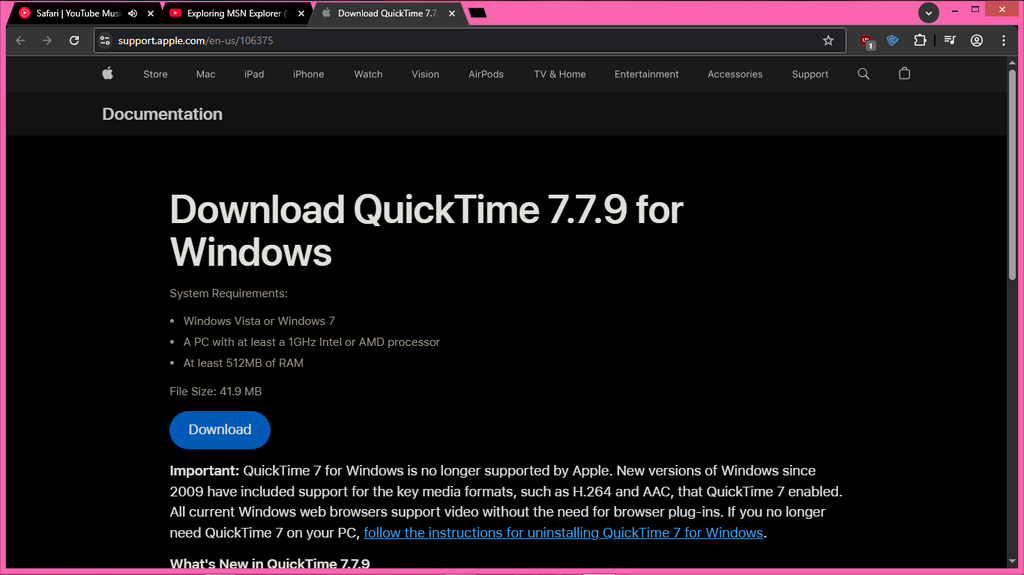
Link to comment
https://www.neowin.net/forum/topic/1467314-what-other-retro-software-do-yall-use/Share on other sites
27 answers to this question
Recommended Posts
Create an account or sign in to comment
You need to be a member in order to leave a comment
Create an account
Sign up for a new account in our community. It's easy!
Register a new accountSign in
Already have an account? Sign in here.
Sign In Now