
Microsoft has announced that WSL containers, a feature that allows developers to run Linux containers natively inside Windows without the need for Docker Desktop, is now available in public preview several weeks after Microsoft previewed it at Build 2026.
To use the new container feature, you first have to install the latest pre-release version of the Windows Subsystem for Linux by running a quick update command in your terminal:
wsl --update --pre-release
After installing, you'd get access to the new Linux container CLI (wslc.exe) and the programmable API.
Microsoft said that the CLI has a "familiar format" that matches the toolsets developers already use every day. If you know standard Docker commands, your muscle memory will translate directly to wslc.exe, which even features a built-in alias called container.exe.
You can quickly run a full Ubuntu KDE desktop container by exposing ports, or pass your graphics card straight into a machine learning environment to run PyTorch workloads. Passing the --gpus all flag inside the run command instantly links your hardware.
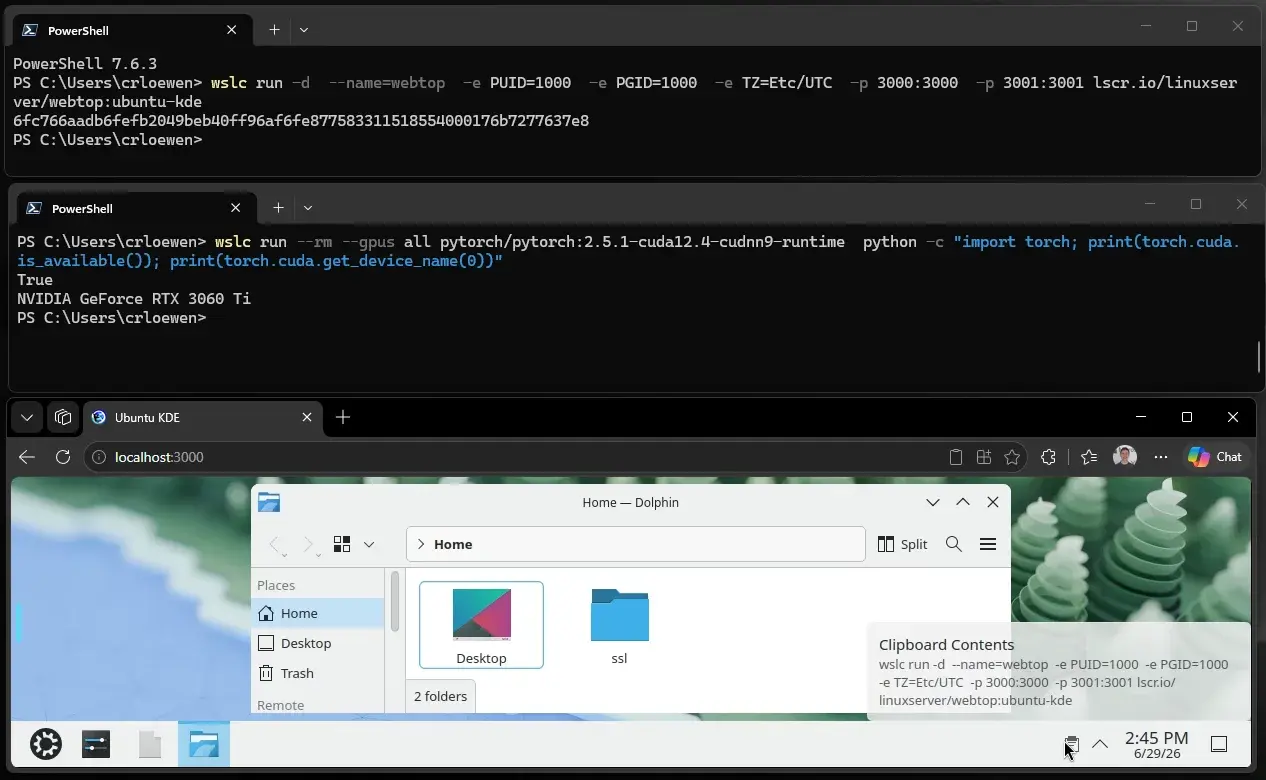
As for the API, developers can now embed Linux container operations directly inside native Windows applications without exposing the command line to users. The team integrated the API directly into MSBuild and CMake, so developers can define container steps directly in project files.
Apart from bringing the CLI and API into public preview, Microsoft also said that it's working on a new default file system called virtiofs to speed up file transfer rates between Windows and Linux. Microsoft also introduced an experimental networking mode named consomme, which resolves compatibility issues with corporate VPNs by routing Linux network traffic straight through Windows.
One thing to note about WSL containers is that they don't run in your standard WSL distributions; instead, every application and CLI session spawns its own lightweight Hyper-V utility VM in the background. This basically reduces the chances of one app snooping on the container of another app.

















3 Comments
Load the comments and join the conversation!
Read the comments, ask the editors questions, show respect and join the conversation.