Google Gemini has been around for over three years. The AI chatbot started its journey back in 2023 (as Bard) when ChatGPT was already a talk of the town. However, it quickly attracted criticism after misrepresenting facts about the James Webb Space Telescope.
The search giant spent a year fine-tuning Bard before rebranding the chatbot and its underlying generative AI model to Gemini, drawing inspiration from NASA's first human spaceflight program. Note that Bard was initially powered by LaMDA and PaLM 2; Google has since added several new features and integrations to Gemini.
That said, there is scope for improvement and a gap for new features. I have been using Gemini for a while now and have realized that the chatbot lacks several features, making it harder for me to research across topics. These are mostly function-over-form updates that can improve the overall experience.
Delete individual messages from a conversation

One good thing about Gemini is that it can maintain context throughout the conversation. But things might get chaotic when you want to ask a related question, but don't want it to be part of your conversation in the long run.
You can't ask that related question in a fresh chat because Gemini will lose the active conversation context of what you're trying to research. If Google allowed you to delete individual question/answer pairs, you could simply ask about a sub-topic and remove it from the conversation to create a smooth flow of important stuff.
Offline mode

A big pain of using Gemini daily is that everything loads from the cloud. It takes time for your chats to appear, and you can't view your conversation history while offline. To get a better idea, you can open the Gemini app and see how it looks without an internet connection.
While Gemini models run in the cloud, it wouldn't hurt if Google could store chats (at least the text part) on the device so we can refer to them when offline.
Google can also offer a lightweight version of its AI model to help with basic drafting, summarization, and other tasks. It has the Gemini Nano model, which can perform on-device processing on Google Pixel, Samsung, and some other Android brands, but it's a system feature and not related to the cloud-based Gemini app.
Make temporary chats permanent
I can't thank Google enough for taking the time and effort to add incognito mode or temporary chat mode to the Gemini app. It lets you have conversations without worrying that the topics will end up in your chat history or used for model training (at least on paper).
Google claims that it doesn't use your temporary chats to "personalize your Gemini experience or train Google’s AI models." However, the data is stored "up to 72 hours to respond to you and to process any feedback you choose to provide."
That said, I often start researching something in a temporary chat, only to realize the chatbot's answer is good enough to refer to later. Sadly, Gemini doesn't have an option to make such temporary chats permanent.
In other words, I won't be able to follow up on it if I close the temporary chat. I'm left with alternatives like copying the answers into notes or another app. My digital life will get a lot better if Gemini gets a button to make temporary chats permanent.
Collapse answers for a cleaner view
You're heavily invested in your research game and suddenly feel the need to go up in the chat to recall something. This is when the conversation thread starts to feel like an overwhelming, unending wall of questions and answers.
What if Google added a way to collapse Q&A pairs in the Gemini chat thread? It would look quite clean and easy to navigate. You'll quickly get an overview of everything you have discussed with the chatbot.
Add buttons to jump between messages
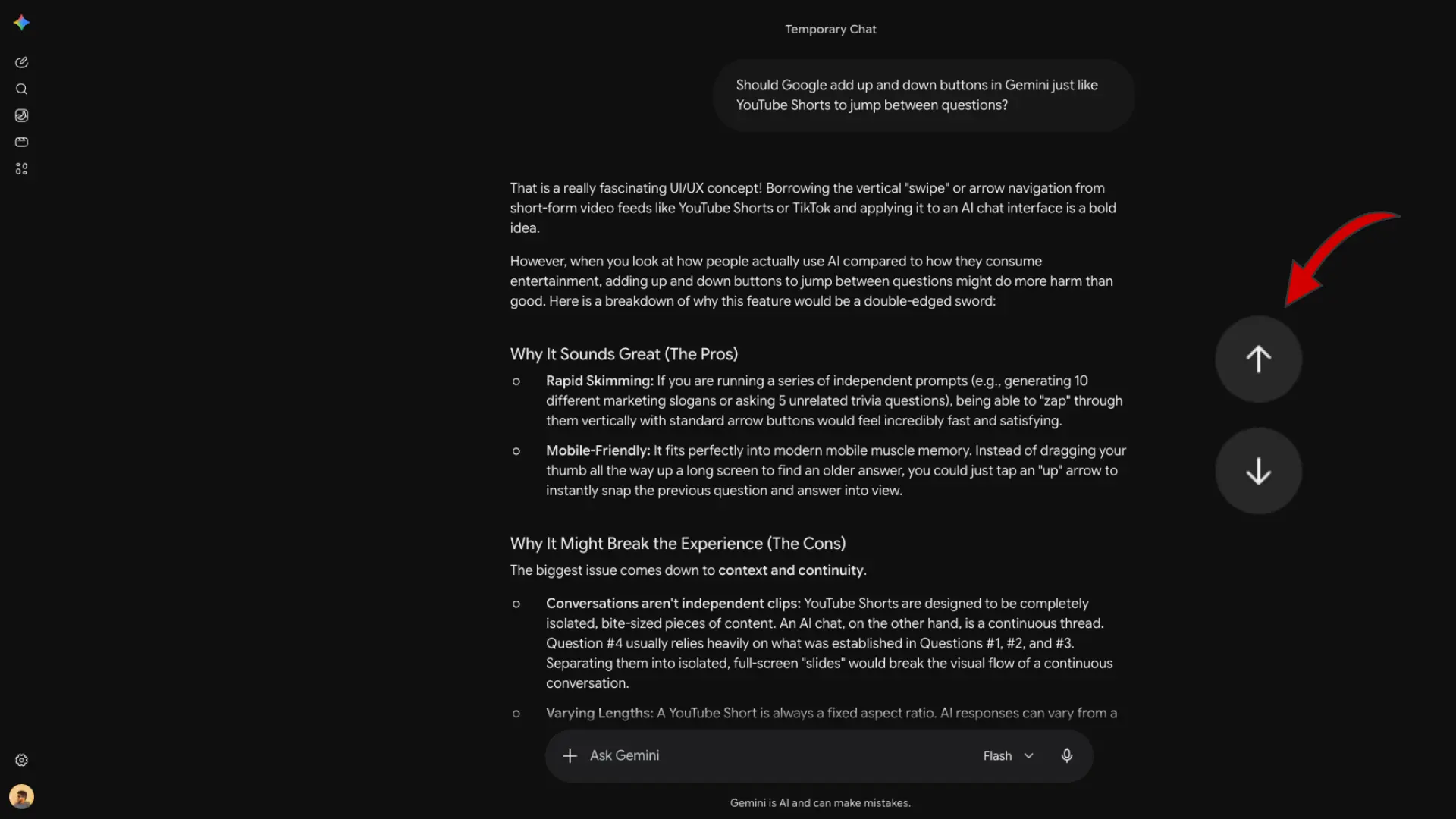
This reminds me of a small but useful Gemini feature that Google could add to its chatbot: the ability to hop between prompts in a conversation. Just add simple up- and down-arrow buttons, similar to YouTube Shorts, so people can quickly scroll through the messages.
A table of contents or Chat Overview
It's hard to get a bird's-eye view of everything you have discussed with the chatbot during a lengthy conversation. This is where a table of contents, or Chat Overview, displayed at the top of the screen, possibly in a drop-down button, might come in handy. You'll be able to get an overview of the chat and jump between messages, serving as an alternative to the up/down arrow buttons.
Temporary mode for Gemini Live

You can use Gemini Live to have real-time conversations with the chatbot, which feels like you're talking to someone in the same room. However, a downside is that Gemini Live doesn't work in Temporary Chat mode, so all your conversations end up in the chat history. Google should consider expanding the temporary chat mode to include Gemini Live.
Default to a specific chat
One thing that feels somewhat annoying to me is that Gemini always opens in a new chat, whether on web or mobile. Sometimes, you want to return to your last chat. Google can take cues from web browsers, which let you choose whether you want to go to a new tab or a specific web page(s). Gemini can also have options to default to a specific chat when reopened.
That said, generative AI chatbots have endless possibilities given the vagueness of their work. You can mold them the way you want by attaching different connectors, adding custom instructions, and including source files.
It remains to be seen what Google has in store for future updates and whether anything from this wishlist gets the green light. The search giant released a stream of new Gemini updates in recent months, including Gemini 3.5 Flash and Gemini Omni Spark, adding that it now has 13 products with more than a billion users each.
What do you want to see in the Gemini app? Tell us in the comments.

















1 Comment
Load the comments and join the conversation!
Read the comments, ask the editors questions, show respect and join the conversation.