
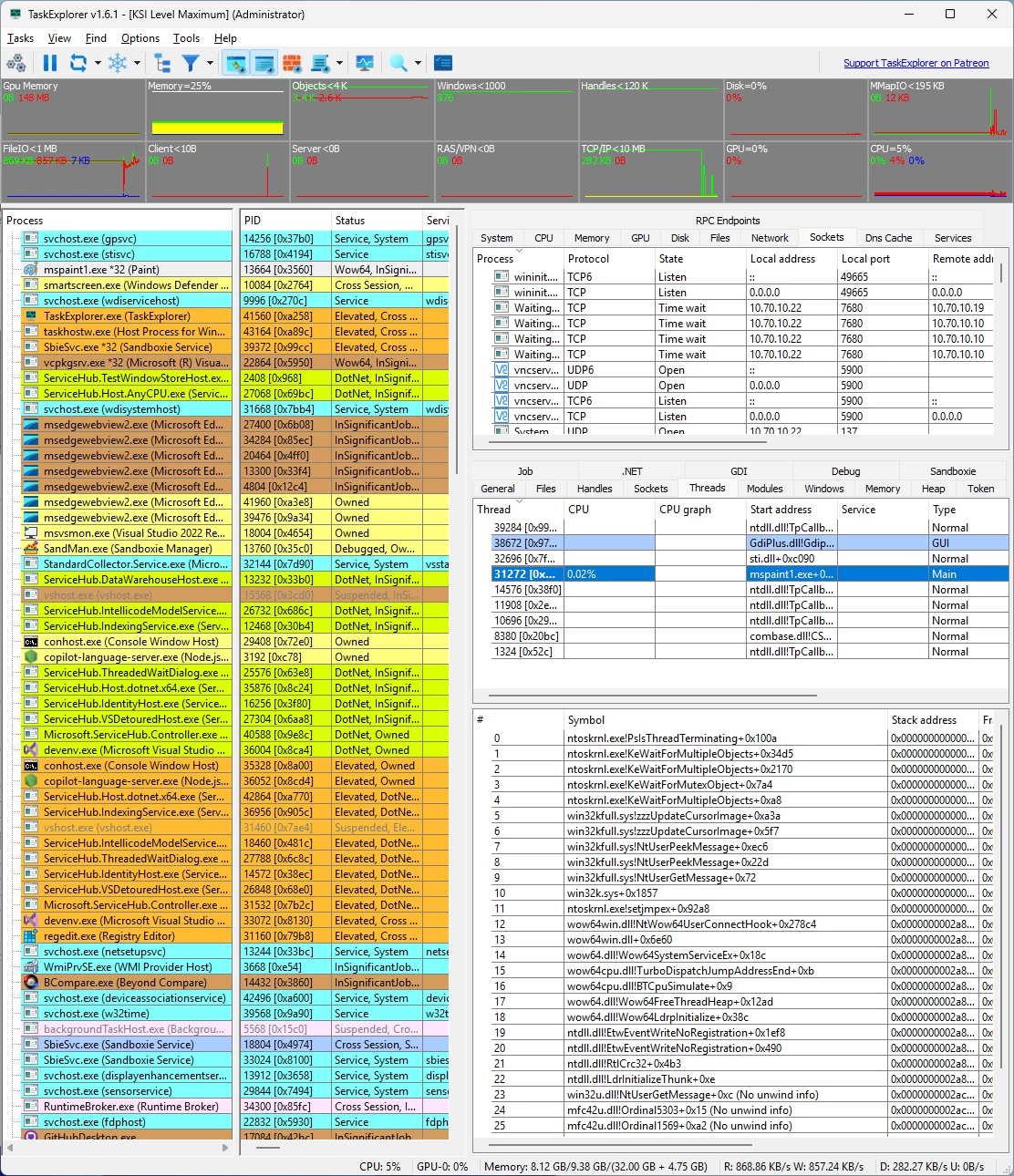
Task Explorer is an advanced Task Manager tool with emphasis on, not just monitoring what applications are running, but on finding out what applications are doing. The UI focuses on expedience and getting real time data of what the processes are doing at any given moment. Relevant data are provided in easy to access (as less clicks as possible) panels, with no need to open windows or windows of sub windows, instead additional information’s for selected entries are shown in the lower half of the panel. Allowing to browse the detailed information’s using arrow keys. And most data are refreshed continuously, as seeing the dynamic of values often grants additional insight.
On Windows TaskExplorer is powered by the ProcessHacker library.
TaskExplorer features:
- The Thread Panel contains a stack trace for the selected thread giving even more insight in wat the selected application is doing right now. This is also very useful to debug deadlocks or performance issues.
- The processes memory can be viewed and edited from the Memory Panel, which provides an advanced memory editor and string search capability.
- In the Handles Panel all open handles are shown, with useful information’s like file name the current file position and size, these allow to see what a program is actually working on right now disk wise.
- The Socket Panel shows all open connections/sockets per process providing also data rate information, in the settings one can enable the display of pseudo UDP connections created from ETW data. That is every destination endpoint for UDP packets will be shown as an own entry in the sockets panel allowing to monitor with whom a program is communicating.
- The Modules Panel shows all loaded dll’s and memory mapped files, allowing to unload them as well as to inject a dll. And many more panels like Token, Environment, Windows, GDI, .NET, etc…. By double clicking on a process, the Task Info panels can be opened in a separate window enabling the viewing of properties of multiple processes simultaneously.
- The system monitor aspect of the application is also well developed. The toolbar provides decently sized graphs providing not just CPU usage but also usage of Objects, handles, network and IO/disk access.
- The system info panels show All Open Files in the system, All Open Sockets by programs, and the services Panel allows viewing and controlling all system services including drives.
- The performance panels for CPU, Memory, Disk I/O, Network and GPU provide large graphs showing the usage of system resources in a detailed manner. The System info panel can be collapsed completely providing more space for the Task info panels. So Instead being a panel of the main window, or additionally, the system info panels can be opened in an own window using the appropriate toolbar button.
TaskExplorer 1.7.0 changelog:
- TaskExplorer 1.7.0 introduces one of the most substantial upgrades the application has received in years, modernizing the UI stack, improving driver robustness, expanding cross-architecture compatibility, and adding many new capabilities.
- This version replaces the previous helper-process architecture with the newly introduced TaskHelper.exe, which now acts as the dedicated worker and service component. By offloading these responsibilities from TaskExplorer.exe itself, overall stability and responsiveness during privileged operations are significantly improved.
- A major focus of this release is the KernelIsolator (KSI) driver. The process-protection logic has been thoroughly redesigned and no longer depends on DynData. This architectural improvement allows a large portion of the driver’s security features to operate even without up-to-date symbol information, increasing reliability across different Windows builds. Additionally, ARM64 compatibility issues that previously caused crashes in the protection layer have been resolved.
- The user interface has undergone a notable modernization. TaskExplorer now uses Qt 6.8.3 together with Windows 7 compatibility patches, and the settings interface has been redesigned with sidebar-based navigation and icons instead of simple tabs. DPI scaling options have been added so the application renders correctly on displays of any density. The QWT graphing library has been upgraded to version 6.3, bringing smoother and more reliable charting.
- Many new data columns and inspection tools have been added throughout the application. Memory view now includes an “original pages” column. Thread inspection provides the actual base priority, RPC usage, COM flags, and LXSS thread ID. Processes can now display CPU affinity and LXSS PID. Module view shows enclave information such as base address, size, and enclave type. A new window-finder tool allows users to drag a target onto any window to immediately locate its owning process, and the service view now provides a direct “open process” action.
- Several behavioral improvements streamline navigation: the handle, module, and memory search windows now allow you to open the corresponding owning process simply by double-clicking a result. Additional security-related metadata has been added to the handle viewer, which has also been moved into its own dedicated section. The “run as” subsystem has been updated for better reliability.
- Multiple bugs have been corrected, including a long-standing crash in the handle view, incorrect coloring of token privileges, ARM64 driver protection failures, and a corruption issue in the internal socket-list structures that was causing a memory leak.
- With this release, support for 32-bit Windows has been removed, allowing development to focus on modern 64-bit platforms and ensuring the long-term maintainability of the driver and UI codebase.
- TaskExplorer 1.7.0 is a major milestone that improves stability, security, performance, and usability across all supported systems, while laying the groundwork for future enhancements.
Download: TaskExplorer 1.7.0 | 27.3 MB (Open Source)
View: TaskExplorer Website | Screenshot
 Get alerted to all of our Software updates on Twitter at @NeowinSoftware


















0 Comments
Load the comments and join the conversation!
Read the comments, ask the editors questions, show respect and join the conversation.