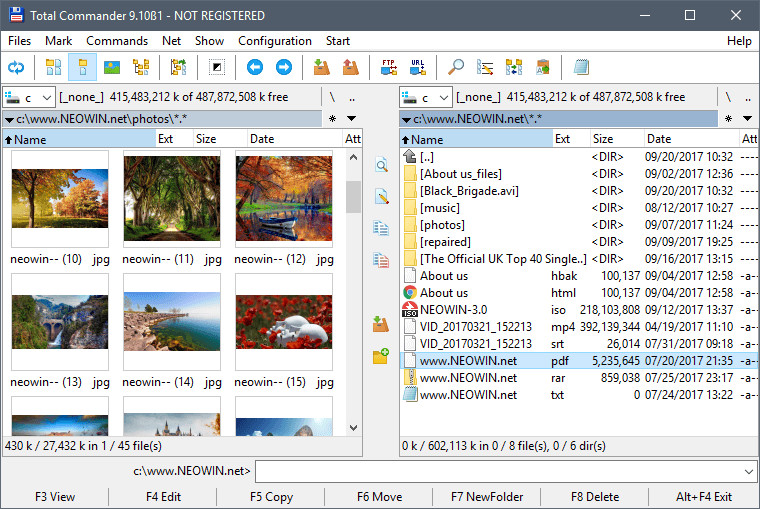
Total Commander is a great two-pane file manager replacement for Windows, a program like Windows Explorer to copy, move, or delete files. It includes extra integrated applications like a built-in FTP client with FXP, a renaming tool, a disk space analyzer, a file synchronizer, can pack and unpack files, compare files by content, a quick view panel with bitmap display, HTTP proxy support and more.
Total Commander 9 is compatible with Windows 95/98/ME/NT/2000/XP/Vista/7/8/8.1/10. Total Commander is distributed as shareware with a trial period of 30 days, but will continue to function, with a subscription reminder, after that.
Total Commander features include:
- Two file windows side by side
- Multiple language and Unicode support
- Enhanced search function
- Compare files (now with editor) / synchronize directories
- Quick View panel with bitmap display
- ZIP, ARJ, LZH, RAR, UC2, TAR, GZ, CAB, ACE archive handling + plugins
- Built-in FTP client with FXP (server to server) and HTTP proxy support
- Parallel port link, multi-rename tool
- Tabbed interface, regular expressions, history+favorites buttons
- Thumbnails view, custom columns, enhanced search
- Compare editor, cursor in lister, separate trees, logging, enhanced overwrite dialog etc.
- Unicode names almost everywhere, long names (>259 characters), password manager for ftp and plugins, synchronize empty dirs, 64 bit context menu, quick file filter (Ctrl+S)
- USB port connection via special direct transfer cable, partial branch view (Ctrl+Shift+B), and many improvements to ftp, synchronizing and other functions
- And many more!
Changelog:
- Fixed: Get \\tsclient shares during remote desktop session using Unicode functions (64)
- Fixed: Position and size of background copy dialog (F5-Enter-Background) could be wrong on Windows 10 Creators Update (32/64)
- Fixed: Drag the copy progress dialog (F5-Enter) to secondary screen with different DPI -> size wasn't changed (64)
- Fixed: If the option EditNewName=name was set to a placeholder string, e.g. EditNewName=<[YMD].txt, the placeholders were not resolved on Shift+F4 (32/64)
- Fixed: 32-bit color drive icons with transparency still used the first pixel as transparent color for the drive buttonbar (64)
- Fixed: Printing didn't work when starting TC with command line parameters starting with / (e.g. /i=ini file) (64)
- Fixed: The initial window size of resizable dialogs (e.g. synchronize dirs, multi-rename tool etc.) was too small on high dpi screens (64)
- Fixed: Synchronize dirs, copy attributes (via right click menu): Couldn't copy timestamp if target had read only attribute (32/64)
- Fixed: Internal associations pointing to different packers didn't work any more, e.g. *.exe -> "7zip packer", **7z (32/64)
Download: Total Commander 9.12 | 7.2 MB (Shareware)
View: Total Commander Website | v9.12 Full Changelog
 Get alerted to all of our Software updates on Twitter at @NeowinSoftware
















8 Comments
Load the comments and join the conversation!
Read the comments, ask the editors questions, show respect and join the conversation.