Back in March, Google announced a Gemini-powered feature for the web version of Gmail. The way it works is pretty straightforward: when Gemini detects calendar-related content in an email, an "Add to Calendar" button conveniently appears. From there, you can also modify the event details if the information generated by Gemini is incorrect. Now, Google has followed up on its earlier announcement, bringing the same capability to mobile on both Android and iOS.
On mobile, the feature works similarly to its desktop counterpart; you get the automatic detection and all that, but this time, a bottom panel opens up in the Gmail app to confirm the event has been added.
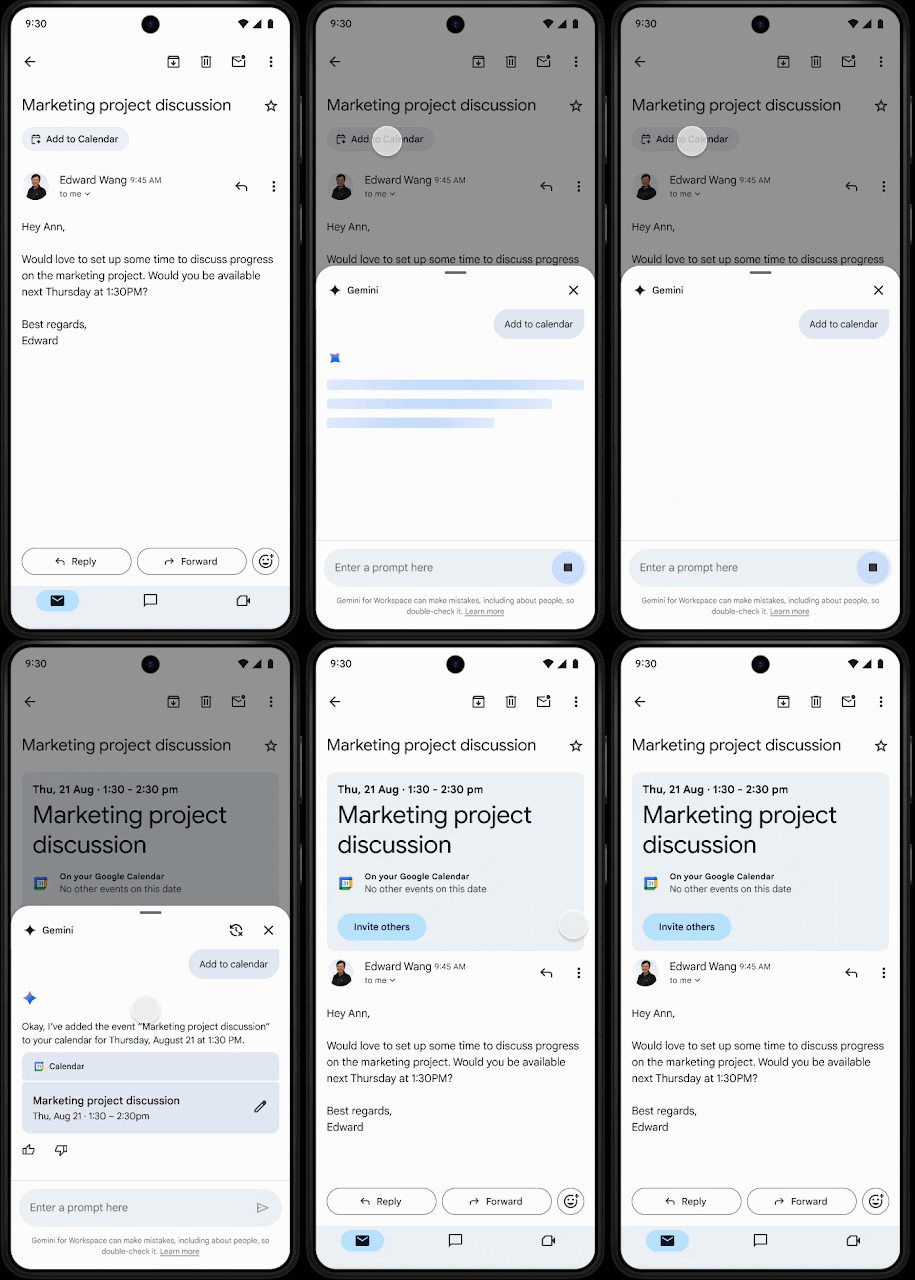
Google notes that if Gemini picks up on content about multiple events within a single email, it will smartly offer to add all of them to your Google Calendar.
Of course, there are some caveats at the moment, like the feature only being available for emails written in English. Just as with the web version, the "Add to Calendar" button will not include any other guests mentioned in the email, so you will have to add them yourself. Also, it will not appear for emails that already have extracted events, such as flight or restaurant confirmations.
The rollout began recently and will take up to 15 days to become fully available for Google Workspace subscribers. The feature is available to customers on these specific plans: Business Starter, Standard, and Plus; Enterprise Starter, Standard, and Plus; Frontline Plus; customers with the Gemini Education or Gemini Education Premium add-on; and Google AI Pro and Ultra subscribers. Anyone who previously purchased the now-discontinued Gemini Business and Enterprise add-ons will also receive this function.
Speaking of Gemini finding its footing within Google Workspace on mobile, just last week, Google brought image generation to Google Docs on Android.
To use it, you simply tap the "Ask Gemini" icon, which opens up a panel where you can describe the image you want. From there, you can preview, download, or insert the generated images right into your document.
















0 Comments
Load the comments and join the conversation!
Read the comments, ask the editors questions, show respect and join the conversation.