
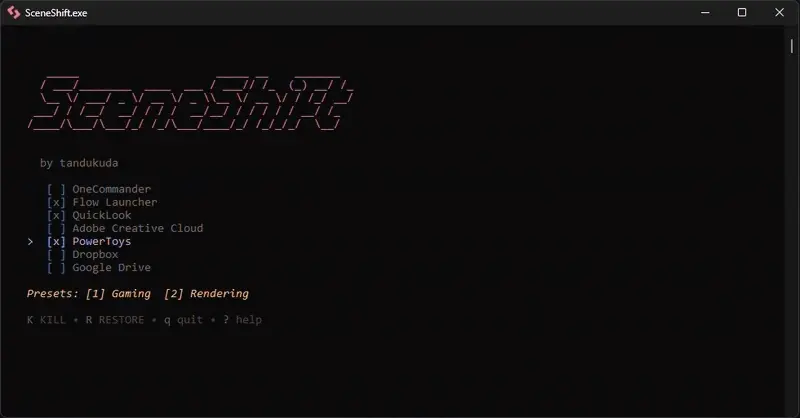
SceneShift is a terminal-first process optimizer built for people who push their hardware hard—gamers, 3D artists, streamers, and anyone preparing for heavy rendering workloads. Instead of manually hunting down background apps eating CPU and RAM, SceneShift lets you kill or suspend them in one move, creating what feels like an instant “performance scene” for your machine.
Its zero-bloat design makes it remarkably quick: you toggle a preset, free gigabytes of memory, and launch your game or render pipeline without the usual slowdowns. Features like Snapshot RAM provide real-time feedback on how much memory you’ve reclaimed, while Smart Process Control lets you suspend apps like Chrome or Spotify without closing them completely. It’s clean, efficient, and designed for peak performance.
Installation is simple: place SceneShift.exe in a dedicated folder, run it with admin privileges, and it automatically generates all required config files. SceneShift delivers a clean, zero-bloat performance boost for modern Windows users.
SceneShift 2.2.0 changelog:
-
Session History: Track all operations with timestamps and affected apps
-
Undo Operations: Reverse kill, suspend, resume, or restore with Ctrl+Z
-
Real-time Stats: View CPU and RAM usage for each process
-
Status Indicators: See which processes are running, suspended, or not found
-
Export/Import Profiles: Share configurations as JSON files
-
PID Tracking: Precise suspend/resume targeting prevents wrong instance resumption
-
Cleaner UI: Help text moved to expandable menu, main screen less cluttered
-
File Browser: Select profiles from list instead of typing paths
Download: SceneShift 2.2.0 | 7.4 MB (Open Source)
Links: Home Page | SceneShift @GitHub | Screenshot
 Get alerted to all of our Software updates on Twitter at @NeowinSoftware



















0 Comments
Load the comments and join the conversation!
Read the comments, ask the editors questions, show respect and join the conversation.