
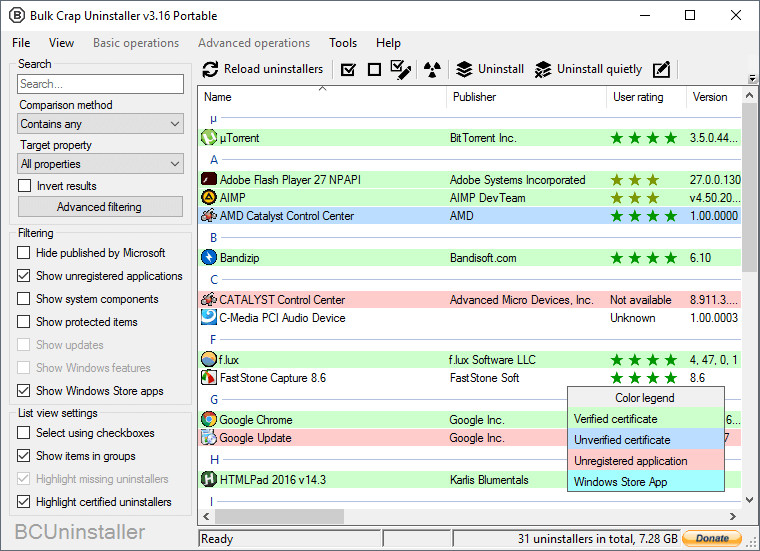
Bulk Crap Uninstaller is a free (as in speech) program uninstaller. It excels at removing large amounts of applications with minimal user input. It can clean up leftovers, detect orphaned applications, run uninstallers according to premade lists, and much more. Even though BCU was made with IT pros in mind, by default it is so straight-forward that anyone can use it effortlessly!
Bulk Crap Uninstaller features:
- Detect and uninstall Windows Store apps
- Uninstall multiple items at once to speed up the process (with collision prevention)
- Uninstall any number of applications in a single batch
- Minimal user input is required during uninstallation
- Can find and remove leftovers after uninstallation
- Can uninstall some apps even if they don't have any uninstallers
- Detects applications with damaged or missing uninstallers
- Adds quiet uninstall options to some uninstallers, even if they do not support them by default
- Uninstall lists for automation
- Startup manager
- Verification of uninstaller certificates
- Fully portable, settings are saved to a single file
Bulk Crap Uninstaller 6.0 changelog:
This release requires at least .NET 8.0 to function, which means only Windows 10 and newer are supported. If you have an unsupported OS you will have to use v5.9 instead.
Since there are now no supported x86 versions of Windows, the releases will no longer include x86 builds. If you somehow have an x86 system that is supported, you can use the AnyCPU portable build or download the source and build to x86 yourself (it still works fine).
What's Changed
Features
- Preliminary support for WoA64 by @theAeon in #790
Fixes
- Add a 40s timeout to es.exe by @Klocman in #837
- Add warning when trying to rename read-only uninstaller kinds by @Klocman in #838
- Fix uninstall progress window spawning out of screen with vertically offset displays by @SeWZC in #785
- Fixed Delete hotkey functionality to check app focus and disposal state by @AniketDeshmane in #797
- Fix crashing on load when InfoCache.xml is corrupted by @Klocman in #839
- Improved tooltip to indicate when SystemRestore is unavailable
Translations
- Updated Hungarian translation by @titanicbobo in #798
- Merged Traditional Chinese (zh-Hant) translation update. (Contributed by Henryliu880922)
- Updated the Localization Pack
Other
- Target net8.0 by @Klocman in #835
- Update es.exe to ES-1.1.0.36.x64 by @Klocman in #836
- Consolidate project properties into Build.props; Deduplicate and clean up files by @Klocman in #834
- Moved off obsolete members, fixed build warnings and messages
Download: Bulk Crap Uninstaller 6.0 | 8.1 MB (Open Source)
Download: Bulk Crap Uninstaller Portable | 10.3 MB
View: Bulk Crap Uninstaller Home Page | GitHub | Screenshot
 Get alerted to all of our Software updates on Twitter at @NeowinSoftware


















0 Comments
Load the comments and join the conversation!
Read the comments, ask the editors questions, show respect and join the conversation.