
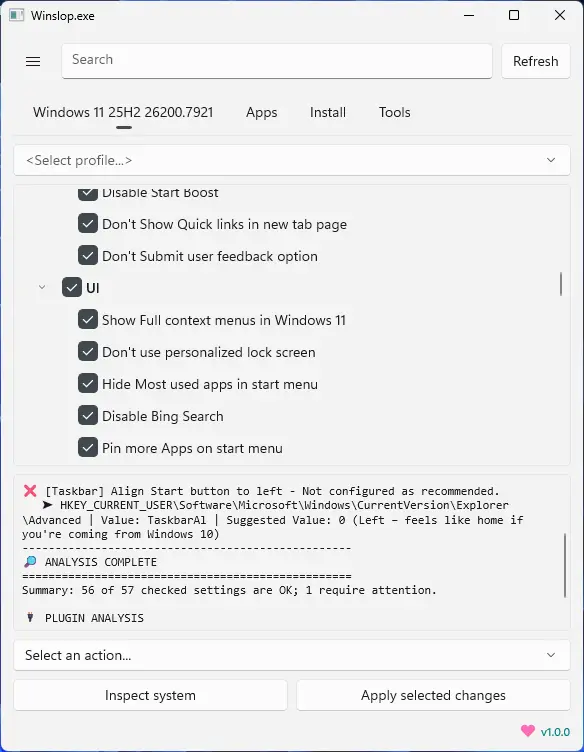
Winslop, developed by the creator of Flyoobe, is a lightweight Windows utility that removes unnecessary system slop, reduces bloat, and restores full user control. A focused, local fork of CrapFixer, Winslop shows exactly what changes will occur, allowing users to review and revert actions. It works entirely offline, with no AI, cloud, or telemetry. Perfect for users who want a cleaner, transparent, and minimal Windows experience, Winslop simplifies system maintenance, optimizes performance, and eliminates forced, opaque, or redundant features while keeping Windows itself intact.
Winslop key features:
- Removes system slop – eliminates unnecessary or redundant Windows components.
- Reduces bloatware – optimizes resource usage for faster performance.
- Full user control – all changes are transparent, reviewable, and reversible.
- Local and offline operation – no AI, cloud, or telemetry involved.
- Deterministic behavior – predictable, consistent, and safe modifications.
- Fork of CrapFixer – smaller, focused, and easier to maintain codebase.
- Improves system performance – reduces overhead and unnecessary processes.
- Targeted optimization – only removes opaque, forced, or optional slop.
- Visibility of changes – shows exactly what will be modified before applying.
- Lightweight tool – minimal footprint, no unnecessary layers or assistants.
Winslop 26.03.201 changelog:
WinUI 3 Update – Streamlined, Fast, Content-Focused
Winslop has migrated from WinForms to WinUI 3, delivering a fully reworked interface optimized for efficiency:
- Navigation & Layout: Sidebar removed; bottom navigation prioritizes content. Pages load instantly with minimal transitions.
- Search & Settings: Search integrated into main UI; settings accessible from the title bar.
- Status & Actions: Visual status indicators highlight attention items. Action buttons (Inspect, Apply, Restore) are compact, consistent, and follow system accent colors. Actions menu simplified to reduce UI clutter.
- Theming: Full light/dark mode support; UI elements update instantly without requiring an app restart.
Download: Winslop 26.03.211 | 43.3 MB (Open Source)
View: Winslop Website | Screenshot
 Get alerted to all of our Software updates on Twitter at @NeowinSoftware

















0 Comments
Load the comments and join the conversation!
Read the comments, ask the editors questions, show respect and join the conversation.